Robotic Bean – Hand Clap Studio (Windows)
£20.00
Discover Robotic Bean – Hand Clap Studio (Windows)
Bring the vibe of vintage drum machines and live clappers into your DAW with Hand Clap Studio by Robotic Bean — the most detailed and customizable handclap plugin ever made! 🎶 Whether you're producing funk, pop, hip-hop, retro synthwave, or modern dance music, this plugin gives your tracks that organic, groovy energy only handclaps can…
🎛️ Timing & Flam Control – Humanize the groove with adjustable delays
🎚️ Velocity Variation – Add dynamic realism to each hit
🔁 Round Robins & Randomization – No two claps sound the same
Explore product features & full description
👏 Robotic Bean – Hand Clap Studio (Windows)
Bring the vibe of vintage drum machines and live clappers into your DAW with Hand Clap Studio by Robotic Bean — the most detailed and customizable handclap plugin ever made! 🎶 Whether you're producing funk, pop, hip-hop, retro synthwave, or modern dance music, this plugin gives your tracks that organic, groovy energy only handclaps can deliver. 🙌🔊
🔥 Why Hand Clap Studio Rocks
🎤 Authentic Claps, Real Human Feel
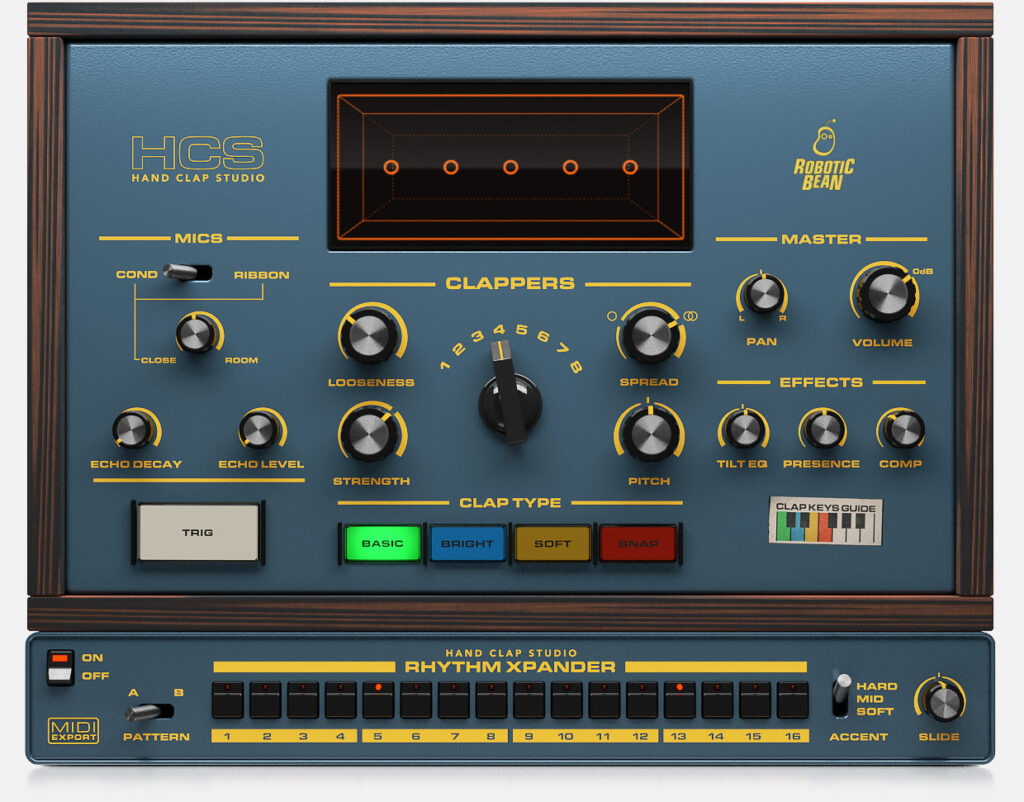
Hand Clap Studio isn’t just samples — it’s a dynamic instrument. Mix up to 8 individual clappers with different timings, stereo widths, and pitch settings to create anything from tight studio claps to big stadium crowd vibes! 🏟️👏
🕹️ Full Control Over the Clap
-
🎛️ Timing & Flam Control – Humanize the groove with adjustable delays
-
🎚️ Velocity Variation – Add dynamic realism to each hit
-
🔁 Round Robins & Randomization – No two claps sound the same
🎧 Layered Clap Sounds
Blend multiple layers like Soft, Loud, Slap, Snap, Room, and Reverb mics to craft the perfect clap tone for your track. 📀
🧠 Intuitive Interface
Sleek, drag-and-drop style UI that’s fun to use and easy to tweak. Stay inspired and creative without digging through menus. 🎨
🎛️ Built-In Effects
Add Reverb, EQ, and Stereo Width directly inside the plugin — no need for extra FX chains. 🚀
🧩 Perfect for Any Producer
Whether you're layering clap tracks in a 90s house banger or adding subtle human groove to your trap beat, Hand Clap Studio gives you complete control and unmatched realism — all with zero hassle. 🎼💻
📦 Key Features at a Glance
✅ 8 Virtual Clappers with customizable timing, pitch & pan
✅ 6 Mic Channels – Blend close, room, reverb, and more
✅ Natural round-robin variation & random clapper placement
✅ Powerful tone-shaping tools: EQ, width, reverb
✅ Clean, resizable interface with drag-and-drop workflow
✅ VST/AU/VST3 compatible – Plug & play in any DAW
Compatibility checklist
- Windows 10,11 (64Bit Only)
- VST3, VST
- Formats: VST3 · VST
Requirements vary by supplied version. Confirm your setup with support before purchasing.
Delivery & activation
- Complete your purchaseReview compatibility and purchase details.
- Download your filesAccess available downloads through your order and account.
- Follow the included setup guideContact GetPlugins if you need installation help.
Activation, where included, is provided by GetPlugins. Publisher-account registration, transferable publisher keys and a publisher-issued licence are not included. Read the activation policy.
Frequently asked questions
How do I receive my download?
After payment, access available files from your order details and GetPlugins account. Contact support if a download is missing.
What activation is included?
Follow the activation instructions supplied with your download. Activation is provided by GetPlugins. Confirm device allowances and reinstall arrangements before ordering.
Will this work with my computer and DAW?
Check the compatibility information for this listing and ask us to confirm the exact supplied build. Libraries may require a compatible sampler or additional software.
What if I need installation help?
Email support@getplugins.io with your order number, operating system, DAW and any error message.
Which updates are included?
Activation and updates are separate. Confirm the available version and update arrangements before ordering; do not assume access to future publisher releases.
How do I request a refund?
Contact support with your order number and issue details. Read our Refund Policy for eligibility and the request process.

Reviews
There are no reviews yet.