


Discover Quartarone Guitar Reveries
You Must Purchase Kontakt Pro From Us To Install & Use This Library In Full Version Click Here
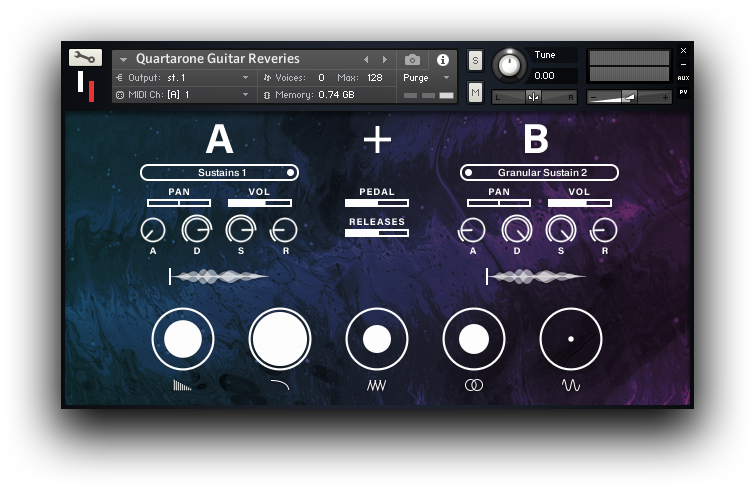
COMBINE SOUND SOURCES Quartarone Guitar Reveries primarily works by combining two sound sources in order to create new and interesting resulting sounds.
DESIGN YOUR SOUND Change the sample's starting position as well as attack, decay, sustain and release of each Sound Source; and more…
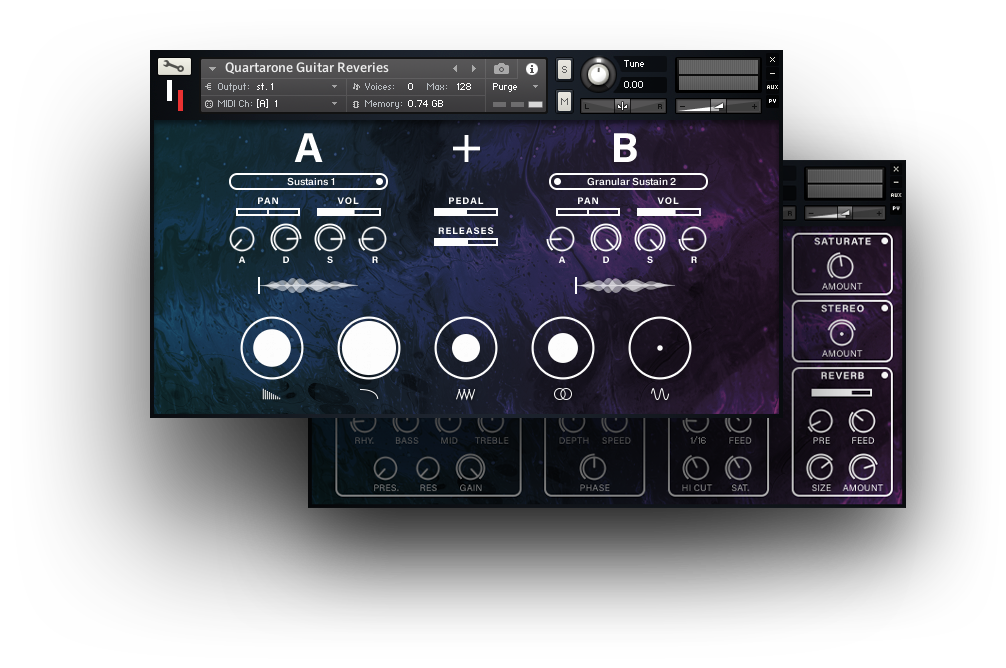
CIRCLE CONTROLS Use the circle controls to apply Reverb, Filter, Saturation, Widening and Tremolo on the Main Page for both Sound Sources…
Explore product features & full description
QUARTARONE GUITAR REVERIES
CINEMATIC ATMOSPHERIC ELECTRIC GUITAR
A new cinematic electric guitar instrument that will expand your imagination. Capturing the avant-garde sound of one of Europe’s greatest guitarists and composers, Claudio Quartarone, we have recreated his signature musical palette inside this Kontakt instrument.
For media composers, producers and musicians, this immediately inspiring instrument is intuitive and easily playable. These ambient, sensual, abstract, cinematic guitar sounds and vivid musical textures will add colour and depth to your music.
Use it by combining two sound sources, adjusting the effects for each one, as well as global effects. This means you can go to town creating your own unique guitar textures from the provided sound sources.
This library also comes packed with a vast array of presets to get you started. From more naturally played guitar sounds, to pads and keyboard-like sounds, as well as more designed textural and abstract sounds. Sometimes it sounds like a guitar, and other times like an organic synthesizer, but all the sounds contained within are derived from Claudio's guitar.
FEATURES
COMPATIBLE WITH THE FREE KONTAKT PLAYER
NKS READY FOR NATIVE INSTRUMENTS HARDWARE
150 ORIGINAL PRESETS
4,982 SAMPLES
(9GB COMPRESSED)
-
COMBINE SOUND SOURCES
Quartarone Guitar Reveries primarily works by combining two sound sources in order to create new and interesting resulting sounds.
-
DESIGN YOUR SOUND
Change the sample's starting position as well as attack, decay, sustain and release of each Sound Source; and more thoroughly design your instrument.
-
CIRCLE CONTROLS
Use the circle controls to apply Reverb, Filter, Saturation, Widening and Tremolo on the Main Page for both Sound Sources A and B. The larger the iris/circle dilates, the more intense an effect is.
-
COMBINE EFFECTS
Go more in-depth on the Effects Page and adjust specific parameters for Sound Source A or B separately.
Compatibility checklist
- Confirm the supplied build, operating system and required host before ordering.
Requirements vary by supplied version. Confirm your setup with support before purchasing.
Delivery & activation
- Complete your purchaseReview compatibility and purchase details.
- Download your filesAccess available downloads through your order and account.
- Follow the included setup guideContact GetPlugins if you need installation help.
Activation, where included, is provided by GetPlugins. Publisher-account registration, transferable publisher keys and a publisher-issued licence are not included. Read the activation policy.
Frequently asked questions
How do I receive my download?
After payment, access available files from your order details and GetPlugins account. Contact support if a download is missing.
What activation is included?
Follow the activation instructions supplied with your download. Activation is provided by GetPlugins. Confirm device allowances and reinstall arrangements before ordering.
Will this work with my computer and DAW?
Check the compatibility information for this listing and ask us to confirm the exact supplied build. Libraries may require a compatible sampler or additional software.
What if I need installation help?
Email support@getplugins.io with your order number, operating system, DAW and any error message.
Which updates are included?
Activation and updates are separate. Confirm the available version and update arrangements before ordering; do not assume access to future publisher releases.
How do I request a refund?
Contact support with your order number and issue details. Read our Refund Policy for eligibility and the request process.




Reviews
There are no reviews yet.