Pulsar Audio – Pulsar 8200 EQ (Windows)
£30.00
Discover Pulsar Audio – Pulsar 8200 EQ (Windows)
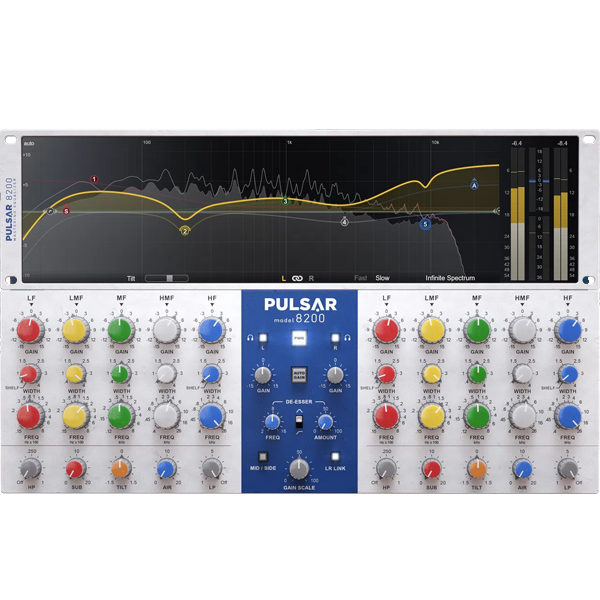
The Pulsar 8200 EQ is a faithful emulation of George Massenburg’s iconic GML 8200, the first parametric equalizer ever designed. Known for its tight low-end, silky highs, and surgical precision, this EQ has been trusted by top engineers across every genre. Pulsar brings its legendary tone into the digital era with modern tools, advanced workflow…
📈 Visual Curve Editor – Fast, intuitive adjustments
👀 Spectrum Analyzer – Real-time frequency monitoring
🔄 Auto-Gain – Maintain consistent levels while EQ’ing
Explore product features & full description
🎚️ Pulsar Audio – Pulsar 8200 EQ
✨ The Legendary GML 8200, Reborn for Your DAW
The Pulsar 8200 EQ is a faithful emulation of George Massenburg’s iconic GML 8200, the first parametric equalizer ever designed. Known for its tight low-end, silky highs, and surgical precision, this EQ has been trusted by top engineers across every genre. Pulsar brings its legendary tone into the digital era with modern tools, advanced workflow features, and visual editing, making it a mixing & mastering essential.
🔊 Analog Character, Digital Precision
Unlike standard EQ plugins, the Pulsar 8200 captures the all-discrete Class-A analog circuitry and parallel topology of the original hardware, ensuring smooth, natural curves and musical tone shaping.
-
📈 Visual Curve Editor – Fast, intuitive adjustments
-
👀 Spectrum Analyzer – Real-time frequency monitoring
-
🔄 Auto-Gain – Maintain consistent levels while EQ’ing
👉 The result: analog warmth meets digital accuracy.
🎤 Tame, Polish & Enhance with Built-In Tools
The Pulsar 8200 isn’t just an EQ—it’s a mixing powerhouse with smart tools built right in:
-
✅ De-Esser – Smooth sibilance & tame harshness 🎶
-
✅ Tilt Filter – Balance the tonal spectrum with one knob ⚖️
-
✅ Air & Sub Bands – Add sparkling highs ✨ & powerful lows 🔊
-
✅ Mid-Side Processing – Control the stereo field with precision 🎧
Perfect for vocals, guitars, acoustic instruments, orchestral mixes, electronic tracks, and mastering chains.
🎼 How Does It Sound?
-
🎚️ Mastering – Clean, polished, and balanced results
-
🎻 Orchestral & Acoustic – Natural tone shaping with lifelike presence
-
🎹 Electronic Music – Game-changing low-end control (down to 15Hz)
-
🎤 Vocals & Guitars – Smooth, detailed, and crystal-clear
👉 Whether you want transparent EQ for mastering or creative sound sculpting, the Pulsar 8200 adapts seamlessly to your workflow.
🛠️ Key Features at a Glance
-
📊 Visual Curve Editing with analog behavior
-
🎙️ Built-in De-Esser for vocal perfection
-
🎚️ Mid-Side Processing for stereo imaging
-
🔄 Auto-Gain to keep output levels consistent
-
⚖️ Tilt Filter for quick tonal balance
-
🔊✨ Air & Sub Bands for extended lows & highs
-
👀 Advanced Spectrum Analyzer & Metering for total control
Compatibility checklist
- Windows 10,11 (64Bit Only)
- VST, VST3
- Formats: VST3 · VST
Requirements vary by supplied version. Confirm your setup with support before purchasing.
Delivery & activation
- Complete your purchaseReview compatibility and purchase details.
- Download your filesAccess available downloads through your order and account.
- Follow the included setup guideContact GetPlugins if you need installation help.
Activation, where included, is provided by GetPlugins. Publisher-account registration, transferable publisher keys and a publisher-issued licence are not included. Read the activation policy.
Frequently asked questions
How do I receive my download?
After payment, access available files from your order details and GetPlugins account. Contact support if a download is missing.
What activation is included?
Follow the activation instructions supplied with your download. Activation is provided by GetPlugins. Confirm device allowances and reinstall arrangements before ordering.
Will this work with my computer and DAW?
Check the compatibility information for this listing and ask us to confirm the exact supplied build. Libraries may require a compatible sampler or additional software.
What if I need installation help?
Email support@getplugins.io with your order number, operating system, DAW and any error message.
Which updates are included?
Activation and updates are separate. Confirm the available version and update arrangements before ordering; do not assume access to future publisher releases.
How do I request a refund?
Contact support with your order number and issue details. Read our Refund Policy for eligibility and the request process.

Reviews
There are no reviews yet.