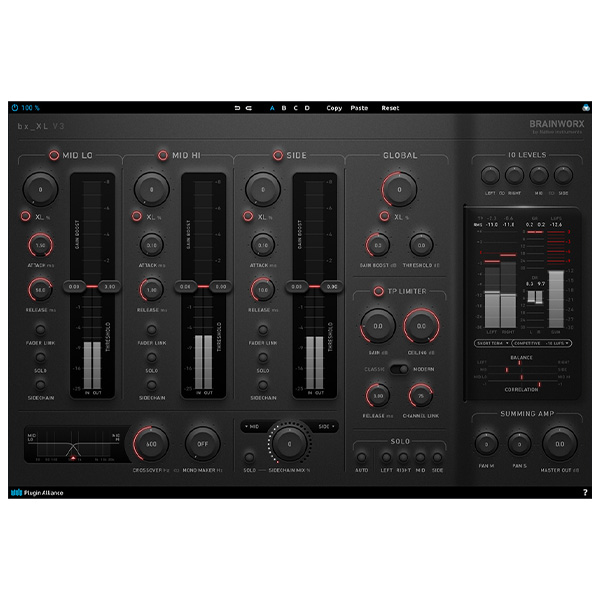
Plugin Alliance – Brainworx bx_XL V3 (Windows)

The bx_XL V3 empowers mastering engineers to achieve loud mixes without sacrificing clarity. Utilizing the mid/side technology from…
Formats: VST3 · AAX · VST

£15.00

Discover Plugin Alliance – Brainworx bx_XL V3 (Windows)

The bx_XL V3 empowers mastering engineers to achieve loud mixes without sacrificing clarity. Utilizing the mid/side technology from Brainworx’s groundbreaking bx_digital EQ, you can split the mid channel into two bands (low and high). This allows for control over three individual channels – mid-low, mid-high, and side – resulting in increased loudness and significantly enhanced…

Dual-band mid/side processing

Four limiting stages

Adjustable crossover frequency

Explore product features & full description

OVERVIEW

Maximize loudness and maintain clarity

The bx_XL V3 empowers mastering engineers to achieve loud mixes without sacrificing clarity. Utilizing the mid/side technology from Brainworx’s groundbreaking bx_digital EQ, you can split the mid channel into two bands (low and high). This allows for control over three individual channels – mid-low, mid-high, and side – resulting in increased loudness and significantly enhanced clarity with fewer artifacts and greater punch.

Hear the power of four limiters

The Crossover Frequency slider lets you define where the mid-low band ends and the mid-high band begins. This allows you to separate the kick drum and apply different limiting from the rest of your mid signal – an essential technique for mixes that need a strong bottom end, such as dance, rap, techno, and rock. After the three channels in the bx_XL V3 are combined back into a stereo signal, the mix is run through a true peak limiter. This means four stages of limiting, resulting in loud and crystal-clear stereo mixes.

Warm up mixes with XL saturation

The XL knobs add warmth to your mixes by introducing third and fifth-order harmonics. A special filtering process prevents aliasing, ensuring your mixes remain free of artifacts. This additional harmonic content enhances perceived loudness without significantly increasing your music’s output level.

Listen to the finest details

Building on the legacy of the bx_XL V2 – the first mid/side mastering limiter to allow individual auditioning of mid/side signals with phase correction using Phase-X crossover filters – V3 includes a three-band “psychoacoustic” loudness maximizer and a variety of detailed mastering meters, making it a top-tier dynamics and loudness control system.
FEATURES

  • True peak limiter
  • Dual-band mid/side processing
  • Four limiting stages
  • Adjustable crossover frequency
  • Advanced Brainworx UI
  • Mono Maker
  • Sidechain circuit
  • True peak, RMS, gain reduction, LUFS, and correlation meters

AUDIO EXAMPLES

Compatibility checklist

  • Windows 10,11 (64Bit Only)
  • Full Version
  • VST, VST3, AAX
  • Formats: VST3 · AAX · VST

Requirements vary by supplied version. Confirm your setup with support before purchasing.

Delivery & activation

  1. Complete your purchaseReview compatibility and purchase details.
  2. Download your filesAccess available downloads through your order and account.
  3. Follow the included setup guideContact GetPlugins if you need installation help.

Activation, where included, is provided by GetPlugins. Publisher-account registration, transferable publisher keys and a publisher-issued licence are not included. Read the activation policy.

Frequently asked questions

How do I receive my download?

After payment, access available files from your order details and GetPlugins account. Contact support if a download is missing.

What activation is included?

Follow the activation instructions supplied with your download. Activation is provided by GetPlugins. Confirm device allowances and reinstall arrangements before ordering.

Will this work with my computer and DAW?

Check the compatibility information for this listing and ask us to confirm the exact supplied build. Libraries may require a compatible sampler or additional software.

What if I need installation help?

Email support@getplugins.io with your order number, operating system, DAW and any error message.

Which updates are included?

Activation and updates are separate. Confirm the available version and update arrangements before ordering; do not assume access to future publisher releases.

How do I request a refund?

Contact support with your order number and issue details. Read our Refund Policy for eligibility and the request process.

Customer Reviews

Reviews

There are no reviews yet.

Be the first to review “Plugin Alliance – Brainworx bx_XL V3 (Windows)”

Your email address will not be published. Required fields are marked *