Playfair Audio – Dynamic Grading (Windows)

Create powerful mixes with depth and power. With Dynamic Grading, you can precisely shape and control different parts…
Formats: VST3 · AAX

£20.00

Discover Playfair Audio – Dynamic Grading (Windows)

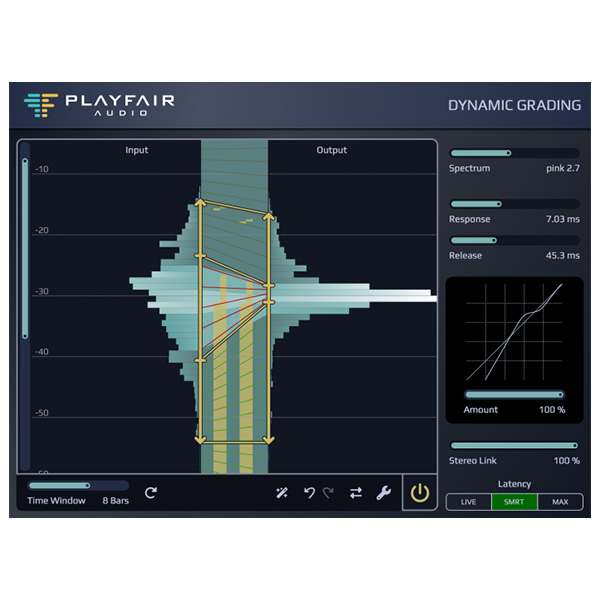
Create powerful mixes with depth and power. With Dynamic Grading, you can precisely shape and control different parts of the dynamic range of your audio. With dynamic histograms and intuitive graphical controls, advanced dynamic processing is easier than ever before.

Explore product features & full description

A New Paradigm for Dynamic Processing

Create powerful mixes with depth and power. With Dynamic Grading, you can precisely shape and control different parts of the dynamic range of your audio. With dynamic histograms and intuitive graphical controls, advanced dynamic processing is easier than ever before.

Land the Impact

Hit your listeners with precise impact. Create depth by placing tracks in front or at a distance.

Keep the Body in Shape

Point the tracks to the right place in the mix. Make instruments rock solid, or dust them off and groove.

Sweep the Floor

Get the right amount of detail and reverb. Remove unwanted noise and make your mix shine.

What’s new in version 1.3?

Improved user interface layout and design

The graphical interface has been redesigned for greater clarity and efficiency. Level meters and curve indicators are now always visible, and the sliders that display current values ​​can be edited using the keyboard. The gradation knobs have a slimmer, more intuitive design.

Improved DSP engine with variable stereo linking

With the new Variable Stereo Link slider, users can now seamlessly switch from fully linked stereo operation to dual-mono or any other mode.

Source Learn

This feature automatically analyzes the dynamic histogram and suggests initial settings for source ranges, maintaining effective ratios for punch, body and floor ranges. This significantly speeds up initial setup and adaptation of existing settings to new source material.

Reference Compare

The one-button A/B comparison tool allows you to quickly compare your current settings to the state when the plug-in window was last opened. The user can set the current “reference” state manually by holding the Alt key while clicking the Reference Compare button.

Cancel/Edit

Familiar Undo and Redo buttons provide flexibility when adjusting audio dynamics, as adjustments can be easily undone.

Protective limiter

To protect against unexpectedly loud peaks when expanding the punch-hole range, the Safety Limiter automatically reduces output levels when the output peak exceeds +6 dBFS.
Compatibility checklist

  • Windows 10,11 (64 Bit Only)
  • VST3, AAX
  • Formats: VST3 · AAX

Requirements vary by supplied version. Confirm your setup with support before purchasing.

Delivery & activation

  1. Complete your purchaseReview compatibility and purchase details.
  2. Download your filesAccess available downloads through your order and account.
  3. Follow the included setup guideContact GetPlugins if you need installation help.

Activation, where included, is provided by GetPlugins. Publisher-account registration, transferable publisher keys and a publisher-issued licence are not included. Read the activation policy.

Frequently asked questions

How do I receive my download?

After payment, access available files from your order details and GetPlugins account. Contact support if a download is missing.

What activation is included?

Follow the activation instructions supplied with your download. Activation is provided by GetPlugins. Confirm device allowances and reinstall arrangements before ordering.

Will this work with my computer and DAW?

Check the compatibility information for this listing and ask us to confirm the exact supplied build. Libraries may require a compatible sampler or additional software.

What if I need installation help?

Email support@getplugins.io with your order number, operating system, DAW and any error message.

Which updates are included?

Activation and updates are separate. Confirm the available version and update arrangements before ordering; do not assume access to future publisher releases.

How do I request a refund?

Contact support with your order number and issue details. Read our Refund Policy for eligibility and the request process.

Customer Reviews

Reviews

There are no reviews yet.

Be the first to review “Playfair Audio – Dynamic Grading (Windows)”

Your email address will not be published. Required fields are marked *