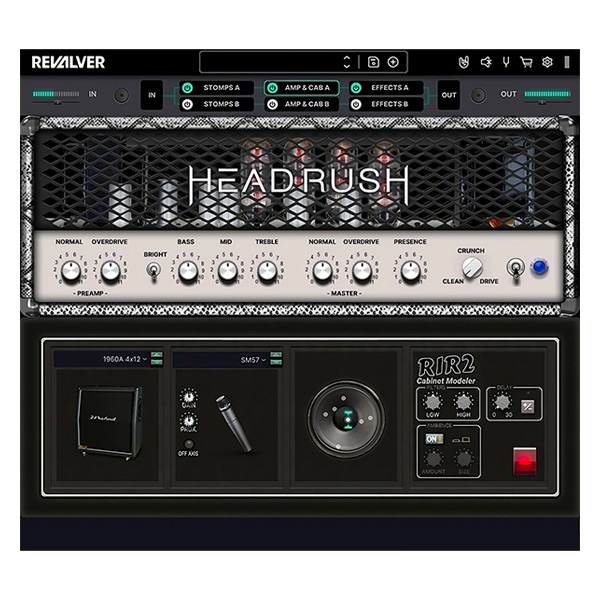
HeadRush ReValver (Windows)
£15.00
Discover HeadRush ReValver (Windows)
The fifth version of the popular guitar emulator, was previously released under the name Peavey Revalver. Combines a set of guitar amplifiers, pedals, effects, and copies of real equipment created using ACT (Audio Cloning Technology)™.
Explore product features & full description
The fifth version of the popular guitar emulator, was previously released under the name Peavey Revalver. Combines a set of guitar amplifiers, pedals, effects, and copies of real equipment created using ACT (Audio Cloning Technology)™.
ReValver 5 is supplied as a modular emulator – many plugin functions are free of charge, while advanced settings and additional equipment can be purchased separately as expansion modules. At the same time, the free version is quite enough to solve many guitar problems.
The main feature of the emulator was the appearance of ACT models – exact copies of devices built on the recreation of the sound characteristics of the equipment. The idea of copies repeats the timbre models previously presented in AmpliTube TONEX from IK Multimedia and is a combination of impulses, equalizer settings, and other magic that allows you to repeat the sound of real guitar devices.
ReValver 5 can also remove user equipment, supports work with custom impulses, and is fully compatible with MIDI. The latter will allow you to control the plugin through external controllers. Additionally, the emulator is equipped with GIG Mode for simplified switching of presets, settings, and parameters, which will be useful at concerts.
Compatibility checklist
- Windows 10,11 (64 Bit Only)
- STANDALONE, VST, VST3, AAX
- Formats: VST3 · AAX · Standalone · VST
Requirements vary by supplied version. Confirm your setup with support before purchasing.
Delivery & activation
- Complete your purchaseReview compatibility and purchase details.
- Download your filesAccess available downloads through your order and account.
- Follow the included setup guideContact GetPlugins if you need installation help.
Activation, where included, is provided by GetPlugins. Publisher-account registration, transferable publisher keys and a publisher-issued licence are not included. Read the activation policy.
Frequently asked questions
How do I receive my download?
After payment, access available files from your order details and GetPlugins account. Contact support if a download is missing.
What activation is included?
Follow the activation instructions supplied with your download. Activation is provided by GetPlugins. Confirm device allowances and reinstall arrangements before ordering.
Will this work with my computer and DAW?
Check the compatibility information for this listing and ask us to confirm the exact supplied build. Libraries may require a compatible sampler or additional software.
What if I need installation help?
Email support@getplugins.io with your order number, operating system, DAW and any error message.
Which updates are included?
Activation and updates are separate. Confirm the available version and update arrangements before ordering; do not assume access to future publisher releases.
How do I request a refund?
Contact support with your order number and issue details. Read our Refund Policy for eligibility and the request process.

Reviews
There are no reviews yet.