🎹 Pitch Innovations – Fluid Chords 2 (Windows)
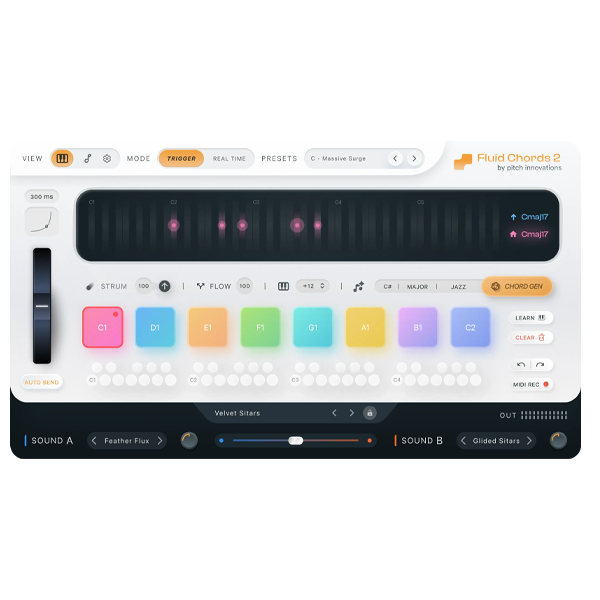
Step into the next era of music expression with Fluid Chords 2 — the revolutionary chord-bending plugin from Pitch Innovations, now available for Windows! Designed to redefine how you play and create harmony, Fluid Chords 2 empowers you to bend from any chord to any other in real-time, unlocking limitless harmonic creativity. Whether you're performing live, composing cinematic scores, or producing cutting-edge tracks, this plugin gives you the tools to move harmony like never before. 🚀🎼
🔑 Key Features That Set Fluid Chords 2 Apart
🎶 Real-Time Chord Bending
Glide from a single note to a full chord with fluid expression — perfect for cinematic transitions, dynamic builds, and live performance magic.
🌀 Strum & Flow Modes
-
Strum Mode: Emulates a natural, human-like chord strumming feel.
-
Flow Mode: Control how notes bend — closer together, stretched wide, or even overlapping!
🔥 Harmony Engine
Auto-generate chord progressions by simply choosing a genre and key — no music theory required. Instant inspiration with one click. 💡
🎹 Split & Play Mode
Play chords with your left hand and melodies with your right — ideal for keyboardists and composers who love intuitive control.
🔁 Trigger Up to 16 Chords
Map and trigger chords chromatically (C1 to D#3) with just one key. Double the capability of the original Fluid Chords plugin.
🕒 Glide Time & Curve Control
Customize the speed and shape of your chord bends for cinematic swells or tight rhythmic stabs.
🧠 Drag & Drop MIDI Mapping
Effortlessly drag in a MIDI file and let Fluid Chords 2 build the chord progression for you — a huge time saver in the studio. 🖱️🎼
🎛 Real-Time Play Mode
Switch chords on the fly using your MIDI controller — no sustain pedal required. Built for expressive stage play and flexible studio work.
🎧 Fluid Sound Engine (Wavetable + MPE Sampler)
Create lush, futuristic sounds by combining organic textures with synthetic precision. Includes onboard effects:
-
Amp
-
Reverb
-
Delay
-
Compressor
🔄 Full MPE Integration
Pair with your favorite MPE-enabled synths and controllers to unlock unparalleled harmonic control and performance expression.
🎯 Why Choose Fluid Chords 2 for Windows?
✔️ Revolutionary Harmony Tools – Create chords that move, morph, and breathe in real-time
✔️ Genre-Bending Capabilities – Perfect for film scoring, electronic, ambient, experimental, pop, and trap
✔️ Windows-Optimized – Designed to run smoothly on all major Windows DAWs
✔️ Creative Control Without Complexity – Intuitive design means less tweaking, more music
✔️ Stage-Ready & Studio-Proven – Ideal for live performers and studio composers alike
https://youtu.be/MpNtAqcmwn8


Reviews
There are no reviews yet.