

PhysicalAudio Modus (Windows)

Modus uses our latest research in collision modeling to connect acoustic elements. Strings, plates, springs, and rattles collide,…
Formats: VST3 · AAX

£15.00

Discover PhysicalAudio Modus (Windows)

Modus uses our latest research in collision modeling to connect acoustic elements. Strings, plates, springs, and rattles collide, literally, in algorithmic air to generate tones that resonate and react just like they would outside the virtual realm. These elements are combined in different ways to create three types of instruments.

Explore product features & full description

Unreal instruments

Modus uses our latest research in collision modeling to connect acoustic elements. Strings, plates, springs, and rattles collide, literally, in algorithmic air to generate tones that resonate and react just like they would outside the virtual realm. These elements are combined in different ways to create three types of instruments.

Connected Strings

Connected Strings

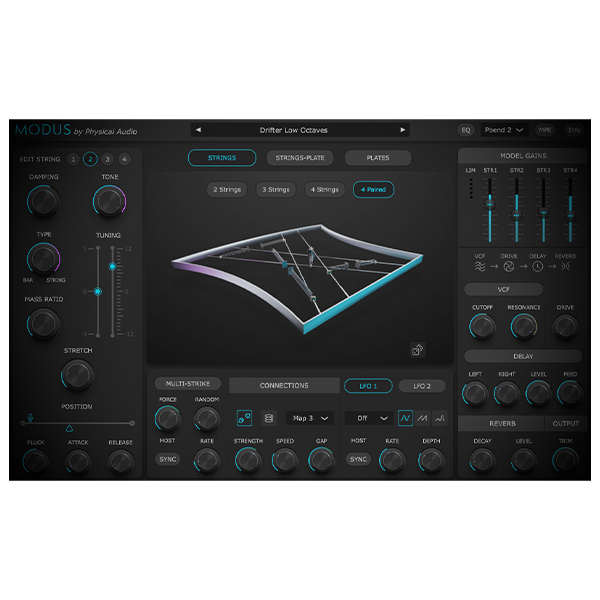
Each voice has up to four connected strings which can be plucked or act as resonators. The strings are connected by either rattles that give collision effects as the strings vibrate or nonlinear springs. Physical parameters control the decay, mass, and harmonic content along with individual semitone and fine-tuning controls.

Strings connected to a Plate

This model has two strings connected to a plate using nonlinear connections that can either be rattles or springs. These strings are retuned on the fly to give 6 octaves of monophonic or duophonic sound. The plate can act as a soundboard by varying its decay, mass, and fundamental frequency. These, along with the connection controls, can all be changed in real-time.

Driven Plates

A driver signal is used to excite the top plate, which is connected to the bottom plate with two nonlinear connections. This driver can be a polyphonic sawtooth sine wave or a multi-striking hit for percussive effects. There is also an option to use a single plate connected to the ground.

Real physics with complete control

Every element in Modus’ true-to-life physical modeling engine reacts like it belongs to a real action in a real space. Where you hit the strings and plates matters, as do the position of the connections. Our next-generation collision modeling creates a huge spectrum of nonlinear behavior, from subtle pitch glides to high-energy crescendos. Modus gives you control over first, how the elements behave, and second, how they’re processed. Details of the theoretical background can be found in this technical paper.

The more you delve into the effects and modulation options available to you in Modus, the more depth you’ll find in your sound – there’s playable realism in every corner of the plugin.With two LFOs that can be assigned to certain parameters, featuring sine, sawtooth up and random shapes, and host tempo sync, alongside complete MPE-compatibility, a whole new realm of expression and augmented musical reality is waiting.

Compatibility checklist

  • Confirm the supplied build, operating system and required host before ordering.
  • Formats: VST3 · AAX

Requirements vary by supplied version. Confirm your setup with support before purchasing.

Delivery & activation

  1. Complete your purchaseReview compatibility and purchase details.
  2. Download your filesAccess available downloads through your order and account.
  3. Follow the included setup guideContact GetPlugins if you need installation help.

Activation, where included, is provided by GetPlugins. Publisher-account registration, transferable publisher keys and a publisher-issued licence are not included. Read the activation policy.

Frequently asked questions

How do I receive my download?

After payment, access available files from your order details and GetPlugins account. Contact support if a download is missing.

What activation is included?

Follow the activation instructions supplied with your download. Activation is provided by GetPlugins. Confirm device allowances and reinstall arrangements before ordering.

Will this work with my computer and DAW?

Check the compatibility information for this listing and ask us to confirm the exact supplied build. Libraries may require a compatible sampler or additional software.

What if I need installation help?

Email support@getplugins.io with your order number, operating system, DAW and any error message.

Which updates are included?

Activation and updates are separate. Confirm the available version and update arrangements before ordering; do not assume access to future publisher releases.

How do I request a refund?

Contact support with your order number and issue details. Read our Refund Policy for eligibility and the request process.


Customer Reviews

Reviews

There are no reviews yet.

Be the first to review “PhysicalAudio Modus (Windows)”

Your email address will not be published. Required fields are marked *




