Oeksound – Soothe2 (Windows)

soothe2 is a dynamic resonance suppressor. It identifies problematic resonances on the fly and applies matching reduction automatically.…
Formats: confirm before ordering

£21.99

Discover Oeksound – Soothe2 (Windows)

soothe2 is a dynamic resonance suppressor. It identifies problematic resonances on the fly and applies matching reduction automatically. This results in a smoother, more balanced sound and saves you from having to notch out the frequencies by hand. The reduction kicks in only when and where needed without affecting the nearby frequency areas. This preserves…

Remove harshness from close mic’d sound sources

Transparently manage sibilance in vocals and dialog

Treat uneven tonal balance from suboptimal recordings

Explore product features & full description

soothe harshness, save time

soothe2 is a dynamic resonance suppressor. It identifies problematic resonances on the fly and applies matching reduction automatically. This results in a smoother, more balanced sound and saves you from having to notch out the frequencies by hand. The reduction kicks in only when and where needed without affecting the nearby frequency areas. This preserves the timbre of the original sound source and results in transparent treatment with minimal artifacts.

soothe2 can be used to reduce harshness, sibilance, and mud from the sound source, and excels in fixing a range of problems. With soothe2 you can:

  • Remove harshness from close mic’d sound sources
  • Transparently manage sibilance in vocals and dialog
  • Treat uneven tonal balance from suboptimal recordings
  • Clear muddiness, boominess, and proximity effect
  • Soften overly bright guitar and piano recordings
  • Tame piercing synth sounds

soothe2 saves time and effort in audio work. It is equally at home on individual tracks and on buses. It works wonders on anything from sound design and post-production to the most demanding mastering applications.

quick yet detailed

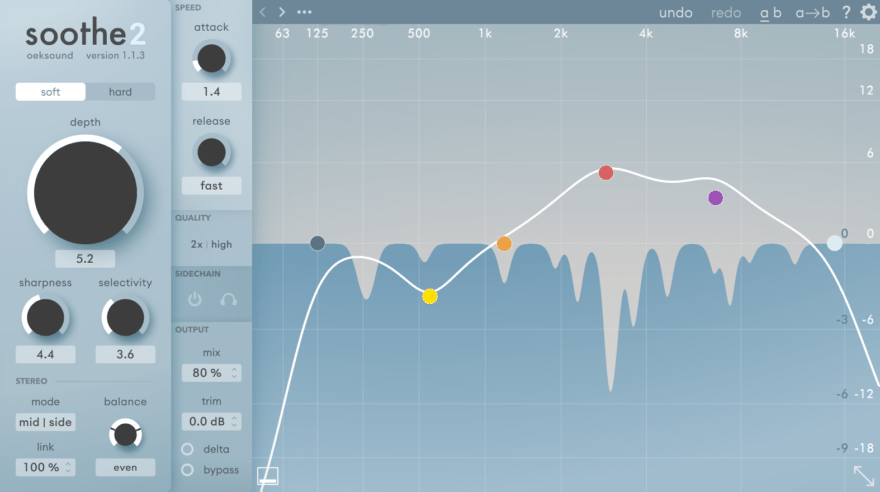
soothe2 has been designed with simplicity in mind. It is fast to set up and easy to use, yet allowing you to fine-tune the processing to your needs. Pressing the delta button presents you with what soothe2 is removing, and is the quickest way to understand what the processor is reacting to.

The modern, well thought-out and informative user interface makes it easy to target just the frequency areas you wish, with control over the frequency range and sensitivity of the process. The unique frequency graph shows the reduction exactly as it’s happening.

available as:

Windows 7 / 64 bit VST and VST3, and 64 bit AAX).

Compatibility checklist

  • Confirm the supplied build, operating system and required host before ordering.

Requirements vary by supplied version. Confirm your setup with support before purchasing.

Delivery & activation

  1. Complete your purchaseReview compatibility and purchase details.
  2. Download your filesAccess available downloads through your order and account.
  3. Follow the included setup guideContact GetPlugins if you need installation help.

Activation, where included, is provided by GetPlugins. Publisher-account registration, transferable publisher keys and a publisher-issued licence are not included. Read the activation policy.

Frequently asked questions

How do I receive my download?

After payment, access available files from your order details and GetPlugins account. Contact support if a download is missing.

What activation is included?

Follow the activation instructions supplied with your download. Activation is provided by GetPlugins. Confirm device allowances and reinstall arrangements before ordering.

Will this work with my computer and DAW?

Check the compatibility information for this listing and ask us to confirm the exact supplied build. Libraries may require a compatible sampler or additional software.

What if I need installation help?

Email support@getplugins.io with your order number, operating system, DAW and any error message.

Which updates are included?

Activation and updates are separate. Confirm the available version and update arrangements before ordering; do not assume access to future publisher releases.

How do I request a refund?

Contact support with your order number and issue details. Read our Refund Policy for eligibility and the request process.

Customer Reviews

Reviews

There are no reviews yet.

Be the first to review “Oeksound – Soothe2 (Windows)”

Your email address will not be published. Required fields are marked *