
Discover Native Instruments – Reverb Classics (Windows)
Windows 10 or 11 (64-bit, latest Service Pack)Intel Core i5 or equivalent CPU, 4 GB RAM (6 GB recommended)
Explore product features & full description
SYSTEM REQUIREMENTS
Windows 10 or 11 (64-bit, latest Service Pack)Intel Core i5 or equivalent CPU, 4 GB RAM (6 GB recommended)
An Internet connection and a graphics card that supports OpenGL 2.1 or higher are required to download and activate this product. Once installed and activated, the product can be used offline.
Supported interfaces:
Windows (64-bit only): VST, VST3, AAX
LUSCIOUS SPACES

HALLOWED HALLS
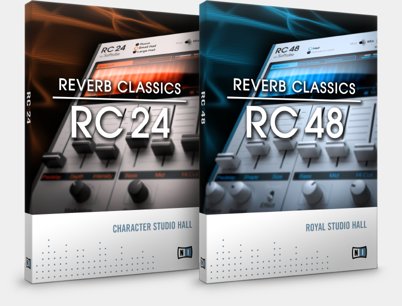
The REVERB CLASSICS faithfully recreate two renowned hall reverbs that have shaped the sound of music since the 1980s. Brought to life by Softube, the RC 24 and RC 48 have a lush, harmonic character that gives every mix stunning dimension.
The interface is ultra-intuitive to use, and a first-of-its kind visual display allows you to see the shape of the reverb for instant adjustments with gorgeous visual feedback. Whether adding depth and texture, or taking sounds out into space for sound design, the REVERB CLASSICS add their famous sonic signature to any production.
Both effects run as stand-alone plugins in any DAW, and integrate perfectly with MASCHINE.
RC 24 - CHARACTER STUDIO HALL
The three reverb algorithms in the RC 24 deliver larger-than-life halls with stunning accuracy – right down to its 12-bit converters.
The RC 24 shapes the texture of tracks to perfection while still preserving their original harmonics – a lush reverb capable of extremely long tails and impressive sound design.

RC 48 - ROYAL STUDIO HALL
The RC 48 is inspired by the undisputed king of hall reverbs. A rich, elaborate, and refined sound that adds a golden touch to acoustic instruments and vocals.
Two algorithms provide truly flexible, studio-grade reverb with a harmonic, musical sound made famous on countless game, TV, and film soundtracks and gold and platinum hit records.

Compatibility checklist
- Confirm the supplied build, operating system and required host before ordering.
Requirements vary by supplied version. Confirm your setup with support before purchasing.
Delivery & activation
- Complete your purchaseReview compatibility and purchase details.
- Download your filesAccess available downloads through your order and account.
- Follow the included setup guideContact GetPlugins if you need installation help.
Activation, where included, is provided by GetPlugins. Publisher-account registration, transferable publisher keys and a publisher-issued licence are not included. Read the activation policy.
Frequently asked questions
How do I receive my download?
After payment, access available files from your order details and GetPlugins account. Contact support if a download is missing.
What activation is included?
Follow the activation instructions supplied with your download. Activation is provided by GetPlugins. Confirm device allowances and reinstall arrangements before ordering.
Will this work with my computer and DAW?
Check the compatibility information for this listing and ask us to confirm the exact supplied build. Libraries may require a compatible sampler or additional software.
What if I need installation help?
Email support@getplugins.io with your order number, operating system, DAW and any error message.
Which updates are included?
Activation and updates are separate. Confirm the available version and update arrangements before ordering; do not assume access to future publisher releases.
How do I request a refund?
Contact support with your order number and issue details. Read our Refund Policy for eligibility and the request process.







Reviews
There are no reviews yet.