


Discover Native Instruments – HYPHA
You Must Purchase Kontakt Pro From Us To Install & Use This Library In Full Version Click Here
FX On/Off: Switches all effects on or off.
FX Page: Opens the FX page, which enables you to add and tweak a number of different effects. For more information, refer…
Settings Page: Opens the Settings page, which provides global options related to MIDI control, tuning, and randomization. For more information, refer to Settings…
Explore product features & full description
https://www.youtube.com/watch?v=lHTCGx0HOK8
HYPHA Overview
HYPHA offers fast and immediate access to key parameters and performance controls on its Main page. Additionally, you can tweak and fine-tune effects on the FX page, and find global options relating to MIDI control, tuning, and randomization on the Settings page.
HYPHA contains the following elements:
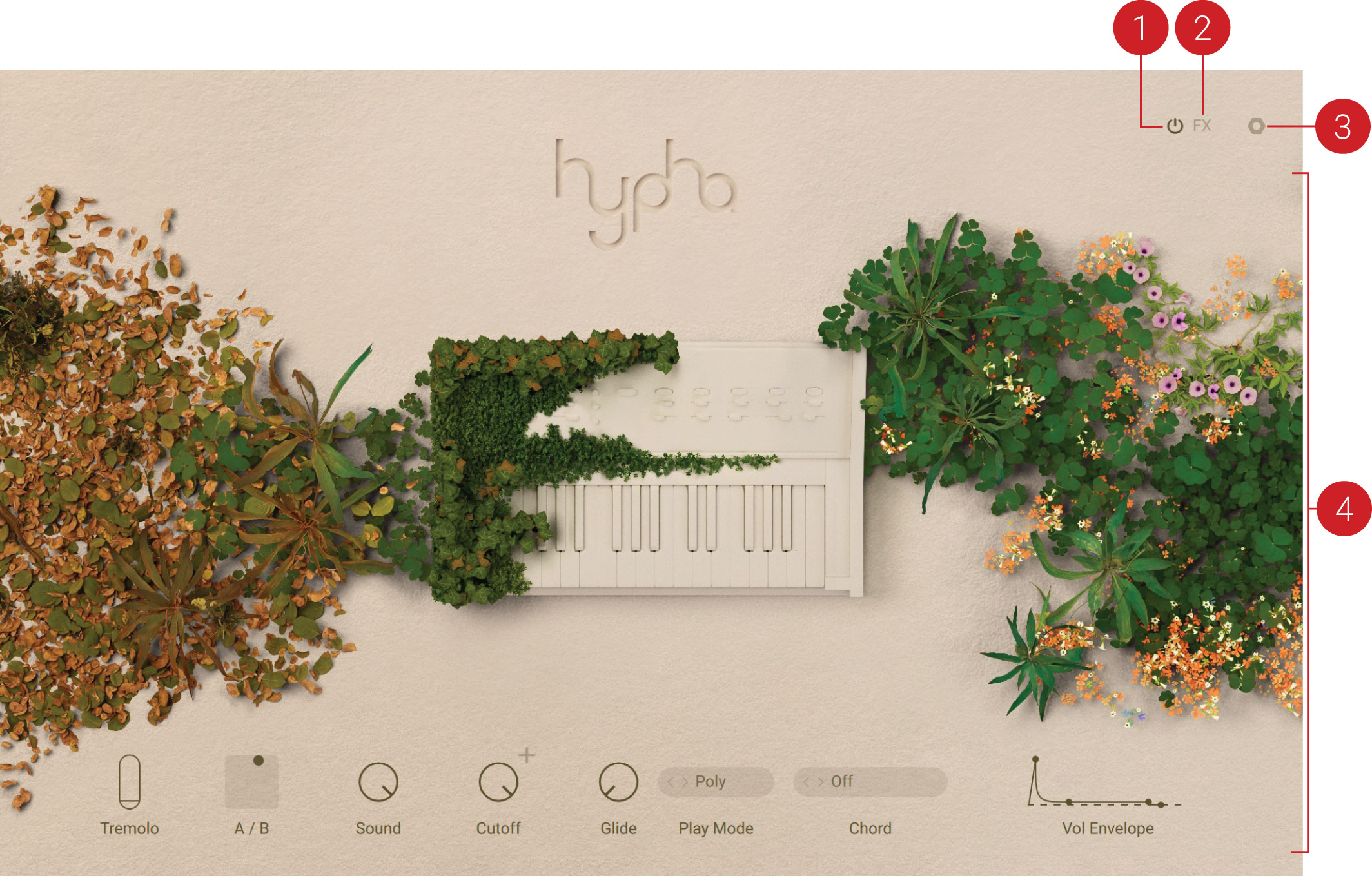
- FX On/Off: Switches all effects on or off.
- FX Page: Opens the FX page, which enables you to add and tweak a number of different effects. For more information, refer to FX Page.
- Settings Page: Opens the Settings page, which provides global options related to MIDI control, tuning, and randomization. For more information, refer to Settings Page.
- Main Page: The Main page provides performance controls that enable you to play and tweak presets in an intuitive way. For more information, refer to Main Page.
Compatibility checklist
- Confirm the supplied build, operating system and required host before ordering.
Requirements vary by supplied version. Confirm your setup with support before purchasing.
Delivery & activation
- Complete your purchaseReview compatibility and purchase details.
- Download your filesAccess available downloads through your order and account.
- Follow the included setup guideContact GetPlugins if you need installation help.
Activation, where included, is provided by GetPlugins. Publisher-account registration, transferable publisher keys and a publisher-issued licence are not included. Read the activation policy.
Frequently asked questions
How do I receive my download?
After payment, access available files from your order details and GetPlugins account. Contact support if a download is missing.
What activation is included?
Follow the activation instructions supplied with your download. Activation is provided by GetPlugins. Confirm device allowances and reinstall arrangements before ordering.
Will this work with my computer and DAW?
Check the compatibility information for this listing and ask us to confirm the exact supplied build. Libraries may require a compatible sampler or additional software.
What if I need installation help?
Email support@getplugins.io with your order number, operating system, DAW and any error message.
Which updates are included?
Activation and updates are separate. Confirm the available version and update arrangements before ordering; do not assume access to future publisher releases.
How do I request a refund?
Contact support with your order number and issue details. Read our Refund Policy for eligibility and the request process.




Reviews
There are no reviews yet.