Native Instruments Driver (Windows)

Intel Core i5 or equivalent CPU, 4 GB RAM (6 GB recommended)
Formats: confirm before ordering

£26.99

Discover Native Instruments Driver (Windows)

Intel Core i5 or equivalent CPU, 4 GB RAM (6 GB recommended)

Explore product features & full description

SYSTEM REQUIREMENTS

Windows 10 or 11 (64-bit, latest Service Pack)

Intel Core i5 or equivalent CPU, 4 GB RAM (6 GB recommended)

An Internet connection and a graphics card that supports OpenGL 2.1 or higher are required to download and activate this product. Once installed and activated, the product can be used offline.

Supported interfaces:
Windows (64-bit only): VST, VST3, AAX

TEXTURAL CRUNCH

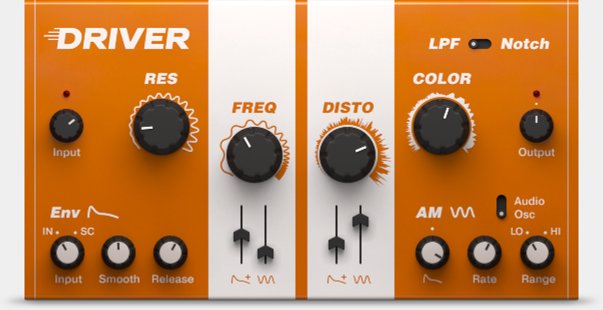
A versatile, creative distortion and filter effect. The smooth filter, powerful distortion, and audio modulation combine to take tracks from subtle filtering to all out mayhem.

ADVANCED RESONANCE

DRIVER is an inspiring creative tool from the creator of MASSIVE featuring the rare pairing of a high-quality filter with a punishing distortion unit. The smooth filter section delivers a wide range of effects, from ultra-subtle to incredibly rich, while two modulation sources produce dramatic textural shifts.

The distortion section is capable of everything from light saturation to complete sonic destruction. Running as a stand-alone effect in any DAW, or as an effect in MASCHINE, DRIVER is perfect for any track needing fresh musical color, total annihilation, or a smooth sweep from one to the other.

JAM THE FREQUENCY

Behind DRIVER’s intuitive user interface is a powerful set of highly tweakable features. The resonant filter offers both low pass and notch settings. Discover a world of wild new textures by modulating the filter with the envelope follower or audio modulation sections.

Fine-tune the envelope follower with the Smooth and Release controls for precise control of the filter’s responsiveness, or trigger DRIVER via an incoming signal to give any track a shot of dynamic motion.

SONIC FURY

DRIVER’s distortion section is a sonic beast ready to scratch, abuse, and tear your tracks to shreds. Increase resonance and distortion levels to travel from light, crunchy overtones to thick fuzzed-out bliss – and the sound reacts dynamically in response to the audio input.

When using the AM section in Audio Mode, the Clip Cut control allows you to take your tracks deep into a dungeon of audio devastation.
Compatibility checklist

  • Confirm the supplied build, operating system and required host before ordering.

Requirements vary by supplied version. Confirm your setup with support before purchasing.

Delivery & activation

  1. Complete your purchaseReview compatibility and purchase details.
  2. Download your filesAccess available downloads through your order and account.
  3. Follow the included setup guideContact GetPlugins if you need installation help.

Activation, where included, is provided by GetPlugins. Publisher-account registration, transferable publisher keys and a publisher-issued licence are not included. Read the activation policy.

Frequently asked questions

How do I receive my download?

After payment, access available files from your order details and GetPlugins account. Contact support if a download is missing.

What activation is included?

Follow the activation instructions supplied with your download. Activation is provided by GetPlugins. Confirm device allowances and reinstall arrangements before ordering.

Will this work with my computer and DAW?

Check the compatibility information for this listing and ask us to confirm the exact supplied build. Libraries may require a compatible sampler or additional software.

What if I need installation help?

Email support@getplugins.io with your order number, operating system, DAW and any error message.

Which updates are included?

Activation and updates are separate. Confirm the available version and update arrangements before ordering; do not assume access to future publisher releases.

How do I request a refund?

Contact support with your order number and issue details. Read our Refund Policy for eligibility and the request process.

Customer Reviews

Reviews

There are no reviews yet.

Be the first to review “Native Instruments Driver (Windows)”

Your email address will not be published. Required fields are marked *