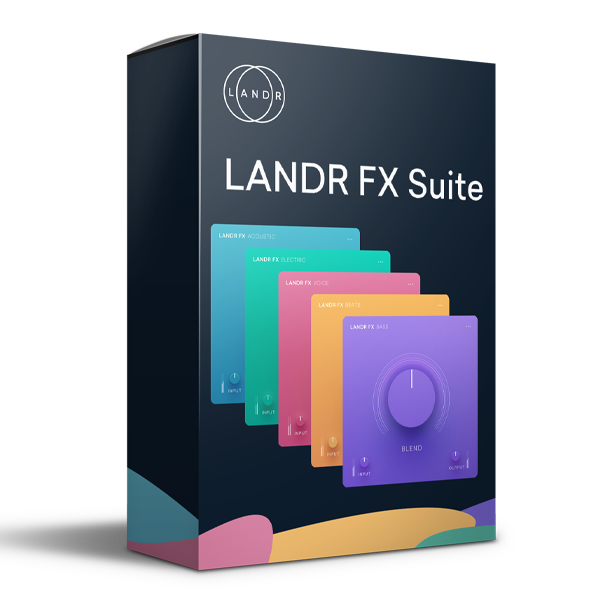
LANDR – FX Suite Effects Plugins (Windows)
£42.00
Discover LANDR – FX Suite Effects Plugins (Windows)
Step up your production game with the LANDR FX Suite Effects Plugins for Windows — a powerful multi-FX bundle designed to deliver professional results fast, without the need for deep technical know-how. Whether you're mixing vocals, shaping beats, enhancing instruments, or adding final polish, this suite offers smart, genre-ready presets and AI-powered audio processing that…
🔥 Over 240 expertly crafted presets
🎛️ Intuitive one-knob interface = zero learning curve
🎵 Professional mixing techniques built-in
Explore product features & full description
LANDR – FX Suite Effects Plugins (Windows) 🎛️✨ | Instant Pro Sound for Every Track
Step up your production game with the LANDR FX Suite Effects Plugins for Windows — a powerful multi-FX bundle designed to deliver professional results fast, without the need for deep technical know-how. Whether you're mixing vocals, shaping beats, enhancing instruments, or adding final polish, this suite offers smart, genre-ready presets and AI-powered audio processing that help you achieve radio-ready sound in seconds. 🚀🎶
🎯 What Makes LANDR FX Suite Special?
✅ AI-Enhanced Simplicity – Get professional sound instantly with no guesswork
✅ 240+ Pro Presets – Designed by award-winning engineers for every genre
✅ One-Knob Control – Easy mix-speed dials to fine-tune your sound fast
✅ Fully DAW-Compatible – Works in any VST/VST3/supported software (Windows)
✅ Low CPU Load – Smooth performance on all modern systems
🎚️ What’s Included in the LANDR FX Suite?
🎤 Voice FX – Polish Every Vocal Take
Enhance vocals with EQ, reverb, delay, saturation, and more. Perfect for singers, podcasters, and voiceovers.
🎸 Electric FX – Shape Guitars & Synths with Style
Add classic shimmer, warmth, and space to electric guitars, synth leads, and FX-heavy tracks.
🔊 Bass FX – Powerful Low-End Processing
Sharpen subfrequencies, tighten basslines, and inject punch and definition to your mix’s foundation.
🥁 Beats FX – Boost Rhythm and Impact
Make your drums slap with punchy presets that add weight, depth, and groove to individual hits or full kits.
🎻 Acoustic FX – Natural Warmth for Organic Sounds
Add lush character to acoustic instruments, orchestral samples, and live recordings.
💼 Designed for Creators Who Need Results — Fast
🎹 Music Producers – Save time with genre-ready FX chains
🎧 Mix Engineers – Add color, clarity, and space with one click
🎙️ Podcasters & Streamers – Instantly clean up and enhance vocal recordings
🎬 Content Creators – Bring professional polish to your audio, fast
🌟 Key Benefits
-
🔥 Over 240 expertly crafted presets
-
🎛️ Intuitive one-knob interface = zero learning curve
-
🎵 Professional mixing techniques built-in
-
🚀 Perfect for all genres and styles
-
💻 Optimized for Windows (VST/VST3) platforms
Compatibility checklist
- Windows 10,11 (64Bit Only)
- VST3, VST
- Formats: VST3 · VST
Requirements vary by supplied version. Confirm your setup with support before purchasing.
Delivery & activation
- Complete your purchaseReview compatibility and purchase details.
- Download your filesAccess available downloads through your order and account.
- Follow the included setup guideContact GetPlugins if you need installation help.
Activation, where included, is provided by GetPlugins. Publisher-account registration, transferable publisher keys and a publisher-issued licence are not included. Read the activation policy.
Frequently asked questions
How do I receive my download?
After payment, access available files from your order details and GetPlugins account. Contact support if a download is missing.
What activation is included?
Follow the activation instructions supplied with your download. Activation is provided by GetPlugins. Confirm device allowances and reinstall arrangements before ordering.
Will this work with my computer and DAW?
Check the compatibility information for this listing and ask us to confirm the exact supplied build. Libraries may require a compatible sampler or additional software.
What if I need installation help?
Email support@getplugins.io with your order number, operating system, DAW and any error message.
Which updates are included?
Activation and updates are separate. Confirm the available version and update arrangements before ordering; do not assume access to future publisher releases.
How do I request a refund?
Contact support with your order number and issue details. Read our Refund Policy for eligibility and the request process.

Reviews
There are no reviews yet.