


Discover Kontakt Factory Library
You Must Purchase Kontakt Pro From Us To Install & Use This Library In Full Version Click Here
KONTAKT Factory Library
Welcome to the KONTAKT Factory Library
KONTAKT Factory Library
Explore product features & full description
The KONTAKT Factory Library comes with an array of brand-new sounds, effects, and under-the-hood engine features, plus a modern, easy-to-use interface, making creativity with sampled instruments even faster and more intuitive. With over 43 GB of meticulously recorded samples from nearly 900 individual instruments, it covers everything from deep-sampled acoustic instruments to vintage drum machines and classic analog synths.
This manual gives you an overview of the KONTAKT Factory Library, and provides detail information about the options and parameters you will find in each of the seven collections, Acoustic, Band, Beats, Choir, Orchestral, Synth, and Vintage.
Thank you for choosing KONTAKT. We hope you enjoy it!
Stay tuned for more content added to this manual soon! Currently detail information about individual parameters is missing from a number of sections.
KONTAKT Factory Library Overview
The KONTAKT Factory Library consists of seven collections, each including a variety of different Instruments.
- Acoustic: Instruments from a huge range of locations, including Ireland, Turkey, Japan, Cuba, Armenia, and beyond. For more information, refer to Acoustic Collection.
- Band: Acoustic and electric sounds, from guitars and basses to organs, horns, and e-pianos. For more information, refer to Band Collection.
- Beats: Drum kits that can be played using pre-made grooves, or with a keyboard or pads. For more information, refer to Beats Collection.
- Choir: Choral vocals that span the soprano, alto, tenor, and bass pitch ranges. For more information, refer to Choir Collection.
- Orchestral: Comprehensive, integrated collection of sampled string, woodwind, brass, and percussion sections. For more information, refer to Orchestral Collection.
- Synth: Synthesizer pads, leads, arps, basses, and soundscapes from the earliest vintage gear to sci-fi-ready FM and modular rigs. For more information, refer to Synth Collection.
- Vintage: Electronic instruments that deliver the rich, timeless warmth of analog synthesis, tube compression, and tape saturation. For more information, refer to Vintage Collection.
Collections in the KONTAKT Browser
You can access the collections and all of the included Instruments using the KONTAKT Library Browser. The Browser's options include the possibility to filter by Library and Bank, allowing you to only show presets included in the KONTAKT Factory Library and its collections.
The following overview shows you the relevant elements in the Browser:
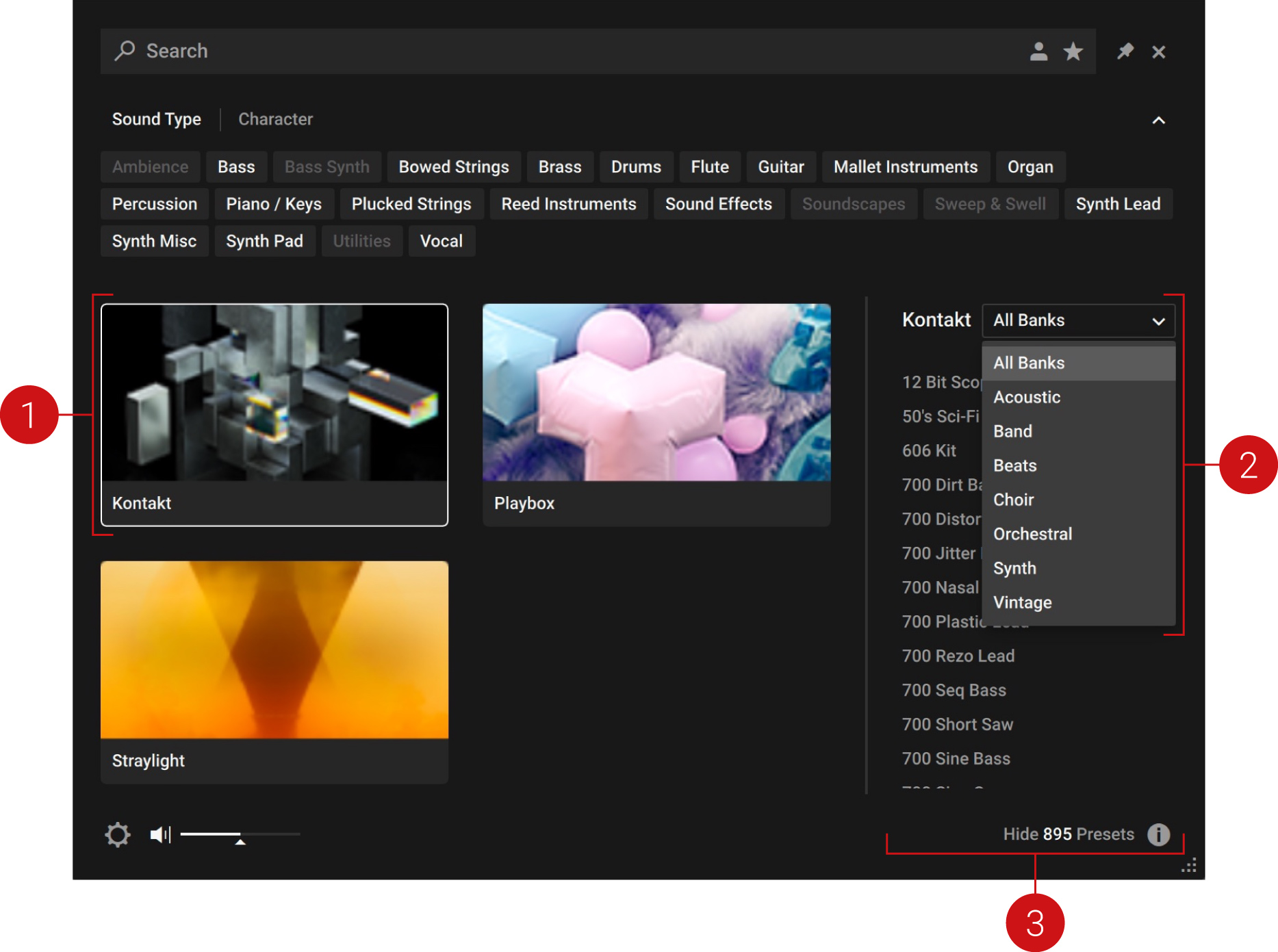
- KONTAKT Factory Library: Clicking the respective Library Tile will filter the Browser's Results list to only include presets from the KONTAKT Factory Library.
- Bank Menu: When the KONTAKT Factory Library's Library Tile is selected, clicking on the Bank menu will open a drop-down list that allows you to select one of the included collections. The Results list will only show presets from the selected collection.
- Results List: Shows all presets according to the filters you have set in the Browser, including the Library Tile and the selection made using the Bank menu.
- To load an Instrument from the KONTAKT Factory Library, click the KONTAKT Factory Library's Library Tile and open any of the presets in the Results list. Optionally, you can also select a collection from the Bank menu.
Detailed information about using the Library Browser including all of its advanced filtering options can be found in the KONTAKT 7 Manual.
Instrument Overview
Each Instrument in the KONTAKT Factory Library features the Main page, which contains key parameters and provides access to the FX and Settings pages.
The Main page consists of the following elements and controls:
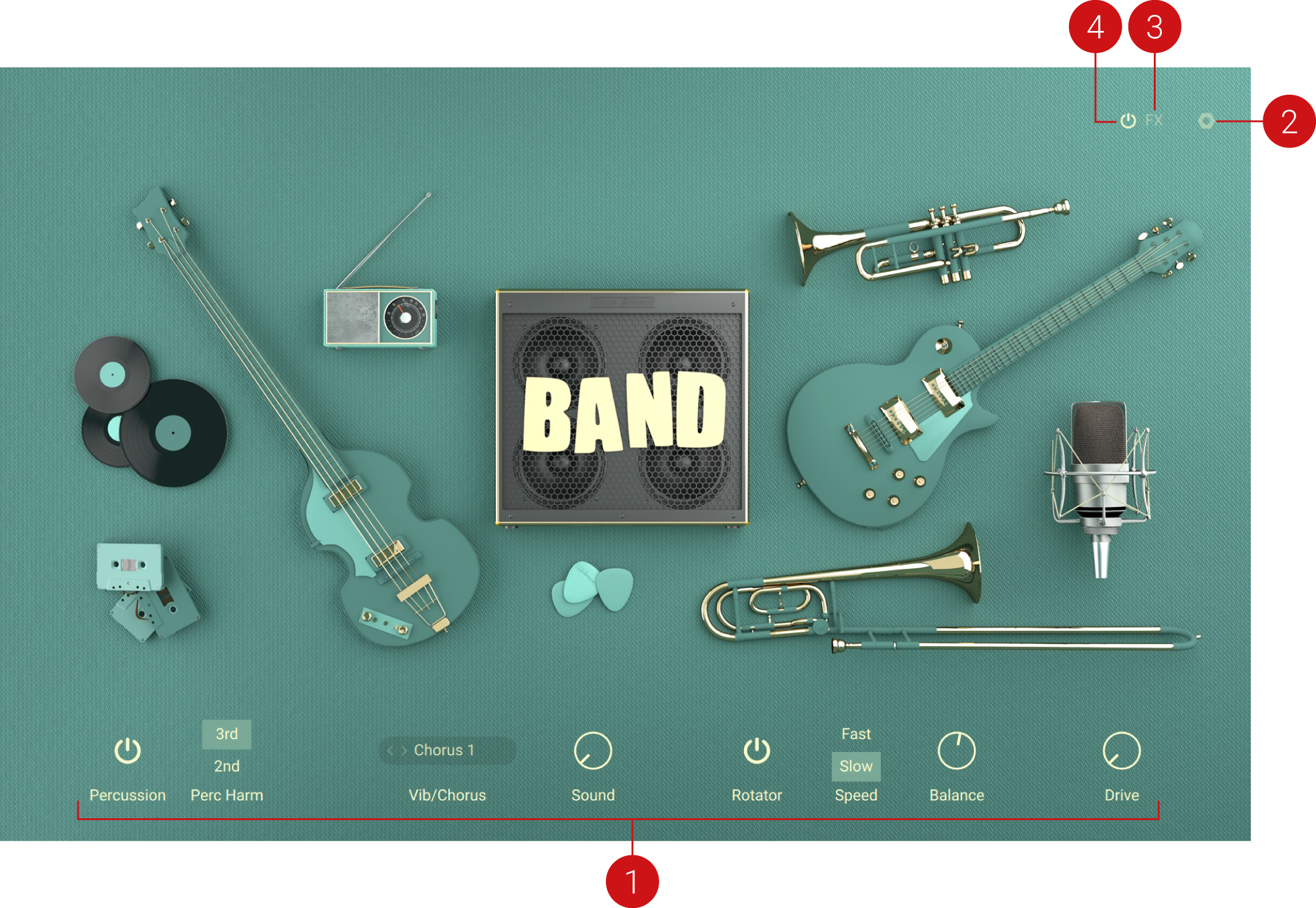
- Instrument Parameters: A set of controls that enable you to adjust the sound and behaviour of the Instrument. Each Instrument has its own dedicated set of controls, tailored to its specific features and characteristics. For detail information about the parameters, refer to the section about the respective collection in this manual.
- Settings Page: Opens the Settings page, which provides global options related to MIDI control, tuning, and randomization. For more information, refer to Settings Page.
- FX Page: Opens the FX page, which enables you to add and tweak a number of different effects. For more information, refer to FX Page.
- FX On/Off: Switches all effects on or off.
Compatibility checklist
- Confirm the supplied build, operating system and required host before ordering.
Requirements vary by supplied version. Confirm your setup with support before purchasing.
Delivery & activation
- Complete your purchaseReview compatibility and purchase details.
- Download your filesAccess available downloads through your order and account.
- Follow the included setup guideContact GetPlugins if you need installation help.
Activation, where included, is provided by GetPlugins. Publisher-account registration, transferable publisher keys and a publisher-issued licence are not included. Read the activation policy.
Frequently asked questions
How do I receive my download?
After payment, access available files from your order details and GetPlugins account. Contact support if a download is missing.
What activation is included?
Follow the activation instructions supplied with your download. Activation is provided by GetPlugins. Confirm device allowances and reinstall arrangements before ordering.
Will this work with my computer and DAW?
Check the compatibility information for this listing and ask us to confirm the exact supplied build. Libraries may require a compatible sampler or additional software.
What if I need installation help?
Email support@getplugins.io with your order number, operating system, DAW and any error message.
Which updates are included?
Activation and updates are separate. Confirm the available version and update arrangements before ordering; do not assume access to future publisher releases.
How do I request a refund?
Contact support with your order number and issue details. Read our Refund Policy for eligibility and the request process.


Reviews
There are no reviews yet.