🎛️ JMG Sound – WideFire 🔥
Step into a new era of mix clarity and dimensional depth with JMG Sound – WideFire, the revolutionary stereo widening and harmonic enhancement plugin designed to make your mixes sound bigger, warmer, and more alive — without compromising mono compatibility or introducing phase issues.
Built on the award-winning legacy of DarkFire, WideFire combines analog-style saturation with a hybrid harmonic spatial engine, creating a rich, immersive stereo field that feels natural and musical across every genre.
🎧 Perfect for vocals, guitars, synths, drums, and full mixes — WideFire makes your sound breathe with emotion and energy!
🔥 The Revolutionary WideFire Engine
Forget the artificial widening tricks — WideFire takes stereo enhancement to a whole new level. Using a custom hybrid analog-harmonic algorithm, it enhances harmonic content, expands it into space, and blends it seamlessly with the original signal.
✨ The result: a wide, lush, and naturally detailed mix that pops out of the speakers — never hollow, never fake.
🎚️ Key Features That Set WideFire Apart
🎛️ Analog-Style Saturation
Infuse your sound with vintage warmth and harmonic richness, driven by a classic analog-inspired saturation circuit.
🌐 Natural Stereo Expansion
Enjoy a 3D stereo field that adds realism and depth to any instrument — from shimmering vocals to cinematic synths.
🎧 Mono-to-Stereo Magic
Transform any mono recording into a lush stereo masterpiece, all while maintaining perfect phase integrity.
⚙️ Precision Tone Controls
-
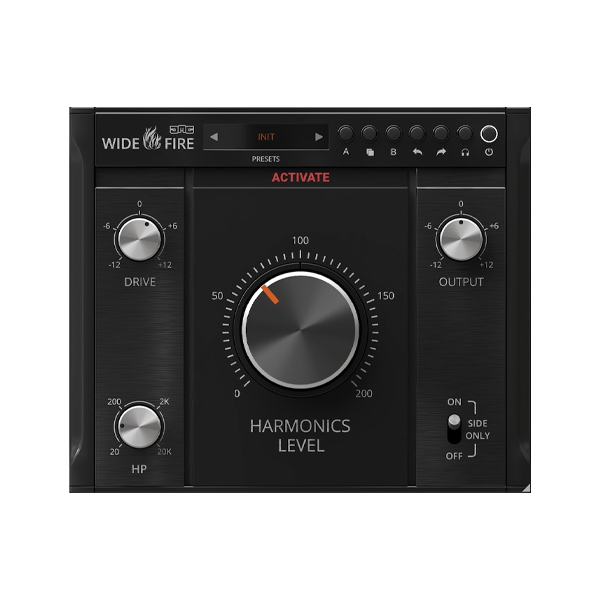
HP (High-Pass Filter): Clean your low end before adding drive.
-
DRIVE: Adjust input gain to shape harmonic intensity.
-
HARMONIC LEVEL: Balance processed and dry signals.
-
OUTPUT: Fine-tune your final mix volume.
-
SIDE ONLY: Process just the stereo sides for subtle enhancement.
-
LISTEN: Solo harmonics to hear your enhancement in detail.
🖥️ Analog Feel, Modern Control
WideFire’s photorealistic 3D interface combines analog warmth with modern precision. Featuring UNDO/REDO, A/B comparison, and COPY functions, it’s designed for effortless creativity.
💡 The resizable UI adapts to any screen — perfect for laptop producers and widescreen studio setups alike.
⚡ Optimized for Performance & Stability
💻 64-bit audio engine for pristine sound quality
🎵 Supports all sample rates (up to 192 kHz+)
🔇 Intelligent Bypass for smooth automation transitions
🕐 Latency compensation for phase-perfect alignment
🌙 Smart Sleep Mode to save CPU when idle
💡 Why Producers Love JMG Sound – WideFire
✅ Natural, artifact-free stereo widening
✅ Adds warmth, width, and professional polish
✅ 100% mono-safe and phase-stable
✅ Ideal for mixing, mastering, and sound design
✅ Ultra-low CPU usage with high-end sound
✅ Sleek, modern UI with real-time metering










Reviews
There are no reviews yet.