




Discover iZotope Stutter Edit 2 (Windows)
Achieving the popular stutter effect can take hours of editing in your DAW, but iZotope’s Stutter Edit 2 gets the job done in seconds. Designed by electronic music guru BT, this plug-in gives you one-button access to this often-used effect, enabling you to slice and dice your samples, tracks, and mixes. A Curve Editor makes…
Software Type : Rhythmic Patterns
Download/Boxed : Download
Format : AAX, AU, VST2, VST3
Explore product features & full description
Tech Specs
- Software Type : Rhythmic Patterns
- Platform : PC Only
- Upgrade/Full : Full
- Download/Boxed : Download
- Bit Depth : 64-bit
- Format : AAX, AU, VST2, VST3
- Hardware Requirements - PC : Intel Core 2 Duo / AMD Athlon 64 X2 or higher, 4GB RAM minimum
- OS Requirements - PC : Windows 8.1 or later
- Manufacturer Part Number : STUTTEREDIT2_RD
Complex Stutter Effects from the Mind of BT
Achieving the popular stutter effect can take hours of editing in your DAW, but iZotope’s Stutter Edit 2 gets the job done in seconds. Designed by electronic music guru BT, this plug-in gives you one-button access to this often-used effect, enabling you to slice and dice your samples, tracks, and mixes. A Curve Editor makes deploying sweeping filters, pumping reverbs, and blends of lo-fi energy easy, while a cache of top-shelf effect modules really gets your blood pumping. BT-designed banks and gestures put a wealth of effects, ideas, and sounds at your fingertips. Stutter Edit 2 also includes an overhauled UI with a dedicated output section, easier Stutter controls, and a flexible system for saving banks and gestures. If you want to elevate your productions with percussive patterns, soaring pop vocal edits, glitched-out dubstep breakdowns, and more, iZotope’s Stutter Edit 2 will get you there.
A multitude of exciting new features
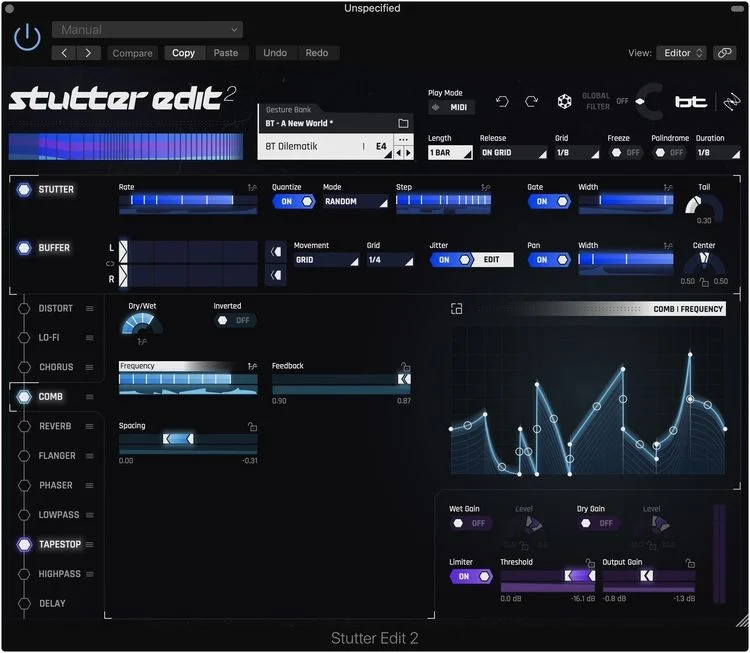
With version 2, Stutter Edit has acquired a multitude of exciting new features. Its effect module upgrades include a 2-band Distort module for adding grit to your tracks and Comb and Chorus modules that supply extra movement within your mixes. A Reverb module from BT’s personal collection adds ear-tickling dimensionality to your projects. You also get 11 additional effects that give you everything from lo-fi ear candy to attention-grabbing tape stops. To top it off, Stutter Edit 2’s Curve Editor enables every knob and slider to move in perfect sync with your session — no DAW automation required.
Create a near-endless array of cutting-edge effects
You can create a near-endless array of mind-blowing effects with iZotope’s Stutter Edit 2. Elevate your productions with cutting-edge rhythmic gestures, sweeping filters, outrageous glitches, or all the above simultaneously. Banks and gestures designed by BT deliver a wealth of effects, ideas, and sounds, while custom banks provide access to dozens of unique gestures that will inject your tracks with inspiring rhythmic flavors. Chop your samples into any beat subdivision or use the Stutter and Buffer controls to shred them into pitched cacophony. At Sweetwater, we’ve created countless one-of-a-kind sounds with Stutter Edit 2. If you want to produce music with a modern, club-ready vibe, this is the effect plug-in that will help you do it.
Auto mode provides easy, one-button access
Stutter Edit 2’s Auto Mode makes setup a breeze, providing you with a hassle-free way to audition sounds in your mix with a single button — no routing required! You can also hook up your MIDI controller and get set up using a dynamic online help system. This super-helpful system first detects your DAW, then supplies you with step-by-step instructions. Professionally designed presets add to Stutter Edit 2’s ease-of-use, giving you easy achieve to cinematic rises, amazing transitions, and stupefying filter sweeps.
iZotope Stutter Edit 2 Features:
- Playable stutter effect for studio and stage designed by BT
- Huge amount of control over slicing/stuttering in real time
- Create completely unique stutter effects — turn pitch into rhythm, and rhythm into pitch
- 2-band Distort module for adding grit to your tracks
- Comb and Chorus modules supply extra movement within your mixes
- Reverb module from BT’s personal collection adds ear-tickling dimensionality to your projects
- 11 effects that span from lo-fi ear candy to attention-grabbing tape stops
- Curve Editor enables every knob and slider to move in sync with your DAW
- Auto mode gives you 1-button access to auditioning sounds with zero routing
- Effects linked to simple gestures on a MIDI controller
- Banks and gestures designed by BT deliver a wealth of effects, ideas, and sounds
- Custom banks provide access to dozens of unique gestures
- Experiment with a huge range of effect sounds by playing keys or pads on a MIDI controller
- Create complex retriggering, pan and gating edits using instrument tracks and entire songs
- Improvise live remixes with stutter fills, filter sweeps, and build-ups that sound like they were produced in the studio
- The perfect companion for Ableton Live for laptop performances and DJ sets
- Use Stutter Edit in the studio on vocals, drums, and other instruments to re-create painstaking stutter-editing techniques
- Grid feature automatically corrects your timing when performing effects live
- Overhauled UI with dedicated output section, easier Stutter controls, and flexible system for saving banks and gestures
Compatibility checklist
- Confirm the supplied build, operating system and required host before ordering.
Requirements vary by supplied version. Confirm your setup with support before purchasing.
Delivery & activation
- Complete your purchaseReview compatibility and purchase details.
- Download your filesAccess available downloads through your order and account.
- Follow the included setup guideContact GetPlugins if you need installation help.
Activation, where included, is provided by GetPlugins. Publisher-account registration, transferable publisher keys and a publisher-issued licence are not included. Read the activation policy.
Frequently asked questions
How do I receive my download?
After payment, access available files from your order details and GetPlugins account. Contact support if a download is missing.
What activation is included?
Follow the activation instructions supplied with your download. Activation is provided by GetPlugins. Confirm device allowances and reinstall arrangements before ordering.
Will this work with my computer and DAW?
Check the compatibility information for this listing and ask us to confirm the exact supplied build. Libraries may require a compatible sampler or additional software.
What if I need installation help?
Email support@getplugins.io with your order number, operating system, DAW and any error message.
Which updates are included?
Activation and updates are separate. Confirm the available version and update arrangements before ordering; do not assume access to future publisher releases.
How do I request a refund?
Contact support with your order number and issue details. Read our Refund Policy for eligibility and the request process.






Reviews
There are no reviews yet.