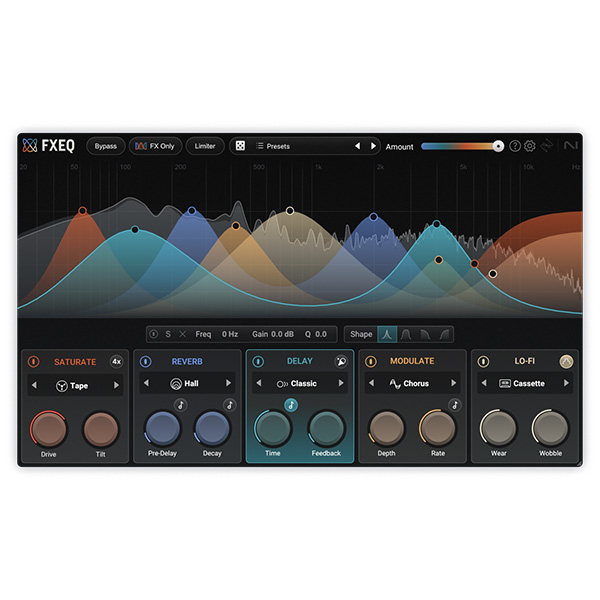
iZotope – FXEQ (Windows)
£25.00
Discover iZotope – FXEQ (Windows)
iZotope FXEQ for Windows is your ultimate tool for surgical equalization and sonic creativity. Built with iZotope’s legendary DSP engine, FXEQ delivers clinical precision and intuitive control, allowing you to sculpt, enhance, and shape your sound like never before. Whether you're mixing vocals, mastering a full track, or tweaking a synth in real-time, FXEQ provides…
Explore product features & full description
🎚️ iZotope FXEQ (Windows) | Precision EQ Meets Creative Power 🎧⚡
iZotope FXEQ for Windows is your ultimate tool for surgical equalization and sonic creativity. Built with iZotope’s legendary DSP engine, FXEQ delivers clinical precision and intuitive control, allowing you to sculpt, enhance, and shape your sound like never before. Whether you're mixing vocals, mastering a full track, or tweaking a synth in real-time, FXEQ provides the tools to get it done — fast and flawlessly. 🔊🎨
From clean tone correction to bold frequency sculpting, FXEQ offers a streamlined, modern interface, dynamic EQ functions, and zero-latency performance — perfect for both studio sessions and live workflows.
🚀 Key Features:
🎚️ Surgical EQ Curves – Clean, precise tone shaping for any source
🔁 Dynamic EQ – Reacts to audio in real-time for musical responsiveness
📊 Visual Spectrum Analyzer – See your frequencies, tweak with confidence
🎧 Mid/Side & L/R Processing – Full control over stereo imaging
🎼 Mixing, Mastering & Sound Design Presets – Ready-to-go pro settings
⚡ Zero-Latency Mode – Ideal for real-time tracking and live performance
📈 Gain Matching & Integrated Metering – Make confident EQ moves every time
🎯 Perfect For:
🎶 Producers who want powerful EQ with a clean workflow
🎛️ Mix Engineers needing ultra-precise tonal control
🎨 Sound Designers crafting creative, dynamic soundscapes
💻 Windows users looking for a lightweight, high-performance EQ plugin
Compatibility checklist
- Windows 10,11 (64Bit Only)
- VST3, VST
- Formats: VST3 · VST
Requirements vary by supplied version. Confirm your setup with support before purchasing.
Delivery & activation
- Complete your purchaseReview compatibility and purchase details.
- Download your filesAccess available downloads through your order and account.
- Follow the included setup guideContact GetPlugins if you need installation help.
Activation, where included, is provided by GetPlugins. Publisher-account registration, transferable publisher keys and a publisher-issued licence are not included. Read the activation policy.
Frequently asked questions
How do I receive my download?
After payment, access available files from your order details and GetPlugins account. Contact support if a download is missing.
What activation is included?
Follow the activation instructions supplied with your download. Activation is provided by GetPlugins. Confirm device allowances and reinstall arrangements before ordering.
Will this work with my computer and DAW?
Check the compatibility information for this listing and ask us to confirm the exact supplied build. Libraries may require a compatible sampler or additional software.
What if I need installation help?
Email support@getplugins.io with your order number, operating system, DAW and any error message.
Which updates are included?
Activation and updates are separate. Confirm the available version and update arrangements before ordering; do not assume access to future publisher releases.
How do I request a refund?
Contact support with your order number and issue details. Read our Refund Policy for eligibility and the request process.

Reviews
There are no reviews yet.