Bass is the main power source of your tracks. Therefore, we created the ultimate all-in-one bass sculpting tool designed for speed and power. Bassrift seamlessly separates the low and high frequencies of your bass signal, empowering you to craft a tight, rumbling bottom end while simultaneously adding captivating and astonishing effects to the upper frequencies. All that with maximum simplicity of use and efficiency.
(Not just) electronic bass
BassRift is your gateway to crafting spine-tingling basslines that dominate the mix and captivate your audience. Whether you're producing EDM, modern pop and hip-hop, or any genre that demands a relentless low-end presence, BassRift is your indispensable tool for sculpting the foundation of your tracks with unparalleled precision and depth. But it's not only synth bass that BassRift is good for. You'll get incredible results on bass guitar, too.
Split the signal
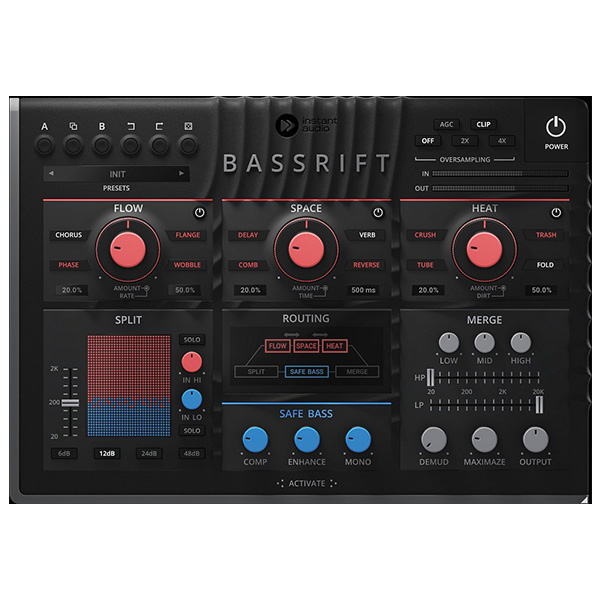
The Split section of BassRift divides the incoming signal into two streams at a selected crossover point: the lower frequencies are refined using the Safe Bass feature for enhanced solidity, while the upper frequencies are subjected to various effects for added texture and depth. Each section has an independent gain control, and you may decide the steepness of the crossover.
Make a solid foundation
The Safe Bass component is dedicated to preserving and enhancing the potency of your bass tracks. It includes a compressor and enhancer, fortifying the clarity and strength of your basslines for an impactful presence in the mix. Furthermore, it allows for the consolidation of the stereo signal into mono, ensuring the solidity and uniformity of low frequencies across various playback platforms.
FX section
After the split, Bassrift runs upper frequencies through a three-stage effect section. Each of the modules can choose from four effects and is easily controlled by a dual knob to maximize the speed of your work. The modules' order can be changed as you wish.
Control the flow
In the Flow section of BassRift, you can infuse your basslines with captivating modulation effects (Chorus, Flange, Wobble and Phase). With just two knobs, "Amount" lets you adjust the intensity of your chosen effect while "Rate" controls its speed. From subtle choruses to swirling phasers, sculpt your sound with ease and precision, effortlessly adding depth and movement to your tracks.
Add some space
The expansive realm of the Space section is here to create atmospheric textures. The "Amount" knob allows you to dial in the intensity of your selected effect, while "Time" shapes its duration. Whether you're craving ethereal reverbs, delays, resonant comb filters, or mesmerizing reverses, the Space section is here to add depth and dimension to your basslines.
Increase the heat
The heat section of BassRift is where raw energy meets sonic grit. Dial the intensity of your chosen distortion type with the Amount" knob, and shape its character and texture with "Dirt". Whether you're seeking the aggressive bite of Crush, Trash, the warm saturation of Tube, or the harmonically rich folds of Fold distortion, the Heat section empowers you to add depth, edge, and attitude to your basslines with effortless precision.
The final touch
The Merge section blends the previously split signals into a cohesive force. Utilize the EQ module, featuring high-pass and low-pass filters, to sculpt your bass frequencies with surgical precision, ensuring clarity and focus. Then, unleash the power of the maximizer to elevate your basslines to their fullest potential, adding punch, presence, and impact to every note.
Hassle-free software protection
No iLok, no dongle, or internet access is required for activation. Our software uses license files to activate your software. You can freely use the purchased software on all your computers as long as you are the user.
Automatic Gain Compensation
Automatic gain compensation quickly adapts to current settings and ensures the output sounds as loud as the input. This even protects you from thinking that something sounds better. In some cases, it is just louder.
Realistic 3D yet flexible GUI
The photorealistic graphic user interface of the plugin gives you the feeling you are touching the real hardware. But it easily adapts to your needs. You can always drag the arrow in the bottom right corner to change its size - make it smaller to save valuable screen space, or enlarge it to make it easier to use.
64-bit audio quality at ANY sampling rate
The plugin provides the maximum audio quality you can get. It uses internal 64-bit audio processing and can handle any sampling rate. 192 kHz or even higher.
Smart bypass
The intelligent way our plugins manage bypassing ensures that you don't get any clicks or harmful noises when automating the parameter. It also compensates for latency, ensuring that the bypass states are perfectly in sync with each other.
Intelligent sleep on silence
This plugin intelligently detects whether it makes sense to perform processing at all. If not, it temporarily turns on sleep mode. In such a state, it requires virtually no CPU at all to save the computing sources for other processes.
Free-for-life updates
Our plugins never become obsolete. We keep track of the current operating systems and DAWs. You may always update to the most recent version for free, without paying a cent, a penny, or whatever currency you prefer.









Reviews
There are no reviews yet.