Gforce Software – M-Tron Pro 3 (Windows)

M-Tron Pro  is a 32/64-bit virtual instrument in the following formats:
Formats: Standalone · VST

£25.00

Discover Gforce Software – M-Tron Pro 3 (Windows)

M-Tron Pro  is a 32/64-bit virtual instrument in the following formats:

700+ patches including many curated by world-class recording artists and programmers

Over 3.5GB of factory samples, with a huge range of Expansion Packs giving up to 11.3GB in total

Preserves the 8 second tape length, with carefully selected tape banks, such as the rhythms, looped

Explore product features & full description

PUT LEGENDARY MELLOTRON SOUNDS INTO YOUR STUDIO!

From the flutes on the legendary introduction to The Beatles’ “Strawberry Fields Forever” to tracks from The Moody Blues, David Bowie, and The Rolling Stones to the modern sounds of The Flaming Lips, Nine Inch Nails, Modest Mouse, Muse, U2, Sigur Ros, and more, there’s no question that the sound of the Mellotron is a deep part of music history. Now, you can experience that tape-based playback sonic experience for yourself — and with 100%-digital convenience – with M-Tron Pro.

In addition to its 200 tape banks, M-Tron Pro boasts more than 700+ patches, many custom-designed by world-class recording artists and programmers, so you have instant access to a diverse sonic palette.

CRAFT HYBRID PATCHES AND PERFORM

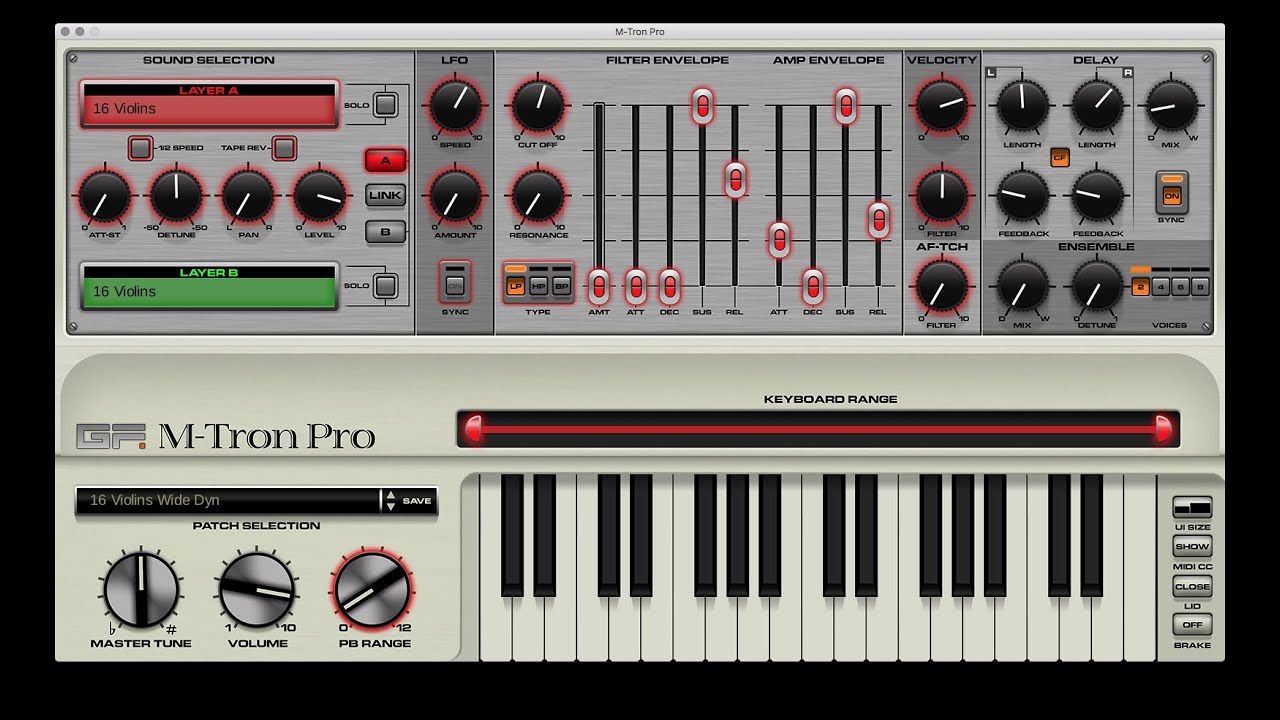
M-Tron Pro offers up to 35 notes, each individually sampled. It also supports dual-layer and split-keyboard operation in addition to MIDI Learn. All of this functionality adds up to a wealth of control over its 29 parameters per layer, including ensemble and delay effects; lowpass, bandpass, and highpass filters; and tape-based effects, such as reverse and half speed. All the control you need to craft your own dual-layer hybrid patches. What’s more, M-Tron Pro can operate standalone, so it’s easy to quickly load it up on your laptop and perform with a MIDI controller onstage.

KEY FEATURES

Nearly 200 total tape banks (sample sets) plus:

  • 700+ patches including many curated by world-class recording artists and programmers
  • Over 3.5GB of factory samples, with a huge range of Expansion Packs giving up to 11.3GB in total
  • Preserves the 8 second tape length, with carefully selected tape banks, such as the rhythms, looped
  • Up to 35 notes, each individually sampled
  • 4 interface sizes in 3 designs, Original, Wood and Clear
  • Dual layer and split keyboard operation
  • Programmable MIDI CC response via MIDI Learn
  • 29 parameters per layer including synth parameters
  • Vintage-style ensemble and delay effects
  • Low-pass, band-pass and high-pass resonant filter section
  • Tape Reverse
  • Tape half-speed
  • Dynamic keyboard control, including filter aftertouch
  • The Brake – provides the ability to slow the tape playback speed for fabulous pitch-shift effects
Compatibility checklist

  • Confirm the supplied build, operating system and required host before ordering.
  • Formats: Standalone · VST

Requirements vary by supplied version. Confirm your setup with support before purchasing.

Delivery & activation

  1. Complete your purchaseReview compatibility and purchase details.
  2. Download your filesAccess available downloads through your order and account.
  3. Follow the included setup guideContact GetPlugins if you need installation help.

Activation, where included, is provided by GetPlugins. Publisher-account registration, transferable publisher keys and a publisher-issued licence are not included. Read the activation policy.

Frequently asked questions

How do I receive my download?

After payment, access available files from your order details and GetPlugins account. Contact support if a download is missing.

What activation is included?

Follow the activation instructions supplied with your download. Activation is provided by GetPlugins. Confirm device allowances and reinstall arrangements before ordering.

Will this work with my computer and DAW?

Check the compatibility information for this listing and ask us to confirm the exact supplied build. Libraries may require a compatible sampler or additional software.

What if I need installation help?

Email support@getplugins.io with your order number, operating system, DAW and any error message.

Which updates are included?

Activation and updates are separate. Confirm the available version and update arrangements before ordering; do not assume access to future publisher releases.

How do I request a refund?

Contact support with your order number and issue details. Read our Refund Policy for eligibility and the request process.

Customer Reviews

Reviews

There are no reviews yet.

Be the first to review “Gforce Software – M-Tron Pro 3 (Windows)”

Your email address will not be published. Required fields are marked *