Flux Audio – Evo Channel (Windows) 🎚️🔊 | Modular Mixing Power for the Future of Audio
Step up your audio game with Flux Audio – Evo Channel for Windows—a state-of-the-art modular channel strip plugin that redefines precision, speed, and versatility in mixing. Whether you’re sculpting vocals, tightening up dialogue, or designing immersive Dolby Atmos soundscapes, Evo Channel gives you the ultimate toolbox for AI-enhanced, real-time audio processing. 🎛️🎧
🧩 5 Modular FX Units – Infinite Sonic Possibilities
🎯 Evo In – Shape Your Signal Path From the Start
Control Drive, Phase, and Gain to build a solid foundation. Add harmonic depth, tame phasing issues, or saturate with analog-style warmth. 🎚️🔥
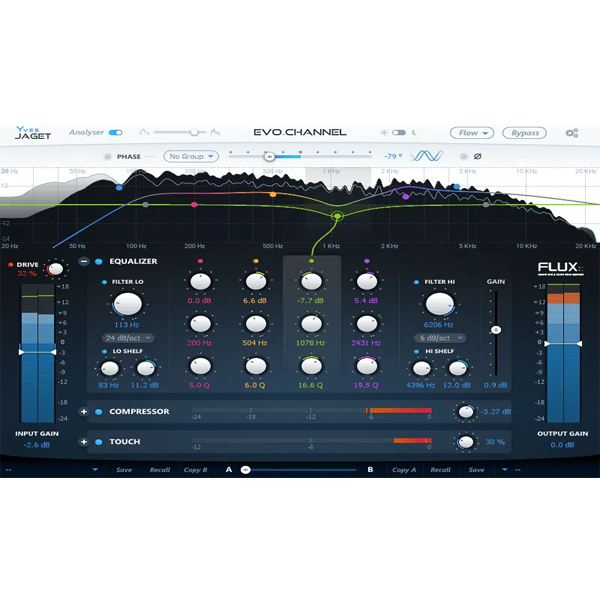
🎨 Evo EQ – Paint with Surgical Precision
A fully parametric EQ with free-form control and linear phase mode for ultra-transparent mixing and mastering. Ideal for vocals, dialogue, and critical frequency shaping. 🎨🔍
🔊 Evo Comp – 9 Compressors. Total Dynamics Control.
From snappy drums to smooth vocals, Evo Comp features nine compression styles designed for everything from subtle glue to bold punch. 💥🎙️
✨ Evo Touch – Smart Dynamics That React to You
A polymorphic processor that transforms into a Transient Designer, De-Esser, or Expander based on the input. Breathe life into dull takes, control sibilance, or sculpt your mix with ease. 🧠🔧
🧪 Evo Out – Finish Like a Pro
Finalize your mix with clean output gain control and advanced metering. Keep your levels broadcast-safe and ready for delivery. 🎚️✅
💡 What Sets Evo Channel Apart?
✅ Modular Workflow – Use modules separately or as a full channel strip
✅ Multichannel Support – Compatible with Stereo, 5.1, Dolby Atmos & Ambisonics
✅ DXD-Ready – Supports sample rates up to 384 kHz
✅ Ultra-Low Latency – Ideal for real-time tracking and mixing
✅ VST3, VST, WPAPI Formats – Smooth DAW integration
🎼 Perfect For:
🎧 Mixing Engineers – Refine your workflow with adaptable processing
🎬 Post-Production Specialists – Clean up dialogue and match tone quickly
🎵 Music Producers – Build modern vocal chains and instrument processing
🌍 Immersive Sound Designers – Work effortlessly in 3D audio environments
🌟 Key Highlights
-
🛠️ 5 Core Modules for Full Mixing Control
-
🎚️ 9-Mode Compressor for Any Sound Source
-
🎨 Linear Phase EQ with Transparent Detail
-
✨ Evo Touch: One Plugin, Three Dynamic Tools
-
🧪 Pro-Level Output Metering and Gain Staging
-
🧠 AI-Enhanced Workflow, Designed for Speed









Reviews
There are no reviews yet.