FireSonic FireEQ (Windows)
£15.00
Discover FireSonic FireEQ (Windows)
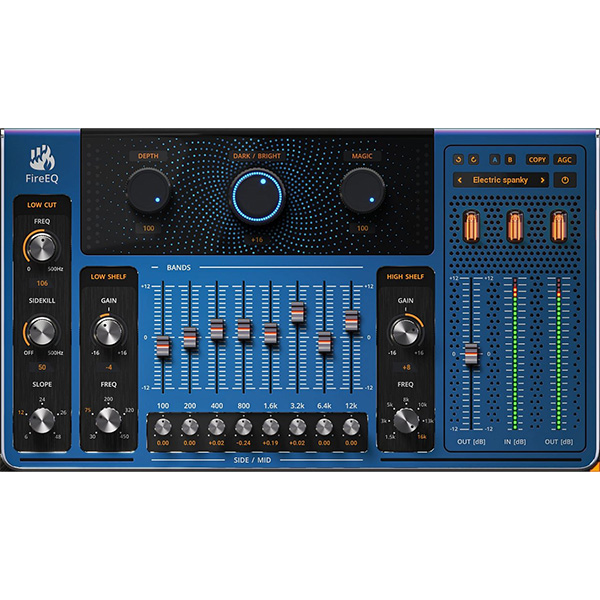
FireSonic's FireEQ is an advanced equalizer plugin that transcends traditional EQ capabilities by not only allowing precise frequency adjustments but also enhancing the overall dynamics and spatial characteristics of your audio tracks. Designed to simplify the complexities of mixing and mastering, FireEQ integrates multiple EQ techniques to deliver exceptional sound quality with every use.
Vintage-Style Analog Filters: FireEQ introduces low and high-shelf filters meticulously modeled after revered analog equalizers, infusing your tracks with warmth and character.
Dynamic Processing with the MAGIC Knob: Implementing sophisticated dynamic processing, the MAGIC knob amplifies quieter elements and attenuates louder ones, functioning similarly…
Dark/Bright Balance Control: The DARK/BRIGHT balance knob offers instant control over the overall color of your mix, allowing you to dynamically adjust…
Explore product features & full description
FireSonic's FireEQ is an advanced equalizer plugin that transcends traditional EQ capabilities by not only allowing precise frequency adjustments but also enhancing the overall dynamics and spatial characteristics of your audio tracks. Designed to simplify the complexities of mixing and mastering, FireEQ integrates multiple EQ techniques to deliver exceptional sound quality with every use.
Key Features:
- Vintage-Style Analog Filters: FireEQ introduces low and high-shelf filters meticulously modeled after revered analog equalizers, infusing your tracks with warmth and character.
- Dynamic Processing with the MAGIC Knob: Implementing sophisticated dynamic processing, the MAGIC knob amplifies quieter elements and attenuates louder ones, functioning similarly to a multiband compressor to ensure a smooth and consistent sound.
- Dark/Bright Balance Control: The DARK/BRIGHT balance knob offers instant control over the overall color of your mix, allowing you to dynamically adjust the mood of your track, making it brighter or darker as desired.
- Precision Low-Cut Filter with Side-Kill Function: FireEQ features a precision-engineered low-cut filter with a side-kill function specifically designed to address low-frequency issues in stereo imaging, resulting in a tighter and cleaner sound.
- Stereo Image Control: Each of FireEQ's eight core frequency bands has an associated SIDE/MID knob, allowing you to adjust the gain of neighboring frequencies in both mid and side signals, empowering you to sculpt the balance and width of your tracks.
FireEQ is compatible with major DAWs on Windows platforms, supporting VST, VST3, and AAX formats. A 15-day fully functional trial version is available for users to explore its capabilities before making a purchase. overview and demonstration of FireEQ's features, you can watch the following walkthrough video:
Compatibility checklist
- Windows 10,11 (64Bit Only)
- VST, VST3
- Formats: VST3 · VST
Requirements vary by supplied version. Confirm your setup with support before purchasing.
Delivery & activation
- Complete your purchaseReview compatibility and purchase details.
- Download your filesAccess available downloads through your order and account.
- Follow the included setup guideContact GetPlugins if you need installation help.
Activation, where included, is provided by GetPlugins. Publisher-account registration, transferable publisher keys and a publisher-issued licence are not included. Read the activation policy.
Frequently asked questions
How do I receive my download?
After payment, access available files from your order details and GetPlugins account. Contact support if a download is missing.
What activation is included?
Follow the activation instructions supplied with your download. Activation is provided by GetPlugins. Confirm device allowances and reinstall arrangements before ordering.
Will this work with my computer and DAW?
Check the compatibility information for this listing and ask us to confirm the exact supplied build. Libraries may require a compatible sampler or additional software.
What if I need installation help?
Email support@getplugins.io with your order number, operating system, DAW and any error message.
Which updates are included?
Activation and updates are separate. Confirm the available version and update arrangements before ordering; do not assume access to future publisher releases.
How do I request a refund?
Contact support with your order number and issue details. Read our Refund Policy for eligibility and the request process.

Reviews
There are no reviews yet.