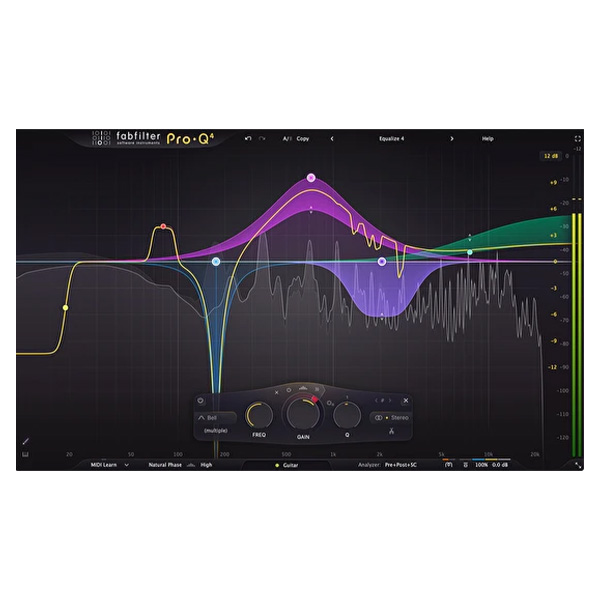
Fabfilter Pro Q 4 (Windows)

When it comes to mixing and mastering, an equalizer is the most frequently used tool in your arsenal.…
Formats: VST3 · VST2 · AAX

£10.00

Discover Fabfilter Pro Q 4 (Windows)

When it comes to mixing and mastering, an equalizer is the most frequently used tool in your arsenal. FabFilter Pro-Q 4 delivers unmatched sound quality, an intuitive interface, and cutting-edge features that make it an indispensable asset for audio professionals.

Control every instance of Pro-Q 4 in your session from a single interface.

Use filtering, pinning, and zooming to streamline your workflow.

Save time by setting up EQ across your session with ease.

Explore product features & full description

FabFilter Pro-Q 4: The Ultimate Equalizer for Mixing and Mastering

When it comes to mixing and mastering, an equalizer is the most frequently used tool in your arsenal. FabFilter Pro-Q 4 delivers unmatched sound quality, an intuitive interface, and cutting-edge features that make it an indispensable asset for audio professionals.


Why Choose Pro-Q 4?

Unrivalled Sound Quality
Experience the highest possible audio fidelity, making your tracks shine with precision and clarity.

Innovative Interface
Pro-Q 4’s beautifully designed interface offers an unparalleled workflow, making EQ adjustments faster and more intuitive than ever before.


Key Features

Instance List

Manage multiple EQ instances effortlessly.

  • Control every instance of Pro-Q 4 in your session from a single interface.
  • Use filtering, pinning, and zooming to streamline your workflow.
  • Save time by setting up EQ across your session with ease.

EQ Sketch

Draw the curve you need in one gesture.

  • Quickly create your starting EQ with intuitive sketching.
  • Add low-cut filters, bell filters, and high-shelf filters with a single movement.

Spectral Dynamics Processing

Pinpoint problem frequencies with surgical precision.

  • Unlike traditional EQ, this mode adjusts gain dynamically for specific problem frequencies only when they exceed a threshold.
  • Perfect for treating varying frequency issues without affecting other parts of the spectrum.

User-Friendly Dynamic Processing

Pro-Q 4 simplifies complex spectral dynamics workflows.

  • No need for additional plugins; Pro-Q 4 integrates this capability seamlessly.

FabFilter Pro-Q 4: A Game-Changer in Equalization

Whether you're addressing problematic frequencies, adding depth, or achieving sonic perfection, Pro-Q 4 sets a new standard for equalizer performance and usability.

Elevate your mixing and mastering today with FabFilter Pro-Q 4! 🎚️

 

4o

Compatibility checklist

  • Windows 10,11 (64Bit Only)
  • Full Version
  • VST2, VST3, AAX
  • Formats: VST3 · VST2 · AAX

Requirements vary by supplied version. Confirm your setup with support before purchasing.

Delivery & activation

  1. Complete your purchaseReview compatibility and purchase details.
  2. Download your filesAccess available downloads through your order and account.
  3. Follow the included setup guideContact GetPlugins if you need installation help.

Activation, where included, is provided by GetPlugins. Publisher-account registration, transferable publisher keys and a publisher-issued licence are not included. Read the activation policy.

Frequently asked questions

How do I receive my download?

After payment, access available files from your order details and GetPlugins account. Contact support if a download is missing.

What activation is included?

Follow the activation instructions supplied with your download. Activation is provided by GetPlugins. Confirm device allowances and reinstall arrangements before ordering.

Will this work with my computer and DAW?

Check the compatibility information for this listing and ask us to confirm the exact supplied build. Libraries may require a compatible sampler or additional software.

What if I need installation help?

Email support@getplugins.io with your order number, operating system, DAW and any error message.

Which updates are included?

Activation and updates are separate. Confirm the available version and update arrangements before ordering; do not assume access to future publisher releases.

How do I request a refund?

Contact support with your order number and issue details. Read our Refund Policy for eligibility and the request process.

Customer Reviews

Reviews

There are no reviews yet.

Be the first to review “Fabfilter Pro Q 4 (Windows)”

Your email address will not be published. Required fields are marked *