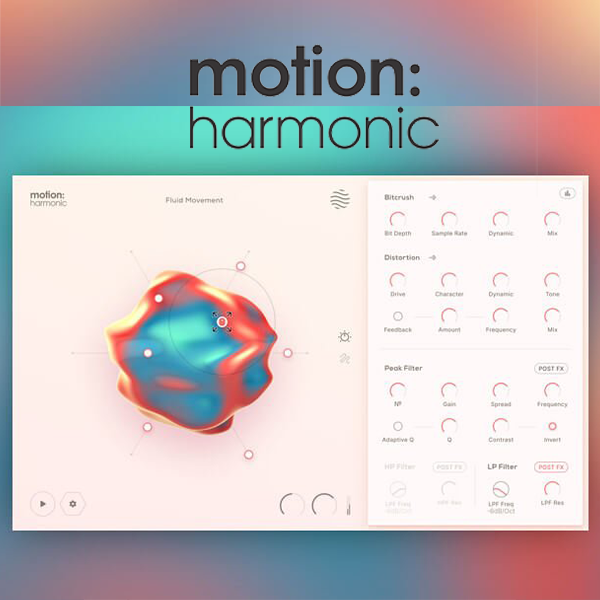
Excite Audio Motion Harmonic (Windows)

Transform your audio with versatile distortion, bit-crushing and creative filtering effects.
Formats: VST3 · VST2 · AAX · Standalone

£15.00

Discover Excite Audio Motion Harmonic (Windows)

Transform your audio with versatile distortion, bit-crushing and creative filtering effects.

Transform your audio with versatile distortion, bit-crushing and creative filtering effects.

Automate multiple parameters at once to transform loops into constantly changing phrases.

Create evolving textures and animated sound design with comprehensive modulation parameters.

Explore product features & full description
  • Transform your audio with versatile distortion, bit-crushing and creative filtering effects.

  • Automate multiple parameters at once to transform loops into constantly changing phrases.

  • Create evolving textures and animated sound design with comprehensive modulation parameters.

  • Enhance harmonics with distortion and bit crushing that can be focused on transients and frequency ranges.

  • Design expressive sweeps with Lo-Pass/Hi-Pass filters and versatile ‘comb-style’ peak filters.

  • Perform the onboard effects with the innovative ‘Hexagon’ controller and ‘magnetic’ cursor control.

  • Assign any number of parameters to the macro sliders or the internal sidechain.

  • Visualize your audio with the immersive and reactive 3D object.

Motion: Harmonic opens up new frontiers in distortion, filtering, and bit crushing, placing you at the center of a dynamic and responsive sound-shaping experience. Transforming your audio signal is now an animated, visually-led, and creative experience with the innovative and reactive Hexagon controller.

From subtle warming and shaping to intense modulated signal destruction, Motion: Harmonic puts everything you need at your fingertips. Comprehensive parameters for distortion, bit crushing, and filtering take these effects into new creative territory, with tools like the multipeak filter and dynamic distortion giving you new ways to play with sound.

The Hexagon, alongside a pulsating and reactive 3D object in the main view, offers six macro sliders that can be assigned to control any of the plugin’s effect parameters. These sliders then react to a ‘magnetic’ cursor whose path can be recorded using mouse movements or drawn graphically.

The Hexagon: Reactive Animation

Improving upon the concept of the traditional XY pad with new dimensions, the hexagonal control area is first and foremost in Motion: Harmonic, allowing its six macro sliders to be pushed and pulled together, in a reactive and creative way.

The six sliders act as macro controls for any distortion, filtering, or modulation parameter in the plugin. The sliders themselves are then moved by a magnetic field surrounding the mouse cursor.

Your cursor movements can be played live, recorded, or pre-programmed; then controlled with extensive syncing and playback options.

In addition, assigning any effect parameters to the center of the hexagon means their properties will be modulated by the incoming audio level.

Making The Moves

Your motions within the Hexagon can attract or repel macro sliders, your magnetic field can be customized for its Range and Strength and the macros’ slider’s behavior can be changed using Hold and Release timing parameters. The path of your motions can be created and played back in many ways…

Paths can be recorded freely using the mouse cursor or designed using drawing and editing functions. Record a path using the mouse, and you can audition and trim the recording to hone in on your ideal pattern. Designing a path yourself is fully customizable – you can create, edit or remove points, and curve lines between them.

Once your path shape is fully formed, the Timeline provides full flexibility for how it’s played back and triggered. Playback can be looped or triggered by your DAW, and playback direction can be set between Forward, Backward, or Pendulum.

You can sync playback to your DAW’s tempo or run the path in milliseconds, and even the speed of the cursor’s movement through the path can be made variable, accelerating or decelerating during playback.

You might, for example, choose to record a slow, careful movement with your mouse then speed it up and trigger it as a flourish. Or you may carefully design a complex movement using points and curves, and set it to play very slowly, transforming a static loop into a continually evolving pattern throughout the course of a whole piece.

Bitcrusher: Flavoursome Degradation

Set the bit depth and sample rate to bring your signal’s fidelity down, emulating the grit and feeling of early digital systems. Turn up the Dynamic control to focus the bitcrushing effect onto transients, for when you want to retain the body of your sound. Or use the Lo and Hi sliders to focus the effect onto a particular band of frequencies to keep the rest of the audio spectrum unaffected.

The bitcrusher can be treated with pre-filters, rolling off lows or highs before bitcrushing for increased signal clarity. It also provides a Mix control to tame the destructive effects, blending the original signal back in.

Distortion: Heat With Feedback

Dial in your preferred flavour of distortion using the Drive and Tone controls, and smoothly transition between tape, tube and fuzz algorithms using the Character dial. Use the Dynamic parameter to weight the distortion’s response more or less heavily to transients in the input signal, or focus the distortion effect on a particular frequency band of your choice.

Motion: Harmonic’s distortion section also houses a Feedback control, adding to the distortion effect with a ringing feedback loop – turn the Frequency up or down to tailor the frequency of this resonant effect. You’ll also find a Mix control and low- and high- input filtering.

Toggle the distortion and bitcrushing visualisers to reveal the real-time effects your settings have on the wet signal and compare the output to your dry signal.

Filtering: Highlight And Sculpt

When modulated by Motion: Harmonic’s Hexagon controller, these high-pass and low-pass filters, with frequency, slope and resonance controls, can provide anything from distortion-calming and slow, undulating effects to rhythmic sweeps and chops.

The filter effects can be placed before or after the Bitcrushing and Distortion modules withe the Post FX buttons.

The Peak Filter allows you to dial in a symmetrical bank of peaks or notches to replicate complex audio effects like spectral resonance or a shifting phaser sound.

Use the No. control to increase the number of peaks, and the Frequency and Q controls to change their position and shape.

The Contrast and Invert switches add further flexibility and customisation to this unique module’s usage.

Toggle the peak filter and LP/HP visualisers to reveal the spectrum analysers and the curves of the filters across the frequency range .

Features

  • FX Page (4 effect sections: Bitcrush, Distortion, Peak Filter, LP/HP Filter)

  • Cursor, Path and Timeline Page

  • Reactive 3D Visualiser

  • 6 Macro Sliders

    • Per Slider Parameter Mapping

    • Per Slider Parameter Min/Max Values

    • Audio Reactive Envelope

  • Magnetic Cursor control

  • Input/Output Gain controls

  • Safety Limiter toggle

  • Global Bypass

  • 250 Presets

    • 134 Dual Presets

    • 85 FX & Mapping Presets

    • 31 Path & Cursor Presets

Bitcrush

  • Bit Depth and Sample Rate reduction controls

  • Dynamic control

  • Hi-Lo Frequency Range slider

  • Dry/Wet Mix

Distortion

  • Drive and Character controls

  • Dynamic and Tone controls

  • Feedback Amount, Frequency, On/Off toggle

  • Hi-Lo Frequency Range slider

  • Dry/Wet Mix

Peak Filter

  • Peak Number, Gain, Spread, and Frequency controls

  • Q with Adaptive Q toggle

  • Peak Contrast contrast and Invert toggle

HP/LP Filter

  • Filter Frequency and Resonance controls

  • Filter Slope dB/oct controls

Cursor & Hexagon

  • Attract & Repel modes

  • Magnet Range & Strength controls

  • Magnet On/Off Mouse settings

  • Slider Hold & Release controls

Paths

  • Record Cursor Mode

  • Line & Circle Draw modes

  • Path Drawing Tools:

    • Select Point/Curve Line

    • Add Point

    • Remove Point

    • Scale/Move Path

Timeline

  • Forward, Reverse, Pendulum Playback Direction

  • Loop Path toggle

  • Timeline Speed graph

  • Fixed/Free Timeline Duration

  • Timeline/Recorded Cursor Speed

  • On, Off, Sync Retrigger modes

  • DAW Sync or Free Timeline Duration

  • Time, Multiplier and Offset controls

Compatibility checklist

  • Windows 10,11 (32, 64Bit Supported)
  • Full Version
  • VST2, VST3, AAX & Standalone
  • Formats: VST3 · VST2 · AAX · Standalone

Requirements vary by supplied version. Confirm your setup with support before purchasing.

Delivery & activation

  1. Complete your purchaseReview compatibility and purchase details.
  2. Download your filesAccess available downloads through your order and account.
  3. Follow the included setup guideContact GetPlugins if you need installation help.

Activation, where included, is provided by GetPlugins. Publisher-account registration, transferable publisher keys and a publisher-issued licence are not included. Read the activation policy.

Frequently asked questions

How do I receive my download?

After payment, access available files from your order details and GetPlugins account. Contact support if a download is missing.

What activation is included?

Follow the activation instructions supplied with your download. Activation is provided by GetPlugins. Confirm device allowances and reinstall arrangements before ordering.

Will this work with my computer and DAW?

Check the compatibility information for this listing and ask us to confirm the exact supplied build. Libraries may require a compatible sampler or additional software.

What if I need installation help?

Email support@getplugins.io with your order number, operating system, DAW and any error message.

Which updates are included?

Activation and updates are separate. Confirm the available version and update arrangements before ordering; do not assume access to future publisher releases.

How do I request a refund?

Contact support with your order number and issue details. Read our Refund Policy for eligibility and the request process.

Customer Reviews

Reviews

There are no reviews yet.

Be the first to review “Excite Audio Motion Harmonic (Windows)”

Your email address will not be published. Required fields are marked *