
Discover Excite Audio Lifeline Console (Windows)
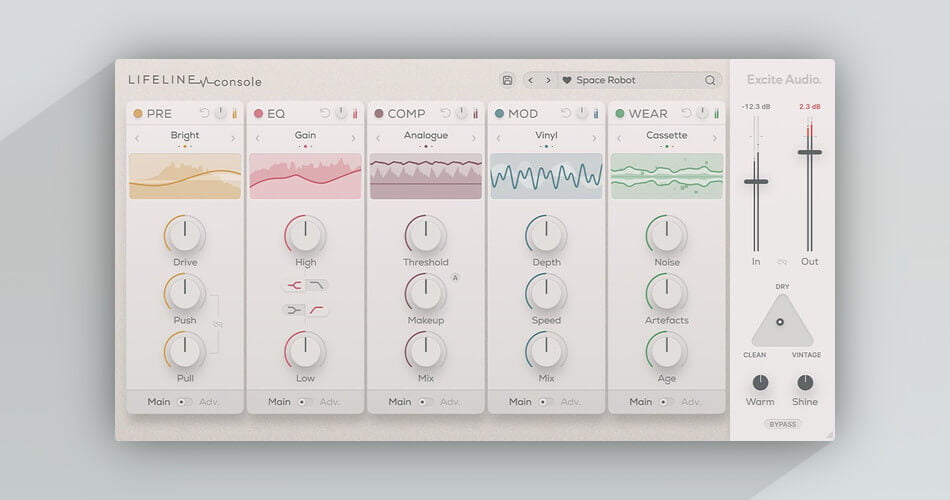
Lifeline Console brings recordings to life with the warmth and charm of analogue audio processing.
Pre-amp warms and enhances the signal with colourful saturation via a customisable frequency response.
EQ offers characterful spectral shaping with a choice of analogue circuitry.
The compressor makes quick work of dynamics duties and contains an innovative Auto Makeup control.
Explore product features & full description

Instant Analogue Character
Lifeline Console brings recordings to life with the warmth and charm of analogue audio processing.
While Lifeline Expanse simulates the space and characteristics of real recording environments and re-amping methods, Lifeline Console focuses on mixing in a control room, offering you the sound of sought-after hardware and analogue formats all within your DAW. Lifeline Console and Lifeline Expanse are also available together within the Lifeline Bundle.
Each of the plugin’s five modules brings a particular vintage flavour to your signal chain:
- Pre-amp warms and enhances the signal with colourful saturation via a customisable frequency response.
- EQ offers characterful spectral shaping with a choice of analogue circuitry.
- The compressor makes quick work of dynamics duties and contains an innovative Auto Makeup control.
- Modulation imparts the movement and life of warped records and tape speed variations.
- Wear adds the charm and imperfections of old-school playback, introducing the noise, artefacts and unpredictable nature of tape, vinyl and cassette.
Whether you’re adding gentle sheen and signal enhancement, degrading a sound into a nostalgic, lo-fi production, or anything in between, there’s a module combination for whatever you need.
Overview
- Five rearrangeable effects modules
- An interactive display for each module
- 15 unique algorithms
- Left/Right or Mid/Side processing for stereo control
- Blend between Vintage and Modern mixing desk styles
- 350 presets for starting your mix
- Zero Latency
Enhance Warmth
The crucial first stage in a recorded signal’s journey, a preamp adds gain but can also impart warmth, drive and excitation.
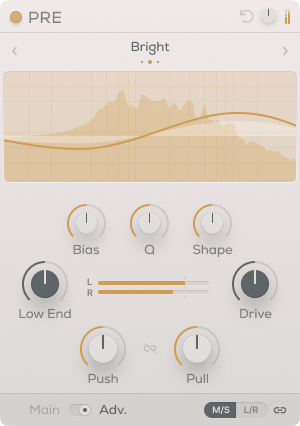
Console’s pre-amp combines this classic preamp workflow with the customizability of the digital realm, letting you shape the frequency response curve of your circuit’s character to perfectly suit the instrument you’re working with.
Three modes help you further refine the type of drive and enhancement needed. Bright offers a high-end presence and sheen that can bring an airy, sparkling quality. Warm adds body, smoothness and presence, particularly useful for midrange frequencies. The dark brings weight and punch to low frequencies.
Push-Pull saturation warms the signal with a weighted frequency response and then brings the overall gain back down – leaving only the spectral character of the preamp. Dial-in the exact character of the response using Bias, Q and Shape controls.
Shape Tonal Balance
Sculpting the frequency range of your audio is essential both for shaping the tonal balance of each channel and for allowing each element its own place in a mix.
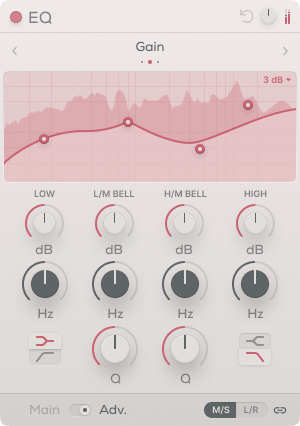
Lifeline Console’s EQ offers a classic parametric four-band approach with a choice of three modes. Gain mode offers a clean circuit for simple and precise EQ jobs. Vintage Circuit mode introduces additional harmonics to drive a signal when boosting. Dirty Circuit mode brings all-out saturation and distortion into the EQing process.
With a low cut or shelf filter, low-mid and high-mid bands, plus a high cut or shelf filter, and the ability to work in 3dB or 30dB modes, Lifeline Console’s EQ offers everything from subtle tone shaping to powerful harmonic enhancement.
Colourful Dynamic Control
Right from the early days of the studio, compressors and been essential to the sound of music. Today, compression is used more than ever before, and in many more applications.
Lifeline Console’s compressor module puts characterful dynamics control at the forefront and lets you choose between three compression types to suit a variety of sources and uses.
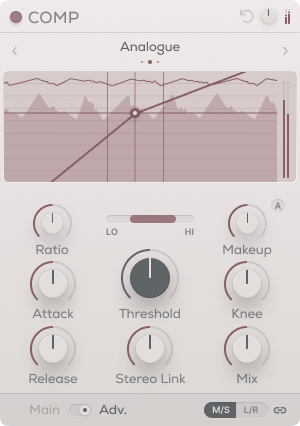
The Comp module provides three compression styles to deal with different production tasks. Analogue smooths out signals and imparts the character of revered compressor hardware. Transparent gives a clean, modern response that’s great for catching peaks while retaining a sound’s body. A variable provides an input-dependent response that’s great for smoothing vocals, glueing busses, and mastering applications.
Controls on the Comp module include Threshold, Ratio, Attack and Release. Lifeline Console’s unique Auto-Makeup control simplifies the make-up gain process, by listening to your audio, taking an average of your audio signal and applying the exact amount of gain required.
Further features include a Dry/Wet mix for parallel processing, a bandpass filter for frequency-specific compression and a gain reduction meter. As with all Lifeline Console modules, the compressor offers Mid/Side and Left/Right functionality for full control over the stereo field
Nostalgic Pitch Warping
In analogue audio formats, the playback speed isn’t always perfectly consistent, and replicating this effect can lend a warm, nostalgic feel to lifeless digital audio.
The Modulation section brings back the magic of pitch variations as experienced with Tape, Vinyl and Cassette, reintroducing the sound-warping character of these media, but with precise control over their properties.
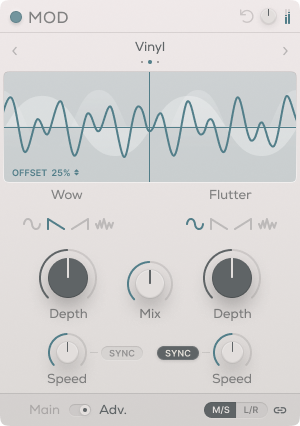
Tape mode introduces subtle pitch modulation where the speed and depth are compensated – an increase in speed is countered by a corresponding decrease in depth. Vinyl simulates the warping of a record, lending a moderate pitch modulation with some speed and depth compensation. Cassette achieves a more extreme pitch modulation effect as heard on compact-style tapes, an effect which is left untamed by keeping speed and depth independent.
The Modulation section’s dual X/Y pads give you graphical control over two parameter combinations: Wow Speed and Depth, plus Flutter Speed and Depth.
Wow and Flutter is found in all three modulation modes, and can even be synced to your DAW’s tempo. Their Waveform Shape can be set to Sine, Linear or Random, and a Dry/Wet control lets you blend pitch modulation into an analogue flanging or chorus-style effect.
Creative Textural Layers
The signal degradation and pitch variation caused by vintage equipment is usually connected and dictated by the physical format. Lifeline Console instead allows you to mix the Wow and Flutter from one format with physical wear from another.
Use noise, hum, artefacts and dropouts to shape a sound’s tone and feel. Add life, realism or even a lo-fi texture to a mix, and use these factors creatively as part of your sound design and production workflow.
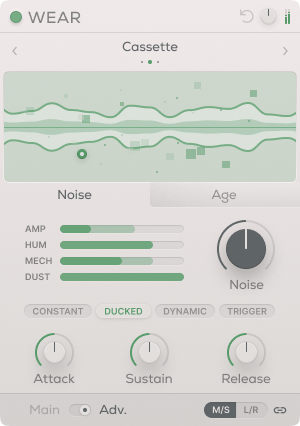
Three Wear modes – Tape, Vinyl and Cassette bring three types of recognisable degradation to your audio, and the Age control introduces the saturation and deterioration that occurs over time in these formats.
Noise properties in the Wear module include Amp (hiss), Hum (electrical noise), Mechanical (physical movement and whir), and Dust (light artefacts). These signals can be ducked or triggered by input audio, letting you harness noise as a creative effect. The interactive display also reacts to your audio, noise, age, artefacts and dropouts.
Create musical elements out of your Artefacts and Dropouts such as light rhythms and subtle gating by syncing them to your project tempo.
Blend Vintage Circuitry
Lifeline Console offers three controls to give a final polish to your sound, rounding out the effects you’ve dialled in with one more layer of analogue goodness.
The Warm knob enhances the low frequencies of an entire mix, helping to glue the bottom end together. The Shine knob achieves a high-end sparkle that’s perfect as a final stage of sheen to give your track an extra edge.
Find your ideal console to work on for each session with the Triangle Pad, which houses both Clean and Vintage emulations of mixing desk circuitry, allowing you to find the perfect blend between the two and your dry signal.
Features
- 5 Effects Modules (Pre-amp, EQ, Compressor, Modulation & Wear)
- 15 Unique Algorithms (243 different combinations)
- Interactive Display for Each Module
- Left/Right and Mid/Side functionality per Module
- Drag & Drop Modular workflow
- Scrollable & Resizeable UI
- 350 Presets
- Zero Latency
Global
- Linkable Input/Output Gain Controls
- A triangle pad for different blends of mixing desk circuitry
- Warm & Shine finishing controls
- Global Bypass
Pre-Amp
- 3 'Push-Pull' Saturation Curves
- Tone Bias, Q & Shape controls
- Lo-cut and Drive controls
- L/R VU Metre
EQ
- 3 Unique EQ Circuits
- 4-band parametric EQ (2 bells, 2 shelves/cuts)
- Scalable Display from 3db-30db
Compression
- 3 Compressor Algorithms
- Threshold, Ratio, Attack & Release controls
- Intelligent Make-up Gain
- Stereo-Link and Dry/Wet controls
Modulation
- 3 Pitch-Modulating Algorithms
- Realistic Speed-Depth compensation
- Wow and Flutter control
- Dual X/Y pad control
- Tempo Sync functionality
- Dry/Wet Mix
Wear
- 3 Wear Modes
- 4 Noise layers per mode (Amp/Hum/Mechanical/Dust)
- Internal Sidechain for Input reactive Noise
- Free & Tempo synced Artefacts/Dropouts
- Mode-specific Age control
Version Comparison
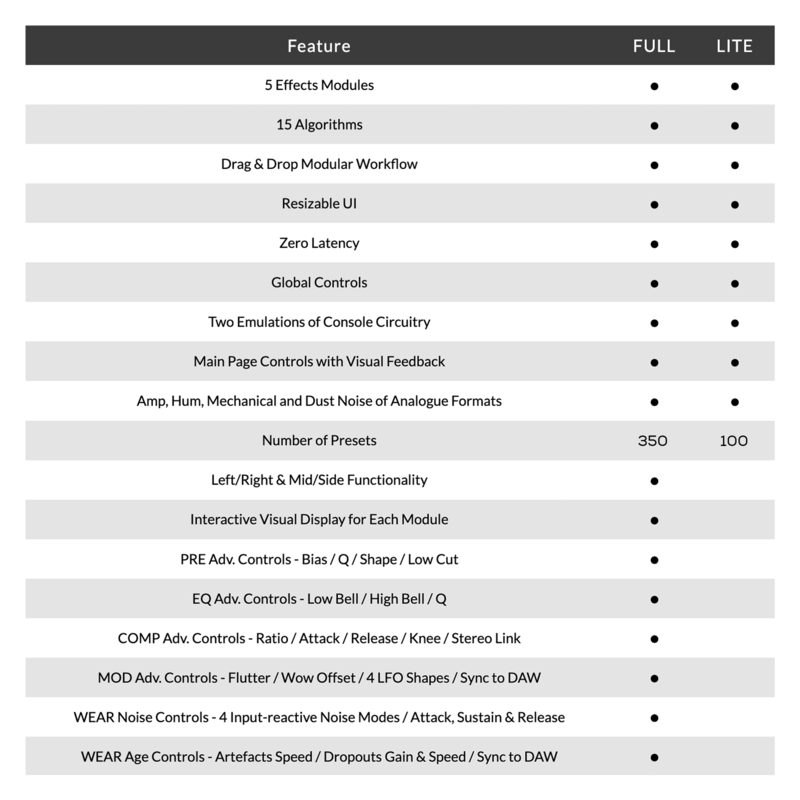
Please Note: An internet connection is required to authorise this software.
Compatibility checklist
- Windows 7 or higher
- VST, VST3, AAX, Standalone
- 64-bit and 32-bit compatible.
- Formats: VST3 · AAX · Standalone · VST
Requirements vary by supplied version. Confirm your setup with support before purchasing.
Delivery & activation
- Complete your purchaseReview compatibility and purchase details.
- Download your filesAccess available downloads through your order and account.
- Follow the included setup guideContact GetPlugins if you need installation help.
Activation, where included, is provided by GetPlugins. Publisher-account registration, transferable publisher keys and a publisher-issued licence are not included. Read the activation policy.
Frequently asked questions
How do I receive my download?
After payment, access available files from your order details and GetPlugins account. Contact support if a download is missing.
What activation is included?
Follow the activation instructions supplied with your download. Activation is provided by GetPlugins. Confirm device allowances and reinstall arrangements before ordering.
Will this work with my computer and DAW?
Check the compatibility information for this listing and ask us to confirm the exact supplied build. Libraries may require a compatible sampler or additional software.
What if I need installation help?
Email support@getplugins.io with your order number, operating system, DAW and any error message.
Which updates are included?
Activation and updates are separate. Confirm the available version and update arrangements before ordering; do not assume access to future publisher releases.
How do I request a refund?
Contact support with your order number and issue details. Read our Refund Policy for eligibility and the request process.







Reviews
There are no reviews yet.