Direct Audio – MiniMeters (Windows)

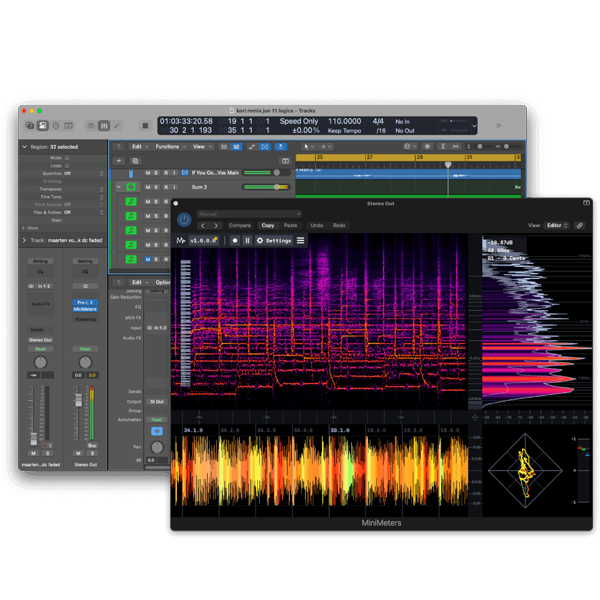
MiniMeters gives you everything you need to see your sound with precision:
Formats: VST3 · VST

£15.00

Discover Direct Audio – MiniMeters (Windows)

MiniMeters gives you everything you need to see your sound with precision:

🔎 Resize & scale the UI to fit any setup

🎨 Switch color themes to match your vibe

📂 Organize meters your way for faster sessions

Explore product features & full description

🔍 Essential Metering Tools in One Plugin

MiniMeters gives you everything you need to see your sound with precision:

🌈 Spectrum Analyzer – visualize frequencies in detail
🌊 Waveform View – monitor phase & dynamics in real-time
📊 Level Meters – track peaks, RMS & LUFS with accuracy
🎶 Spectrogram – view energy & harmonics over time

All meters are clean, beautifully designed, and easy to read, making them perfect for studio mixing or live performance.

🎨 Fully Customizable Interface

Every producer works differently—so MiniMeters adapts to your workflow:

  • 🔎 Resize & scale the UI to fit any setup

  • 🎨 Switch color themes to match your vibe

  • 📂 Organize meters your way for faster sessions

No clutter. No bloat. Just a modern, efficient design that keeps you focused on your music.

⚡ Lightweight & Efficient

Unlike bulky plugins, MiniMeters is optimized for speed and performance. It runs smoothly without eating up CPU power—whether you’re mixing cinematic scores, electronic tracks, or broadcast-ready content.

🎧 Perfect for Producers & Creators

MiniMeters is the go-to tool for:

  • 🎚️ Mixing engineers needing reliable visual feedback

  • 🎼 Composers & producers balancing frequencies and dynamics

  • 🎥 Content creators polishing audio for streaming & broadcast

It fits seamlessly into any DAW setup, keeping your workflow simple and professional.

🚀 Why Choose Direct Audio – MiniMeters?

✅ All-in-one metering solution for music & audio
✅ Customizable UI & color themes for personalization
✅ Accurate, pro-level analysis tools trusted worldwide
✅ Lightweight, CPU-friendly performance for modern setups
Compatibility checklist

  • Windows 10,11 (64Bit Only)
  • VST, VST3
  • Formats: VST3 · VST

Requirements vary by supplied version. Confirm your setup with support before purchasing.

Delivery & activation

  1. Complete your purchaseReview compatibility and purchase details.
  2. Download your filesAccess available downloads through your order and account.
  3. Follow the included setup guideContact GetPlugins if you need installation help.

Activation, where included, is provided by GetPlugins. Publisher-account registration, transferable publisher keys and a publisher-issued licence are not included. Read the activation policy.

Frequently asked questions

How do I receive my download?

After payment, access available files from your order details and GetPlugins account. Contact support if a download is missing.

What activation is included?

Follow the activation instructions supplied with your download. Activation is provided by GetPlugins. Confirm device allowances and reinstall arrangements before ordering.

Will this work with my computer and DAW?

Check the compatibility information for this listing and ask us to confirm the exact supplied build. Libraries may require a compatible sampler or additional software.

What if I need installation help?

Email support@getplugins.io with your order number, operating system, DAW and any error message.

Which updates are included?

Activation and updates are separate. Confirm the available version and update arrangements before ordering; do not assume access to future publisher releases.

How do I request a refund?

Contact support with your order number and issue details. Read our Refund Policy for eligibility and the request process.

Customer Reviews

Reviews

There are no reviews yet.

Be the first to review “Direct Audio – MiniMeters (Windows)”

Your email address will not be published. Required fields are marked *