Perfect Room 2 creates the purest reverb with unprecedented clarity. With surgical controls and an incredibly transparent sound, it’s the purest way to achieve your vision of reverb perfection.
Perfect just got better
Perfect Room 2 is a new approach to reverb with a clean and transparent character.
Perfect Room 2 is a reimagined version of our best-selling plugin to date that surpasses the original with improved clarity, greater precision, and zero latency. Unlike traditional algorithmic or convolution reverbs, Perfect Room 2’s Dynamic Room Response technology ensures that it never affects the original sound.
This makes it ideal for delicate applications where transparency, detail, and source fidelity are important. But physical reality is far from the limit in Perfect Room 2. The sequel offers expanded creative possibilities, allowing you to customize everything from the invisible ambiance to shifting sonic perspectives that evolve with your track.
What’s new in v2
- Zero-latency processing
- Core engine and audio quality improvements
- Improved CPU performance and new ECO mode for even lower usage (at the expense of latency)
- Reverb engine updates in real-time with parameter changes
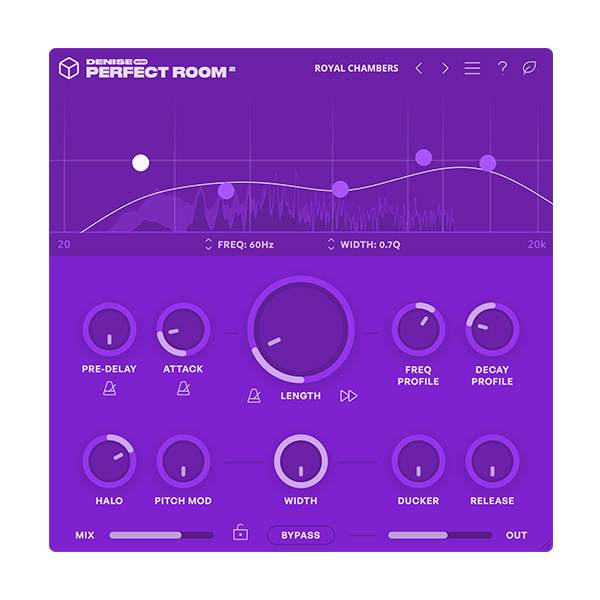
- Major GUI rework for easier workflow
- 5-band EQ for detailed frequency shaping
- Tempo sync across length, pre-delay and attack
- New attack parameter to control reverb onset
- Continuous decay and frequency profile (was implemented step-by-step in v1)
- New Halo feature
- Improved pitch modulation with completely random variations for a more organic response
- Preset lock
Functions
- hint on/off.
- ECO Mode: Turn on to reduce CPU usage. Introduces some latency.
- Pre-Delay: Add a delay before the start of the reverb tail.
- Pre-Delay Sync: Syncs the pre-delay time to the host tempo.
- Attack: Softens the initial phase of the simulated room response for a smoother start to the reverb.
- Attack Sync: Sync the attack time to the host tempo.
- Length: Adjust the length of the reverb tail.
- Length Sync: Syncs the length of the reverb to the host tempo.
- Frequency Profile: Adjusts the frequency content of the simulated room response.
- Positive values emphasize the upper mids and highs.
- Negative values tilt the room color darker.
- Decay Profile Adjusts the decay shape of the simulated room response.
- Positive values create a late decay point, negative values create an early decay point.
- Halo: Isolate high or low frequencies and extend their decay beyond a set length
for a lingering spectral effect. Positive values affect high frequencies, negative values affect low frequencies.
- Pitch Mod: Implement pitch modulation to create lush, choral reverb tails.
- Width: Adjust the difference between the left and right channels of the simulated room response. Mono at 0%.
- Reverse: Change the simulated room profile to reverse.
- Ducker: Set the amount of compression applied to the wet signal.
- Ducker Release: Set the release time of the ducking compressor.
- Mix: Mix the dry signal with the reverb effect.
- Bypass: Bypasses the plug-in.
- Output: Set the global output volume of Perfect Room 2.
- Wet Mode Lock: Locks the wet/dry mix value when changing presets.












Reviews
There are no reviews yet.