Overview of Metaplugin
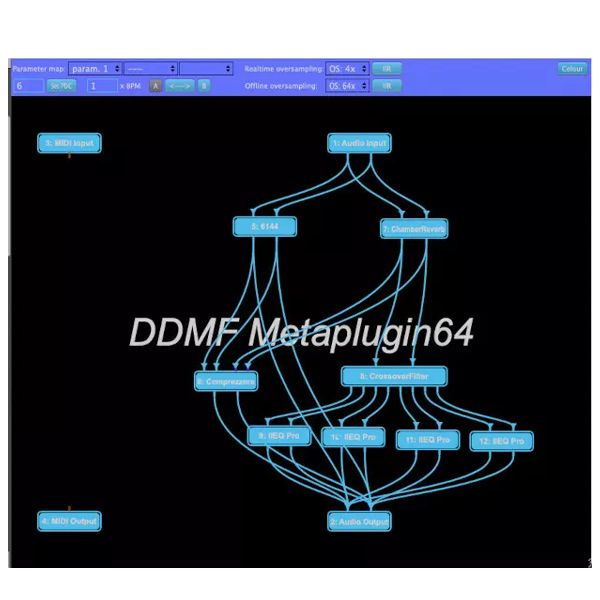
Metaplugin is a plugin that loads other plugins. It’s simple. Create your own effects networks with this wrapper plugin, using any VST/VST3 (and AU if you’re on a Mac) effects you already have on your hard drive. To get you started, the package includes a Mid-Side Matrix, a four-band crossover filter, and a routing plugin.
This means instant cross-track routing, mid-side, multi-band compression/distortion/reverb/ basically, whatever. Of course, this is just the beginning. Let your imagination run wild, nothing is impossible – from creating your multi-layered synth sounds to creating entire sound generators from scratch using simple modules.
Features of Metaplugin
- The effect version handles up to eight separate channels, perfect for surround sound or multi-channel endeavors.
- The instrument version flaunts 16 stereo output buses for intricate routing with multi-channel instruments.
- Double precision audio processing with extensive DAW and plugin format support (except Audio Units).
- Additional stereo sidechain input for added versatility in your creations.
- Plugin organizer for effortless plugin management: Scan once, drag plugins onto the graph area, and voila!
- The automatic connection option streamlines your workflow.
- Internal bridge for seamless integration between 32-bit and 64-bit plugins, even within ProTools or LogicPro X.
- The updated version (4.0) includes an internal bridge for Intel plugins in native Apple Silicon hosts.
- Supports native Apple Audio Unit plugins for Mac users.
- Adjust the dry/wet ratio individually for each loaded plugin.
- Individual bypass for each plugin ensures precise control.
- Full compensation for plugin latency to maintain synchronization.
- Map and automate up to 100 parameters from loaded plugins with ease.
- Enable parameter learning for efficient adjustments.
- Minor additional CPU load for maximum performance.
- Load and play synths using any MIDI controller, crafting your synths using existing building blocks.
- Essential oversampling: Real-time up to 16x and offline rendering up to 64x oversampling to prevent aliasing.
- Includes tools like mid-side matrix, multi-band splitter, cross-track send/receive, mixer, and MIDI channel filter.
- Personalize the plugin with your chosen color palette.
- Fully resizable plugin window for ultimate convenience.
- Functions as a VST/VST3 wrapper in a VST/VST3 wrapper in AAX









Reviews
There are no reviews yet.