For the first time, StereoSavage combines all of these features into one plugin, offering the flexibility to enhance your track with dramatic effects or add the perfect subtle finishing touches.
Get the stunning stereo sound your mix deserves. StereoSavage is an innovative set of stereo instruments that combines time-tested studio technology with…
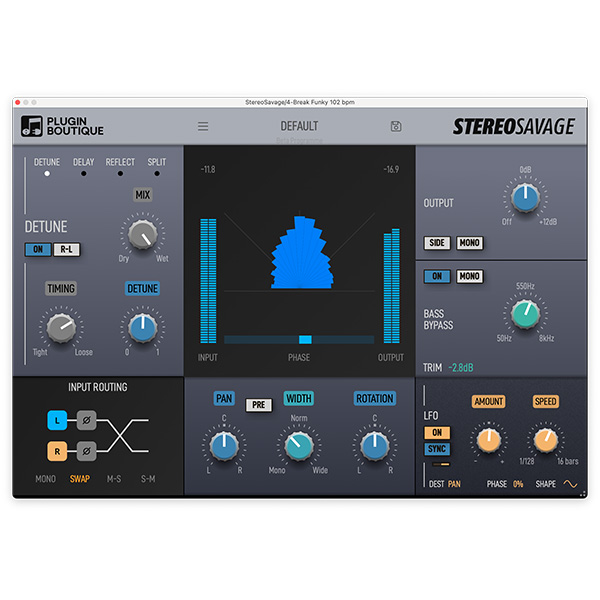
Control the placement and width of stereo sources. Individual instruments in a stereo field.
Use the rotation effect for incredibly natural-sounding panoramas.
Explore product features & full description
Get the stunning stereo sound your mix deserves. StereoSavage is an innovative set of stereo instruments that combines time-tested studio technology with modern and classic instrument simulations that will bring your mix to life.Generate stereo from mono using VOX, DELAY, and EXPAND programs. Precisely distribute sounds across the stereo field using WIDTH, PAN and ROTATION settings. Create movement and chorus effects with the LFO, and maintain strong low frequencies with the adjustable BASS BYPASS.
For the first time, StereoSavage combines all of these features into one plugin, offering the flexibility to enhance your track with dramatic effects or add the perfect subtle finishing touches.
Create stereo from mono sources for richer soundscapes.
Control the placement and width of stereo sources. Individual instruments in a stereo field.
Use the rotation effect for incredibly natural-sounding panoramas.
Maintain excellent mono compatibility with bass bypass.
Get lush, wide vocals in seconds.
Quick and easy controls to achieve big sound.
Add movement or excitement with modulation.
Reduce the number of vocal takes needed for rich, tight background vocals.
Complete your purchaseReview compatibility and purchase details.
Download your filesAccess available downloads through your order and account.
Follow the included setup guideContact GetPlugins if you need installation help.
Activation, where included, is provided by GetPlugins. Publisher-account registration, transferable publisher keys and a publisher-issued licence are not included. Read the activation policy.
Frequently asked questions
How do I receive my download?
After payment, access available files from your order details and GetPlugins account. Contact support if a download is missing.
What activation is included?
Follow the activation instructions supplied with your download. Activation is provided by GetPlugins. Confirm device allowances and reinstall arrangements before ordering.
Will this work with my computer and DAW?
Check the compatibility information for this listing and ask us to confirm the exact supplied build. Libraries may require a compatible sampler or additional software.
What if I need installation help?
Email support@getplugins.io with your order number, operating system, DAW and any error message.
Which updates are included?
Activation and updates are separate. Confirm the available version and update arrangements before ordering; do not assume access to future publisher releases.
How do I request a refund?
Contact support with your order number and issue details. Read our Refund Policy for eligibility and the request process.
Customer Reviews
Reviews
There are no reviews yet.
Be the first to review “Credland Audio – Stereo Savage (Windows)” Cancel reply








Reviews
There are no reviews yet.