🎛️ Boz Digital Labs – Mongoose 2
🎧 Achieve a Tighter, More Focused Stereo Mix
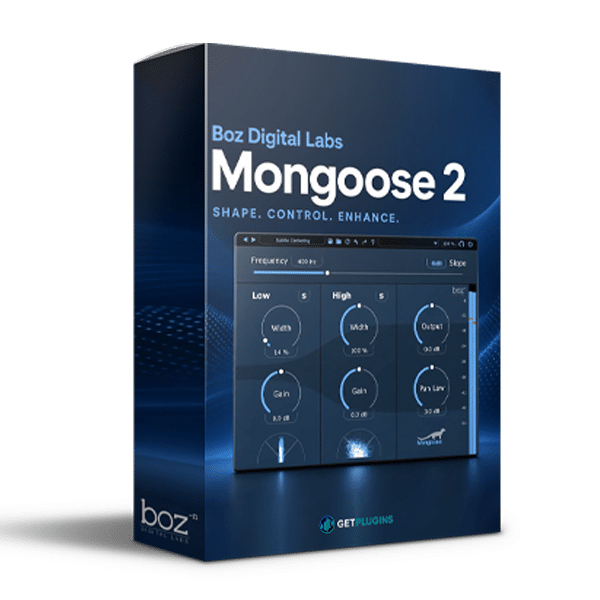
Boz Digital Labs Mongoose 2 is a specialized audio processing plugin designed to help music producers, mixing engineers, and sound designers manage low-frequency stereo information and improve mono compatibility. When working with bass-heavy music and complex stereo arrangements, maintaining a solid center image is essential for achieving a clear, balanced, and consistent mix.
With its focus on stereo control and low-frequency management, Mongoose 2 helps you refine the relationship between bass content and the stereo field, making it a useful tool for modern music production and mixing workflows.
🔊 Intelligent Low-Frequency Stereo Management
Low-frequency information can sometimes become unnecessarily wide or inconsistent across the stereo field. Boz Digital Labs Mongoose 2 is designed to address this challenge by helping control stereo information in the low end while preserving the overall character of your mix.
Use it as part of your mixing process to maintain a more focused low-frequency foundation and improve the way bass elements translate across different playback systems.
- 🎚️ Low-End Stereo Control: Manage stereo information in bass-heavy audio material.
- 🔊 Focused Bass Image: Work toward a more stable and centered low-frequency presentation.
- 🎧 Mono Compatibility: Help reduce potential issues caused by stereo low-frequency content.
- 🎛️ Stereo Field Management: Refine the relationship between low frequencies and the wider mix.
- ✨ Mix Translation: Support a consistent listening experience across different playback environments.
🎹 Designed for Modern Music Production
Boz Digital Labs Mongoose 2 can be especially useful in productions where powerful bass and detailed stereo imaging need to work together.
Whether you're mixing electronic music, hip-hop, pop, or cinematic compositions, managing the stereo characteristics of low-frequency content can help create a more controlled mix.
- 🥁 Drum & Bass Processing: Maintain a focused low end in kick drums, basslines, and rhythmic elements.
- 🎹 Synthesizer Mixing: Manage stereo bass patches and low-frequency synth layers.
- 🔥 EDM & Dance Music: Support tight, controlled bass foundations in energetic productions.
- 🎤 Pop & Hip-Hop: Refine low-frequency elements in dense, modern arrangements.
- 🎬 Cinematic Mixing: Help maintain a coherent low-frequency foundation in complex compositions.
🎚️ A Practical Tool for Mixing Engineers
Stereo management is an important part of achieving a professional mix. Excessive or inconsistent low-frequency stereo information can create challenges when a track is played back in mono or through different speaker configurations.
Mongoose 2 provides a specialized approach to low-frequency stereo management, complementing your existing equalizers, compressors, stereo imaging tools, and mastering processors.
🎧 Mixing Engineers: Improve control over low-frequency stereo content.
🎹 Music Producers: Keep bass-heavy arrangements focused and balanced.
🎛️ Electronic Musicians: Manage the stereo characteristics of synths, kicks, and basslines.
🎬 Composers: Maintain a controlled low end across layered musical arrangements.
💿 Mastering Engineers: Explore low-frequency stereo management as part of a broader quality-control workflow.
💻 Enhance Your DAW Mixing Workflow
Integrate Boz Digital Labs Mongoose 2 into your digital audio workstation to complement your existing mixing and mastering tools.
Use it while balancing low-end elements, checking mono compatibility, and refining stereo imaging. As with any stereo-processing tool, listening in both stereo and mono helps you evaluate the results and avoid unnecessary changes to the original sound.
🌟 Why Choose Boz Digital Labs Mongoose 2?
- 🔊 Specialized low-frequency stereo management for modern mixes.
- 🎧 Mono-compatibility considerations for more reliable playback.
- 🎛️ Useful for bass-heavy productions and complex stereo arrangements.
- 🎹 Versatile studio applications for producers, mixers, and composers.
- 🚀 A focused addition to a professional audio-processing toolkit.
🎵 Build a Stronger, More Consistent Low End
Give your mixes a more controlled foundation with Boz Digital Labs Mongoose 2. Explore low-frequency stereo management, check mono compatibility, and refine the relationship between your bass elements and the wider stereo image.
For music producers, mixing engineers, and composers who want greater control over low-end stereo information, Mongoose 2 offers a specialized tool for a more focused and consistent production workflow. 🔥





Reviews
There are no reviews yet.