BeatSkillz – Ramp 2 (Windows)

Bring your beats to life on Windows with Ramp 2 by BeatSkillz — a creative volume shaper plugin…
Formats: VST3 · VST

£15.00

Discover BeatSkillz – Ramp 2 (Windows)

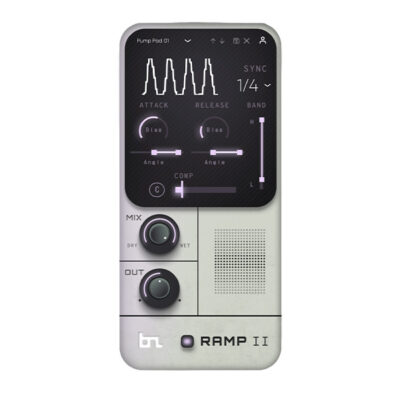
Bring your beats to life on Windows with Ramp 2 by BeatSkillz — a creative volume shaper plugin that lets you add instant pumping, ducking, and filtering effects to your music without tedious automation. Whether you're producing lo-fi vibes, house grooves, or EDM bangers, Ramp 2 delivers tempo-synced modulation and dynamic movement in seconds. 🖥️🎛️

Explore product features & full description

🪟 BeatSkillz - Ramp 2 (Windows) 🎚️

Bring your beats to life on Windows with Ramp 2 by BeatSkillz — a creative volume shaper plugin that lets you add instant pumping, ducking, and filtering effects to your music without tedious automation. Whether you're producing lo-fi vibes, house grooves, or EDM bangers, Ramp 2 delivers tempo-synced modulation and dynamic movement in seconds. 🖥️🎛️

🎛️ Feature Highlights (Windows Edition):

🕒 Time Divisions
Easily sync your volume ramps to your DAW's tempo with beat divisions from 1/32 to 8 bars for rhythmic precision.

📈 Bias Control
Shape how fast or slow the curve rises and falls — perfect for customizing attack and release with a natural feel.

🔁 Angle Shaping
Use the 2-way angle slider to go from smooth ducking to punchy gating and swing-style effects. 🎵

🎚️ Bandpass Filtering
Target specific frequency bands for shaping. Create LFO-style filter sweeps or isolate low-end ducking — your sound, your rules.

🌀 Mix Depth
Dial in the perfect amount of volume ramping — from subtle pulse to extreme sidechain-style pumping!

🧈 Compressor
Add built-in post-ramp compression for smooth dynamics and cohesive transitions.

🎯 Why Producers Love Ramp 2 for Windows:

✅ Quick, musical results with minimal setup
✅ Ideal for electronic, chillhop, house, trap & more
✅ Lightweight, efficient performance on Windows systems
✅ Great for chords, basslines, drums, pads & FX
✅ No complicated automation lanes or routing needed 🖱️✨
Compatibility checklist

  • Windows 10,11 (64 Bit Only)
  • VST, VST3
  • Formats: VST3 · VST

Requirements vary by supplied version. Confirm your setup with support before purchasing.

Delivery & activation

  1. Complete your purchaseReview compatibility and purchase details.
  2. Download your filesAccess available downloads through your order and account.
  3. Follow the included setup guideContact GetPlugins if you need installation help.

Activation, where included, is provided by GetPlugins. Publisher-account registration, transferable publisher keys and a publisher-issued licence are not included. Read the activation policy.

Frequently asked questions

How do I receive my download?

After payment, access available files from your order details and GetPlugins account. Contact support if a download is missing.

What activation is included?

Follow the activation instructions supplied with your download. Activation is provided by GetPlugins. Confirm device allowances and reinstall arrangements before ordering.

Will this work with my computer and DAW?

Check the compatibility information for this listing and ask us to confirm the exact supplied build. Libraries may require a compatible sampler or additional software.

What if I need installation help?

Email support@getplugins.io with your order number, operating system, DAW and any error message.

Which updates are included?

Activation and updates are separate. Confirm the available version and update arrangements before ordering; do not assume access to future publisher releases.

How do I request a refund?

Contact support with your order number and issue details. Read our Refund Policy for eligibility and the request process.

Customer Reviews

Reviews

There are no reviews yet.

Be the first to review “BeatSkillz – Ramp 2 (Windows)”

Your email address will not be published. Required fields are marked *