🎚️ AYAIC – Mix Monolith
Intelligent Level-Plane Mixing for Fast, Balanced, Professional Results
Mix Monolith is the latest innovation from AYAIC, delivering a powerful automatic mixing system designed to perfectly align track levels in any environment. Built around AYAIC’s unique level-plane technology, Mix Monolith helps you achieve a clean, open, and balanced mix — from individual tracks to bus groups, effects channels, and even the master fader.
Instead of fighting faders, Mix Monolith creates instant clarity and depth, allowing your mix to breathe while maintaining precise, musical control.
🧠 Automatic Mixing with Level Planes
Balance your mix in seconds, not hours
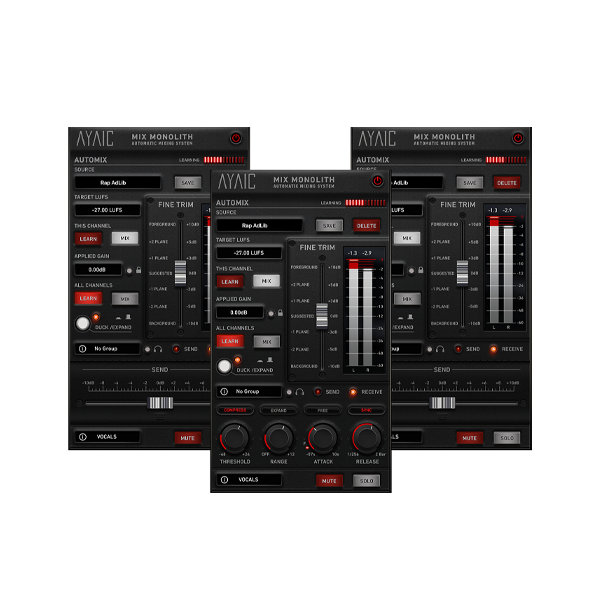
At the heart of Mix Monolith is a smart level-plane fader that lets you push elements forward or backward in the mix instantly. Every instance of Mix Monolith in your session functions as one unified system, ensuring consistent balance across the entire project.
Add as many Monoliths as you need — vocals, drums, submixes, or the master bus — and experience cohesive, transparent level control at incredible speed.
🔗 Seamless Integration with Hyper-EQ
Shape ceilings, then hear the mix instantly
When combined with AYAIC Ceilings Of Sound Pro / Hyper-EQ, Mix Monolith unlocks an advanced workflow that allows you to design new ceiling shapes and immediately hear how they fit into the mix.
This powerful pairing lets producers and engineers sculpt tonal boundaries and balance simultaneously, resulting in mixes that sound controlled, open, and musically intentional.
⚡ One-Click Learning & Global Control
From individual channels to full sessions
These intelligent learning modes allow Mix Monolith to adapt instantly to your session, delivering consistent gain structure and musical balance across all elements.
🎛️ Advanced Dynamics & Timing Control
Precision behavior with a musical response
Mix Monolith features infinite DUCK, EXPAND, and MUTE control across grouped channels, providing powerful dynamic shaping without complexity.
Choose your timing behavior:
-
“Free” mode – Adjust Attack and Release based on time
-
“Sync” mode – Sync Attack timing to musical notes
-
“F” function – Accelerate attack by 0.7 ms in Sync mode for ultra-fast response
An Applied Gain Lock ensures long-term stability, preventing unwanted level changes once your balance is set.
🚀 Key Features
-
Automatic mixing powered by level-plane technology
-
Unlimited Monolith instances — all act as one system
-
Global “All Channels” LEARN/MIX function
-
Individual “This Channel” LEARN/MIX control
-
Infinite DUCK / EXPAND / MUTE group processing
-
Fully automated level-plane fader
-
Free & Sync modes for Attack/Release control
-
Fast-attack “F” function
-
Instant depth control via level-plane movement
-
Applied Gain Lock for rock-solid mix stability
🎶 Who Is Mix Monolith For?
Mix Monolith is designed for producers, mixing & mastering engineers, musicians, and singer-songwriters who want professional-sounding mixes at lightning speed.
If you value clarity over clutter, balance over guesswork, and speed without sacrificing quality, AYAIC – Mix Monolith is your next-generation mixing foundation.







Reviews
There are no reviews yet.