🎛️ apulSoft – Opalize
Precision Harmonic Sculpting Beyond Traditional Saturation
When modern producers reach for saturation or distortion, the goal is rarely distortion itself — it’s controlled harmonic enhancement. Whether you’re making basslines translate on small speakers, adding punch to drums, or helping synths cut through dense mixes, harmonic accuracy is what truly matters.
Opalize introduces a next-generation approach to harmonic generation, delivering surgical precision, dynamic independence, and tonal transparency that conventional waveshapers simply cannot achieve.
✨ Harmonics Beyond Dynamics
Create harmonics exactly where you want them — without destroying the source
Unlike traditional saturation tools, Opalize is not just a waveshaper. It enables you to add harmonics independently of input level, preserving the natural dynamics and integrity of your original signal.
Inject 2nd, 3rd, 4th, and 5th harmonics into specific frequency ranges, ensuring maximum musicality with zero unwanted artifacts. Even-order harmonics are generated without DC offset issues, making Opalize ideal for clean yet powerful sound design.
🎯 Advanced Multi-Band Harmonic Control
Shape multiple frequency regions with absolute precision
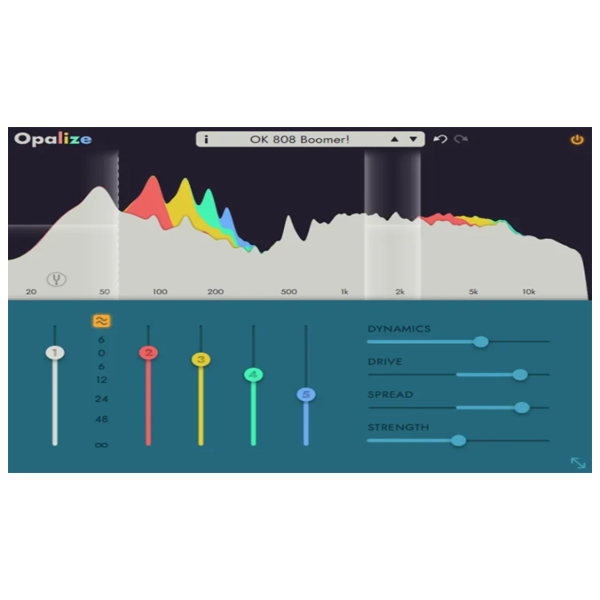
Opalize processes up to four parallel frequency bands simultaneously, allowing you to target fundamentals, mids, and harmonics independently.
Built-in low-pass and band-pass filters isolate core tonal content before harmonic generation — perfect for bass, leads, and focused instruments.
One band can track the pitch of a monophonic signal, automatically adjusting the filter in real time for intelligent, musical harmonic shaping.
📊 Visual Precision & Intuitive Workflow
See and sculpt harmonics in real time
The integrated frequency analyzer shows exactly where harmonics are distributed across the spectrum, enabling fast, confident tonal decisions.
You can create, move, and edit bands directly on the analyzer display, delivering a workflow that feels both visual and musical.
With unlimited undo/redo, experimentation is completely risk-free — ideal for modern, creative production workflows.
⚙️ High-End DSP, Zero Compromise
Developed for professionals who demand accuracy
The core DSP algorithm, originally developed by J. Budweiser, has been expertly implemented by apulSoft, ensuring exceptional sound quality, precision, and reliability.
Choose between low-latency or phase-matched processing modes, making Opalize equally powerful for sound design, mixing, and mastering.
🚀 Key Features
-
Innovative harmonic generation with dynamic independence
-
Add 2nd, 3rd, 4th, and 5th harmonics with pinpoint control
-
Even-order harmonics without DC offset artifacts
-
Up to 4 parallel frequency bands
-
Monophonic pitch-tracking band
-
Real-time harmonic frequency analyzer
-
Low-latency and phase-accurate modes
-
Direct band editing on the analyzer display
-
Unlimited undo/redo
-
System-wide preset management with XML import/export
🎶 Who Is Opalize For?
Opalize is built for producers, composers, sound designers, and modern music creators who demand clean, controllable harmonic enhancement without sacrificing dynamics, clarity, or musicality.








Reviews
There are no reviews yet.