Auburn Sounds – Lens (Windows)
£15.00
Discover Auburn Sounds – Lens (Windows)
Auburn Sounds LENS: Redefining Spectral Dynamics Processing
Explore product features & full description
Auburn Sounds LENS: Redefining Spectral Dynamics Processing
Unlock unparalleled control and clarity in your audio productions with Auburn Sounds LENS. This cutting-edge spectral dynamics processor combines powerful multiband compression and companding technology to transform your mixes with precision and transparency. Ideal for sound designers, producers, and audio engineers, LENS offers unmatched clarity without the typical artifacts found in traditional processors.
Key Features:
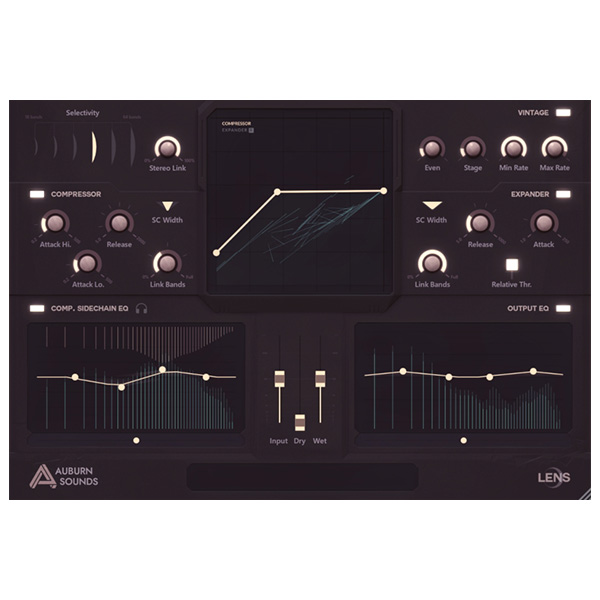
🔧 Crystal-Clear Multiband Compander: Achieve pristine sound with no cross-phase shifts, ensuring clean and transparent audio processing.
🎚️ Constant Phase Equalizer: Tweak your sound without introducing unwanted ringing, preserving your mix’s integrity.
⚡ 64 Companders in Harmony: Work with up to 64 companders operating simultaneously on a stereo signal for dynamic precision.
🎛️ Sidechain and Output EQ Control: Fine-tune your mix by adjusting sidechain EQ and output EQ simultaneously for optimal results.
🔊 Masking Reduction: Remove masked information, bringing hidden details to the forefront for a cleaner, more dynamic mix.
🚀 Upward Compression "Over The Top": Cleanly enhance quieter elements for a fuller, more energetic sound.
Why Choose Auburn Sounds LENS?
LENS empowers you to push the boundaries of your mix with powerful spectral dynamics and seamless multiband control. Say goodbye to phase issues and hello to pristine, detailed audio. Whether you're mixing, mastering, or designing soundscapes, LENS delivers the precision and power you need.
Transform Your Sound Today
Experience Auburn Sounds LENS and gain the ultimate control over your mix with powerful spectral processing and crystal-clear results.
Compatibility checklist
- Windows 10.11 (64Bit Only)
- VST3, AAX
- Formats: VST3 · AAX
Requirements vary by supplied version. Confirm your setup with support before purchasing.
Delivery & activation
- Complete your purchaseReview compatibility and purchase details.
- Download your filesAccess available downloads through your order and account.
- Follow the included setup guideContact GetPlugins if you need installation help.
Activation, where included, is provided by GetPlugins. Publisher-account registration, transferable publisher keys and a publisher-issued licence are not included. Read the activation policy.
Frequently asked questions
How do I receive my download?
After payment, access available files from your order details and GetPlugins account. Contact support if a download is missing.
What activation is included?
Follow the activation instructions supplied with your download. Activation is provided by GetPlugins. Confirm device allowances and reinstall arrangements before ordering.
Will this work with my computer and DAW?
Check the compatibility information for this listing and ask us to confirm the exact supplied build. Libraries may require a compatible sampler or additional software.
What if I need installation help?
Email support@getplugins.io with your order number, operating system, DAW and any error message.
Which updates are included?
Activation and updates are separate. Confirm the available version and update arrangements before ordering; do not assume access to future publisher releases.
How do I request a refund?
Contact support with your order number and issue details. Read our Refund Policy for eligibility and the request process.

Reviews
There are no reviews yet.