Lush Digital Radiance
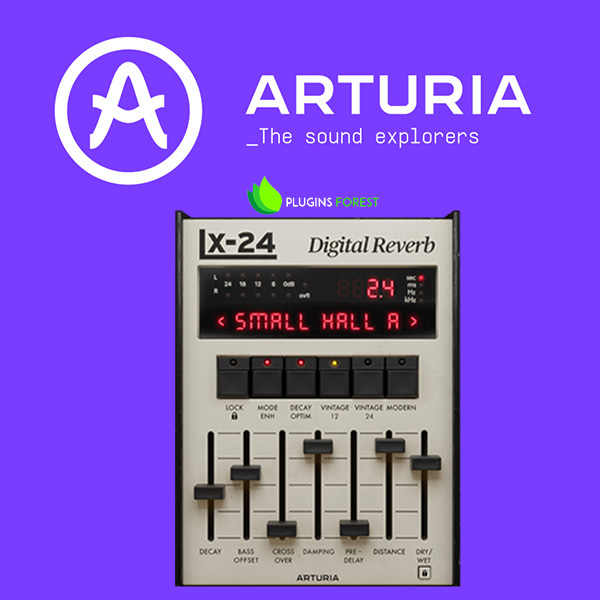
Rev LX-24 is an enhanced virtual replica of a retro ambiance box that defined reverb for a generation. Make your mixes bloom with real-feeling space, cave-depth atmosphere, and subtly-sparkling texture in seconds with a vintage digital sound that refuses to get old.
Choose Your Workflow
Classic gear, new tricks. Rev LX-24 may have been emulated down to the finest detail of the original’s digital architecture, but Arturia has added some useful features in the Advanced panel that makes it easier to use, more flexible, and better suited to your DAW production workflow.
Classic View
Inspired by the original hardware’s iconic control panel. Get the lush reverb you need in seconds with the sliders, buttons, and classic LCD-style display that you can’t resist tweaking.
Advanced View
If you want to go deeper into your reverb sound design, experiment a little, or enjoy a more visual workflow, we added an Advanced View packed with vital extras for modern production.
The Eternal Reverb
Reverb comes in many forms. The bouncy rattling quality of a spring tank; the crystalline texture of a shimmer reverb; but sometimes you just want purity, warmth, and ultra-smooth decay. That’s where Rev LX-24 comes in.
Based on a true studio legend known for its effortlessly clean ambiance, this FX plugin brings vocals, drums, guitars, synths, and entire mixes to life with its pristine long decays, quick-fire algorithms, and feature enhancements that give reverb a whole new creative purpose.
Preset Library
Bread-and-butter reverb presets perfectly tailored to vocals, drums, synths, and more; specially-designed settings offering abstract atmosphere and ever-evolving spaces; Rev LX-24 comes loaded with 100 presets for classic & essential reverb tones in a few clicks.
DAW Ready
However you use these plugins; for the amazing tone of their reverb, for the gritty preamps, or for their incredible sound design abilities, you'll be safe in the knowledge that they are fully compatible with your setup. These plugins work with all major DAWs and on both Windows and MacOS.
ASC
Arturia Software Center lets you download, organize, and update all of your Arturia software titles in one place, as well as manage all of your licenses across multiple devices. Keep it simple.
Resizable GUI
Whether you want the full visual immersion of Arturia's classic effects emulations, or to save precious screen real estate, the interfaces for all of your Arturia plugins can be resized to a scale that suits you.
Real-Time Control
Every parameter in every FX Collection plugin can be mapped to your favorite MIDI controller for an instant, hands-on control of your mix. Sweep a filter, crank a preamp, or warp your modulation on the fly.
In-App Tutorials
Every plugin in FX Collection comes with built-in tutorials, guiding you step-by-step through the crucial parameters, adjustments, and mixing hacks to get the most out of your sound. The tutorial panel also explains the controls you’re using in real-time - so you’ll never miss a tweak.
Preset Browser
FX Collection’s streamlined preset browser lets you filter, organize, and save your favorite presets for instant recall. Search by instrument type, genre, production technique, and much more - so you can quickly find the tweak you need and save valuable creative time!
Features
- Classic digital algorithmic reverb effect
- 8 perfectly-emulated original reverb algorithms:
- Small Hall A
- Small Hall B
- Room A
- Constant Plate
- Vocal Plate
- Large Hall B
- Chamber
- Perc Plate A
- Unique slider-based interface
- Essential controls like Decay, Damping, Pre-Delay, Dry/Wet, and more
- Emulated 12 & 24-bit converters for a dark, warm sound
- Additional ‘Modern’ converter mode for cleaner sound
- Crossover & Offset controls for adjusting bass response
- Mode Enhancement introduces subtle pitch-shift modulation
- Newly-added features in the Advanced panel:
- Interactive visualizer for quick click-and-drag reverb editing
- Dynamic effects: Ducking, Gate, Tremolo
- 100 presets for vocals, drums, guitars, synths, and abstract sound design
- A/B comparison
- NKS-ready












Reviews
There are no reviews yet.