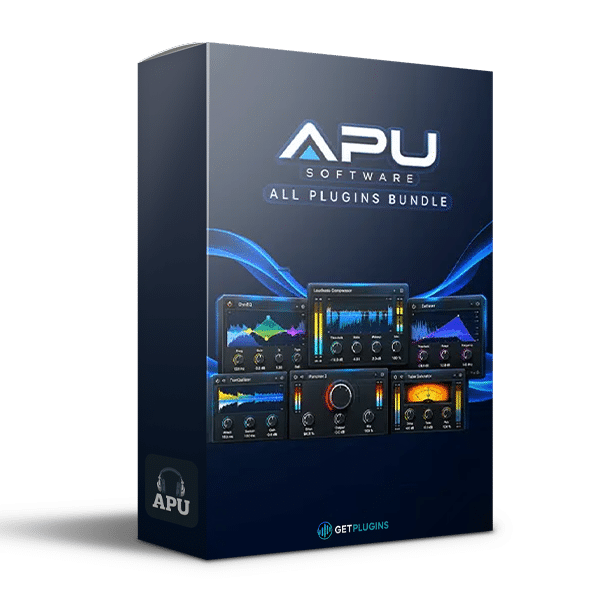
APU Software – All Plugins Bundle v5.7.8
Complete Loudness, Dynamics and Mastering Plugin Collection
APU Software All Plugins Bundle v5.7.8 is a specialized collection of audio processing and monitoring tools designed for music producers, mixing engineers, mastering professionals, and audio creators who require precise control over loudness, dynamic range, gain structure, and peak levels.
The bundle combines six dedicated plugins covering dynamic optimization, loudness-based compression, frequency-dependent loudness monitoring, level stabilization, True Peak limiting, and gain calibration. Each tool addresses a specific aspect of modern audio production, providing a flexible workflow for analyzing, processing, and refining audio.
With support for detailed visual feedback and measurements involving LUFS, RMS, and True Peak levels, APU Software provides practical tools for evaluating audio dynamics and making informed decisions during mixing, mastering, and delivery preparation.
Six Specialized Audio Processing Plugins
The APU Software All Plugins Bundle brings together six complementary processors, allowing you to choose the appropriate tool for different loudness and dynamics requirements.
APU Software Dynamics Optimizer v5.7.8
Dynamics Optimizer is designed to optimize dynamic range and help manage perceived loudness. Its automatic processing approach provides an alternative to manually adjusting dynamics throughout a recording.
Use it to improve level consistency, refine dynamic behavior, and prepare audio for further processing. It can be useful when working with music and other material that requires a more controlled dynamic presentation.
APU Software Loudness Compressor v5.7.8
Loudness Compressor focuses on compression based on perceived loudness, offering an alternative perspective to conventional peak-oriented dynamics processing.
It is designed to help manage loudness variations while shaping the dynamic character of a signal. This makes it a useful option for producers and mastering engineers who want to balance consistency, dynamics, and perceived level.
APU Software Loudness Contour v5.7.8
Loudness Contour focuses on equal-loudness characteristics and frequency-related loudness perception. Its visual monitoring approach helps users examine tonal relationships and understand how frequency balance can influence perceived sound.
Use it as part of a critical listening workflow when evaluating the tonal balance of individual tracks, mixes, and finished masters.
APU Software Loudness Leveler v5.7.8
Loudness Leveler is designed to stabilize variations in perceived audio level over time. It can be useful for material in which changes in loudness need to be managed for a more consistent listening experience.
Apply level management to suitable recordings and audio content while maintaining awareness of the dynamics and expressive characteristics you want to preserve.
APU Software Loudness Limiter v5.7.8
Loudness Limiter provides True Peak-oriented limiting for managing signal peaks and controlling output levels.
True Peak measurement is particularly important when preparing audio for digital distribution because reconstructed peaks can exceed the sample peak values displayed by conventional meters.
The plugin supports workflows where peak control and output-level management are important parts of the mastering and delivery process.
APU Software TrueGain v5.7.8
TrueGain is designed for accurate gain calibration and loudness equalization. It helps establish more consistent level relationships when comparing audio signals or evaluating processing decisions.
By reducing unintended loudness differences during comparisons, gain calibration helps engineers judge changes in tonal balance, dynamics, and clarity more objectively.
Advanced Loudness Measurement and Control
Modern audio production requires more than monitoring peak levels alone. Perceived loudness and dynamic behavior also influence how music translates across different playback environments.
The APU Software collection includes tools designed around LUFS, RMS, and True Peak measurements, helping users evaluate different aspects of audio level and dynamics.
- LUFS: Useful for evaluating perceived loudness and preparing audio for loudness-targeted delivery.
- RMS: Provides information about average signal energy over a measurement period.
- True Peak: Helps identify potential reconstructed peaks that may exceed digital sample peaks.
These measurements serve different purposes, so using them together with critical listening can provide a more complete understanding of a mix or master.
Dynamic Range Optimization and Loudness Processing
The bundle includes dedicated tools for managing dynamic variation and perceived loudness without requiring every task to be handled by a single processor.
Use Dynamics Optimizer to explore automatic dynamic-range management, Loudness Compressor for loudness-focused compression, and Loudness Leveler for controlling level variations over time.
The separate processing tools allow you to choose an approach that matches the audio material and your production goals.
This flexibility can be valuable when working with vocal recordings, instrument groups, complete mixes, and other content that requires carefully controlled dynamics.
True Peak Limiting and Gain Calibration
Peak management and gain staging are essential considerations when preparing a finished production. The integrated Loudness Limiter and TrueGain provide dedicated tools for these tasks.
Loudness Limiter supports True Peak control, while TrueGain helps establish consistent gain relationships for comparisons and level adjustment.
Together, these tools can support a more controlled workflow when refining output levels, comparing processing results, and preparing audio for distribution.
True Peak limiting should be configured according to the requirements of the intended delivery format, and loudness targets should be selected for the specific platform or distribution standard.
Detailed Visual Feedback and Processing Efficiency
APU Software emphasizes visual monitoring to help users understand how audio behaves throughout a processing session.
The collection features a hardware-accelerated graphics engine designed to display detailed signal information while keeping graphics processing separate from the main audio-processing workload.
This approach supports a responsive monitoring experience during detailed mixing and mastering sessions. Actual system performance depends on the computer hardware, operating system, plugin configuration, and project requirements.
Applications in Music Production and Audio Delivery
APU Software All Plugins Bundle can support a range of audio production workflows, including:
- Music Mixing: Evaluate loudness, manage dynamics, and establish consistent gain relationships.
- Mastering: Refine dynamic range, control peaks, and monitor perceived loudness.
- Streaming Preparation: Check loudness and True Peak behavior when preparing digital releases.
- Broadcast Audio: Support level consistency and loudness-oriented processing workflows.
- Vocal Production: Manage level variations and compare processing decisions.
- Instrument Processing: Control dynamic behavior across drums, bass, guitars, synthesizers, and other sources.
- Audio Quality Control: Use loudness measurements and visual feedback to assess signal levels before delivery.
The appropriate processing settings depend on the source material, artistic intent, and technical requirements of the final output.
Key Features of APU Software All Plugins Bundle
- Six specialized APU Software plugins
- Dynamics Optimizer for dynamic-range optimization
- Loudness Compressor for perceived-loudness processing
- Loudness Contour for equal-loudness and frequency-related monitoring
- Loudness Leveler for level stabilization
- Loudness Limiter for True Peak-oriented control
- TrueGain for gain calibration and loudness equalization
- Tools designed around LUFS, RMS, and True Peak measurements
- Detailed visual signal feedback
- Hardware-accelerated graphics engine
- x86 and x64 formats included, as specified for the bundle
- Suitable for mixing, mastering, broadcast, streaming, and audio delivery workflows
Why Choose APU Software All Plugins Bundle?
APU Software All Plugins Bundle v5.7.8 brings together six focused tools for engineers who want more control over loudness, dynamics, and gain structure.
Rather than relying exclusively on a conventional compressor or limiter, the collection provides dedicated processors for dynamic optimization, perceived-loudness management, level stabilization, frequency-related monitoring, True Peak control, and gain calibration.
This specialized approach can help streamline technical audio tasks while leaving room for creative decisions and critical listening.
For producers, composers, and mastering engineers working on contemporary music releases, the bundle offers a practical set of tools for analyzing audio, refining dynamics, and preparing consistent output levels.
Explore the getplugins.io Mastering Plugins Collection for additional audio processing tools to complement your workflow.
You can also visit the official APU Software website for developer information and product details.
APU Software All Plugins Bundle v5.7.8 is a dedicated loudness and dynamics toolkit for modern audio production, combining six specialized processors to help you measure, optimize, level, limit, and calibrate audio with greater precision.





Reviews
There are no reviews yet.