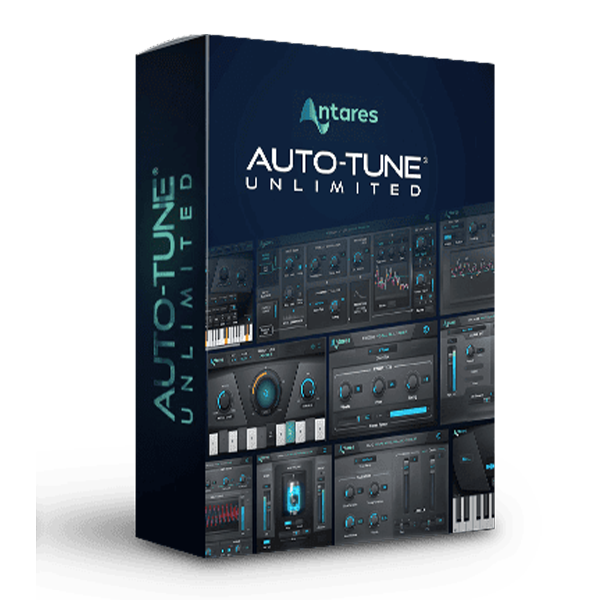
Antares – Auto-Tune Unlimited (Windows)

Auto-Tune Pro is the most complete and advanced version of Auto-Tune. It includes both an automatic mode for…
Formats: VST3 · AAX · VST

£39.99

Discover Antares – Auto-Tune Unlimited (Windows)

Auto-Tune Pro is the most complete and advanced version of Auto-Tune. It includes both an automatic mode for real-time pitch correction and effects and a graph mode for detailed pitch and time editing. For twenty years, Auto-Tune has been the professional standard for pitch correction and the instrument for selecting the most significant vocal effect…

Explore product features & full description

Description:

Auto-Tune Pro is the most complete and advanced version of Auto-Tune. It includes both an automatic mode for real-time pitch correction and effects and a graph mode for detailed pitch and time editing.
For twenty years, Auto-Tune has been the professional standard for pitch correction and the instrument for selecting the most significant vocal effect in popular music.
Now with Auto-Tune Pro, it's more versatile and easier to use than ever before with a completely redesigned interface and powerful new processing, editing, and navigation features.
We've added automatic key detection with the new Auto-Key plug-in (included with Auto-Tune Pro), a classic mode for "Auto-Tune 5 sound" and real-time MIDI control.
The Auto Mode and Graph Mode interfaces have been redesigned to provide the most efficient, flexible, and intuitive workflow for professional users and beginners alike.
Auto-Tune Pro also includes Flex-Tune and Humanize for more transparent and natural tuning, as well as a low latency mode so you can work in real-time without distracting delay.
It also features a time correction feature for non-destructive time editing, as well as formant correction, Vibrato controls, and neck length modeling.
Auto-Tune Pro offers the professional pitch correction and classic effects you're looking for whether you want to quickly tweak a few questionable notes or polish your entire performance.


Included:

Auto-Key v2.0.0 - Automatic Key & Scale Detection
Auto-Tune EFX+ v10.0.1 - Vocoder style Vocal Effects
Auto-Tune Pro v10.3.1 - World Standard Professional Pitch & Time Correction
Auto-Tune Slice v1.2.0 - Advanced Vocal Sampler
Auto-Tune SoundSoap v6.0.0 - Noise Cleaner
Auto-Tune Vocal Compressor v1.0.1 - Compressor
Auto-Tune Vocal EQ v1.0.0 - Equaliser
Auto-Tune Vocodist v1.1.0 - Iconic Vocoder Models
AVOX ARTICULATOR v4.3.0 - Digital Talkbox
AVOX ASPIRE v4.3.0 - Aspiration Noise Processor
AVOX CHOIR v4.3.0 - Vocal Multiplier
AVOX DUO v4.3.0 - Vocal Modeling Auto-Doubler
AVOX MUTATOR v4.3.0 - Extreme Voice Designer
AVOX PUNCH v4.3.0 - Vocal Impact Enhancer
AVOX SYBIL v4.3.0 - Variable Frequency De-Esser
AVOX THROAT v4.3.0 - Physical Modeling Vocal Designer
AVOX WARM v4.3.0 - Tube Saturation Generator
Harmony Engine v4.3.0 - Vocal Modeling Harmony Generator
Mic Mod v4.3.0 - Classic Microphone Modeler
Vocal Reverb v1.0.0 - Reverberator
Compatibility checklist

  • Windows 10,11 (64Bit Only)
  • VST, VST3, AAX
  • Formats: VST3 · AAX · VST

Requirements vary by supplied version. Confirm your setup with support before purchasing.

Delivery & activation

  1. Complete your purchaseReview compatibility and purchase details.
  2. Download your filesAccess available downloads through your order and account.
  3. Follow the included setup guideContact GetPlugins if you need installation help.

Activation, where included, is provided by GetPlugins. Publisher-account registration, transferable publisher keys and a publisher-issued licence are not included. Read the activation policy.

Frequently asked questions

How do I receive my download?

After payment, access available files from your order details and GetPlugins account. Contact support if a download is missing.

What activation is included?

Follow the activation instructions supplied with your download. Activation is provided by GetPlugins. Confirm device allowances and reinstall arrangements before ordering.

Will this work with my computer and DAW?

Check the compatibility information for this listing and ask us to confirm the exact supplied build. Libraries may require a compatible sampler or additional software.

What if I need installation help?

Email support@getplugins.io with your order number, operating system, DAW and any error message.

Which updates are included?

Activation and updates are separate. Confirm the available version and update arrangements before ordering; do not assume access to future publisher releases.

How do I request a refund?

Contact support with your order number and issue details. Read our Refund Policy for eligibility and the request process.

Customer Reviews

Reviews

There are no reviews yet.

Be the first to review “Antares – Auto-Tune Unlimited (Windows)”

Your email address will not be published. Required fields are marked *