
Discover APU Loudness Compressor (Windows)
Play Video The APU Loudness Compressor is a compressor/expander designed to support modern loudness types (LUFS, True Peak). The result is very transparent compression, making it particularly well-suited for mastering and post-production workflows. The compressor is also capable of operating more traditionally, using RMS and Peak units of measurement, so you can have your cake and…
Explore product features & full description

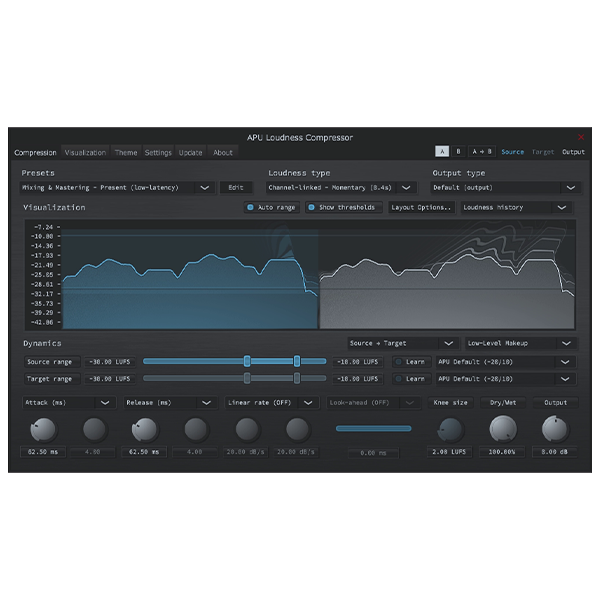
The APU Loudness Compressor is a compressor/expander designed to support modern loudness types (LUFS, True Peak). The result is very transparent compression, making it particularly well-suited for mastering and post-production workflows. The compressor is also capable of operating more traditionally, using RMS and Peak units of measurement, so you can have your cake and eat it too.
By default, the compressor operates using a “source range” and “target range” in place of threshold + ratio controls. You can also enable the traditional threshold + ratio controls if you prefer. A drop-down menu located at the top-right of the compressor’s dynamics section allows switching between these modes of operation and others, such as expander, limiter, etc.
With “learn” mode enabled, the compressor will automatically adjust the source or target range to match the source material. This can be a great way to get started with the compressor and can be used as a starting point for further fine-tuning.
Check it out to see if it fits into your workflow. If you have any questions or feedback, don’t hesitate to reach out using the “Contact the Developer” beacon on this website.
For more information on the motivations behind this compressor, see my LUFS blog post. For detailed information on the compressor’s features and examples of its use, visit the docs site.
Compatibility checklist
- Windows 10,11 (64Bit Only)
- Full Version
- VST3, Standalone
- Formats: VST3 · Standalone
Requirements vary by supplied version. Confirm your setup with support before purchasing.
Delivery & activation
- Complete your purchaseReview compatibility and purchase details.
- Download your filesAccess available downloads through your order and account.
- Follow the included setup guideContact GetPlugins if you need installation help.
Activation, where included, is provided by GetPlugins. Publisher-account registration, transferable publisher keys and a publisher-issued licence are not included. Read the activation policy.
Frequently asked questions
How do I receive my download?
After payment, access available files from your order details and GetPlugins account. Contact support if a download is missing.
What activation is included?
Follow the activation instructions supplied with your download. Activation is provided by GetPlugins. Confirm device allowances and reinstall arrangements before ordering.
Will this work with my computer and DAW?
Check the compatibility information for this listing and ask us to confirm the exact supplied build. Libraries may require a compatible sampler or additional software.
What if I need installation help?
Email support@getplugins.io with your order number, operating system, DAW and any error message.
Which updates are included?
Activation and updates are separate. Confirm the available version and update arrangements before ordering; do not assume access to future publisher releases.
How do I request a refund?
Contact support with your order number and issue details. Read our Refund Policy for eligibility and the request process.







Reviews
There are no reviews yet.