AIR – Multiband Filterbank (Windows)

Unlock a new realm of sonic precision with the Multiband Filterbank – a next-gen audio filter designed not…
Formats: VST3 · VST

£28.00

Discover AIR – Multiband Filterbank (Windows)

Unlock a new realm of sonic precision with the Multiband Filterbank – a next-gen audio filter designed not just to meet the standards of legendary gear, but to redefine them for today’s creative minds. 🧠🎶

Explore product features & full description

https://youtu.be/2TIRxDOG76o

🎛️ Multiband Filterbank ( Windows) – Sculpt Sound Like Never Before 🔊✨

Unlock a new realm of sonic precision with the Multiband Filterbank – a next-gen audio filter designed not just to meet the standards of legendary gear, but to redefine them for today’s creative minds. 🧠🎶

Whether you’re a producer, sound designer, or live performer, this is your ultimate tool for detailed, expressive, and accurate tone shaping. 💼🎚️

🔥 Key Features That Set It Apart 🔥
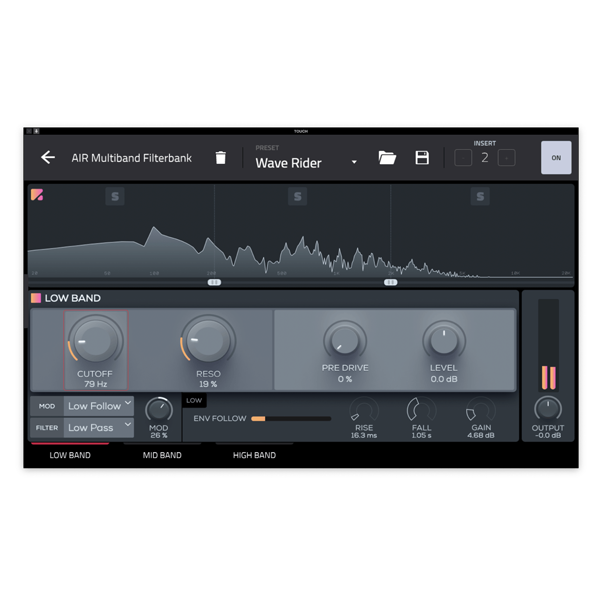
🔹 Resonant Filters Per Band – Dial in your sound with surgical precision.
🔹 Cutoff & Resonance Controls – Fine-tune the core of your frequency bands.
🔹 Envelope Modulation – Add movement and dynamic flair to each band.
🔹 Versatile Filter Types – Switch between Low Pass, Band Pass, High Pass, Notch, and Peak to craft your unique tone.
🔹 Pre-filter Drive Control – Introduce analog-style warmth and grit. 🔥
🔹 Per-Band Level Control – Balance each frequency band to perfection.
🔹 Envelope Follower (Per Band) – Fully assignable with Rise, Fall, and Gain controls.
🔹 Live Spectrum Display – Visualize your sound in real-time for unmatched clarity. 🌈
🔹 Solo Per Band – Isolate and focus your processing like a pro. 🎧

🎵 Why Settle for Ordinary?
The Multiband Filterbank isn’t just an effect – it’s a precision sound-sculpting powerhouse built for the modern music maker. From smooth transitions to extreme modulation, it adapts to your creativity with zero compromise. 🚀


Compatibility checklist

  • Windows 10,11 (64-bit Only)
  • VST,VST3
  • Formats: VST3 · VST

Requirements vary by supplied version. Confirm your setup with support before purchasing.

Delivery & activation

  1. Complete your purchaseReview compatibility and purchase details.
  2. Download your filesAccess available downloads through your order and account.
  3. Follow the included setup guideContact GetPlugins if you need installation help.

Activation, where included, is provided by GetPlugins. Publisher-account registration, transferable publisher keys and a publisher-issued licence are not included. Read the activation policy.

Frequently asked questions

How do I receive my download?

After payment, access available files from your order details and GetPlugins account. Contact support if a download is missing.

What activation is included?

Follow the activation instructions supplied with your download. Activation is provided by GetPlugins. Confirm device allowances and reinstall arrangements before ordering.

Will this work with my computer and DAW?

Check the compatibility information for this listing and ask us to confirm the exact supplied build. Libraries may require a compatible sampler or additional software.

What if I need installation help?

Email support@getplugins.io with your order number, operating system, DAW and any error message.

Which updates are included?

Activation and updates are separate. Confirm the available version and update arrangements before ordering; do not assume access to future publisher releases.

How do I request a refund?

Contact support with your order number and issue details. Read our Refund Policy for eligibility and the request process.

Customer Reviews

Reviews

There are no reviews yet.

Be the first to review “AIR – Multiband Filterbank (Windows)”

Your email address will not be published. Required fields are marked *