
Discover Zynaptiq – Adaptiverb (Windows)
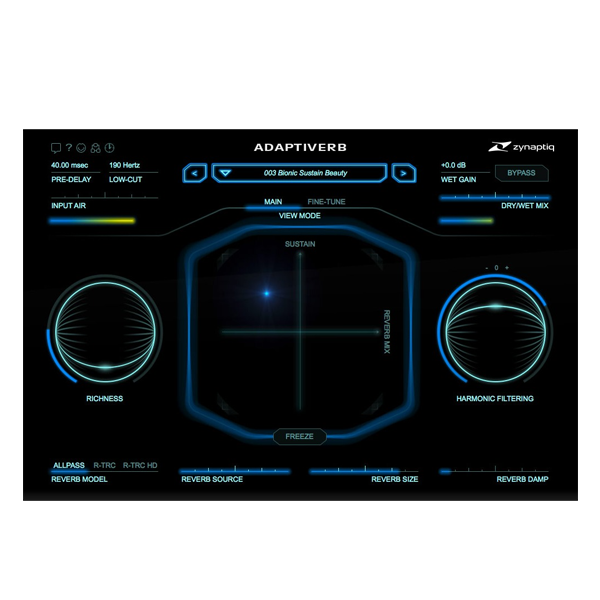
Step into the future of sound with Zynaptiq's ADAPTIVERB – the world's first AI-powered, reflectionless reverb plugin for Windows. Designed not just to simulate space but to enhance it, ADAPTIVERB creates dreamy, ultra-smooth harmonic tails and ambient textures without ever muddying your mix. Whether you’re crafting lush cinematic pads, ambient drones, or crystalline reverbs that…
💡 Musical – always in tune with your source
🧼 Clean – no clutter, no mud, no dissonance
🌊 Organic – feels like natural sustain, not synthetic tails
Explore product features & full description
🎛️ Zynaptiq ADAPTIVERB (Windows) – Revolutionary AI-Powered Reverb 🌌
Step into the future of sound with Zynaptiq's ADAPTIVERB – the world's first AI-powered, reflectionless reverb plugin for Windows. Designed not just to simulate space but to enhance it, ADAPTIVERB creates dreamy, ultra-smooth harmonic tails and ambient textures without ever muddying your mix. Whether you’re crafting lush cinematic pads, ambient drones, or crystalline reverbs that blend like magic – this is the plugin your workflow has been waiting for. 🎶✨

🧠 Why ADAPTIVERB Is a Game Changer
Forget conventional reverb. ADAPTIVERB uses cutting-edge ray tracing, Bionic Sustain Resynthesis, and AI-powered harmonic contour filtering to craft a reverb experience that is:
-
💡 Musical – always in tune with your source
-
🧼 Clean – no clutter, no mud, no dissonance
-
🌊 Organic – feels like natural sustain, not synthetic tails
🔑 Key Features at a Glance
-
🎵 Bionic Sustain Resynthesis – Synthesizes harmonic tails using AI to exclude noise & transients
-
🎯 Harmonic Contour Filter (HCF) – Keeps reverbs in key and free from clashing tones
-
🧬 SIMPLIFY & RICHNESS – Add synth-like textures or harmonic layers (octaves, fifths, unisons)
-
🌀 Ray Tracing Reverb Engine – Creates dense, perfectly diffuse, reflectionless tails
-
❄️ FREEZE Mode – Build endless drones, ambient pads & textures that evolve naturally
-
🎹 HCF Keyboard Mode – Lock your reverb to specific notes or chords for harmonic precision
-
🎚️ Over 400 Presets – From subtle spaces to wild, cinematic atmospheres
-
🎛️ Dual GUI Modes – Simple or deep control, you choose your workflow
-
🎼 MIDI Support – Automate & control every detail in real-time
🎨 Perfect For
-
Ambient & electronic music producers
-
Film/game sound designers
-
Soundtrack composers
-
Vocalists & instrumentalists seeking deep, clean space
-
Anyone tired of muddy, “boxy” reverbs
Compatibility checklist
- Windows 10,11 (64-bit Only)
- VST,VST3
- Formats: VST3 · VST
Requirements vary by supplied version. Confirm your setup with support before purchasing.
Delivery & activation
- Complete your purchaseReview compatibility and purchase details.
- Download your filesAccess available downloads through your order and account.
- Follow the included setup guideContact GetPlugins if you need installation help.
Activation, where included, is provided by GetPlugins. Publisher-account registration, transferable publisher keys and a publisher-issued licence are not included. Read the activation policy.
Frequently asked questions
How do I receive my download?
After payment, access available files from your order details and GetPlugins account. Contact support if a download is missing.
What activation is included?
Follow the activation instructions supplied with your download. Activation is provided by GetPlugins. Confirm device allowances and reinstall arrangements before ordering.
Will this work with my computer and DAW?
Check the compatibility information for this listing and ask us to confirm the exact supplied build. Libraries may require a compatible sampler or additional software.
What if I need installation help?
Email support@getplugins.io with your order number, operating system, DAW and any error message.
Which updates are included?
Activation and updates are separate. Confirm the available version and update arrangements before ordering; do not assume access to future publisher releases.
How do I request a refund?
Contact support with your order number and issue details. Read our Refund Policy for eligibility and the request process.








Reviews
There are no reviews yet.