W.A Production – BassShaper (Windows)
£10.00
Discover W.A Production – BassShaper (Windows)
Introducing BassShaper by W.A. Production—a cutting-edge bass designer plugin engineered to refine and enhance the low-end frequencies of your music. Crafted by experienced audio engineers, BassShaper offers a suite of advanced features to tackle common bass challenges, ensuring your bass lines are both deep and defined.
Advanced Processing Modules: Utilize unique algorithms tailored for bass enhancement.
Subtone Control: Generate complementary low-frequency content to enrich your bass sound.
Surgical Shaping Tools: Employ 'Punch' and 'Fade' controls for transient shaping, 'Deboom' to reduce excessive boominess, 'Demud' to clear up muddy frequencies,…
Explore product features & full description
Introducing BassShaper by W.A. Production—a cutting-edge bass designer plugin engineered to refine and enhance the low-end frequencies of your music. Crafted by experienced audio engineers, BassShaper offers a suite of advanced features to tackle common bass challenges, ensuring your bass lines are both deep and defined.
Key Features:
- Advanced Processing Modules: Utilize unique algorithms tailored for bass enhancement.
- Subtone Control: Generate complementary low-frequency content to enrich your bass sound.
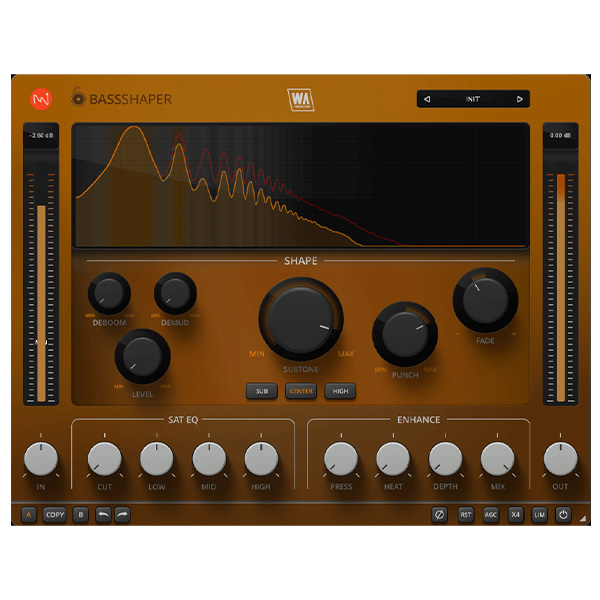
- Surgical Shaping Tools: Employ 'Punch' and 'Fade' controls for transient shaping, 'Deboom' to reduce excessive boominess, 'Demud' to clear up muddy frequencies, and 'Level' to maintain consistent bass presence.
- Tonal Control with Bespoke Algorithms: Precisely sculpt your bass tone to fit perfectly within your mix.
- EQ & Enhancement Features: Apply tailored equalization and enhancement settings to polish your bass sound.
- User-Friendly Interface: Benefit from a resizable, responsive interface designed for intuitive workflow.
- Factory Presets: Access a wide range of genre-spanning presets to kickstart your bass processing.
Elevate your music production with BassShaper, and achieve a low-end that's both powerful and precise.
For a comprehensive overview and demonstration of BassShaper's capabilities, you might find this video insightful:
Compatibility checklist
- Windows 10,11 (32,64Bit)
- VST, VST3, AAX
- Formats: VST3 · AAX · VST
Requirements vary by supplied version. Confirm your setup with support before purchasing.
Delivery & activation
- Complete your purchaseReview compatibility and purchase details.
- Download your filesAccess available downloads through your order and account.
- Follow the included setup guideContact GetPlugins if you need installation help.
Activation, where included, is provided by GetPlugins. Publisher-account registration, transferable publisher keys and a publisher-issued licence are not included. Read the activation policy.
Frequently asked questions
How do I receive my download?
After payment, access available files from your order details and GetPlugins account. Contact support if a download is missing.
What activation is included?
Follow the activation instructions supplied with your download. Activation is provided by GetPlugins. Confirm device allowances and reinstall arrangements before ordering.
Will this work with my computer and DAW?
Check the compatibility information for this listing and ask us to confirm the exact supplied build. Libraries may require a compatible sampler or additional software.
What if I need installation help?
Email support@getplugins.io with your order number, operating system, DAW and any error message.
Which updates are included?
Activation and updates are separate. Confirm the available version and update arrangements before ordering; do not assume access to future publisher releases.
How do I request a refund?
Contact support with your order number and issue details. Read our Refund Policy for eligibility and the request process.

Reviews
There are no reviews yet.