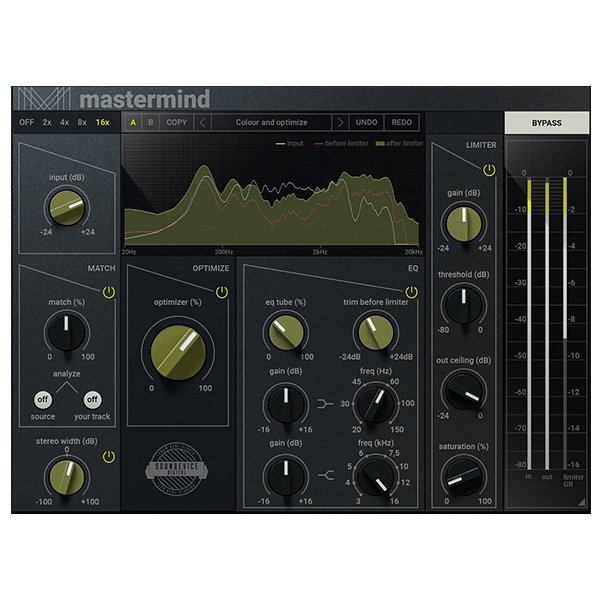
Sound Device Digital – Mastermind (Windows)

Soundevice Digital's MasterMind is an all-in-one mastering plugin designed to streamline the finalization of your tracks, ensuring they…
Formats: VST3 · AAX · VST

£15.00

Discover Sound Device Digital – Mastermind (Windows)

Soundevice Digital's MasterMind is an all-in-one mastering plugin designed to streamline the finalization of your tracks, ensuring they sound polished and professional with minimal effort. Developed under the United Plugins umbrella, MasterMind combines several essential mastering tools into a single, user-friendly interface.

Optimizer: At the heart of MasterMind lies the Optimizer, a specialized algorithm developed after extensive research of mastered material. It enhances your…

EQ Matching: MasterMind's EQ Matching allows you to match the tonal balance of your track to a reference track. This feature is…

Limiter with Saturation: The built-in limiter ensures your mixes are loud and competitive, while the added saturation module helps glue everything together,…

Explore product features & full description

Soundevice Digital's MasterMind is an all-in-one mastering plugin designed to streamline the finalization of your tracks, ensuring they sound polished and professional with minimal effort. Developed under the United Plugins umbrella, MasterMind combines several essential mastering tools into a single, user-friendly interface.

Key Features:

  • Optimizer: At the heart of MasterMind lies the Optimizer, a specialized algorithm developed after extensive research of mastered material. It enhances your signal to make it richer, bigger, and psychoacoustically pleasing, effectively making it "sound right."
  • EQ Matching: MasterMind's EQ Matching allows you to match the tonal balance of your track to a reference track. This feature is particularly useful for achieving consistency across an album or emulating the sound of your favorite mixes.
  • Limiter with Saturation: The built-in limiter ensures your mixes are loud and competitive, while the added saturation module helps glue everything together, providing a cohesive and polished sound.
  • Stereo Width Control: Adjust the stereo field of your mix with a simple knob, enhancing the spatial perception and width to achieve a more immersive listening experience.
  • Analog-Style EQ with Tube Saturation: Fine-tune your track's high and low-end frequencies using an EQ modeled after a famous American analog equalizer, complete with optional tube saturation for added warmth.
  • Visual Analysis: Monitor your signal at various stages—input, post-EQ, and output—using MasterMind's comprehensive analysis section, allowing for precise adjustments during the mastering process.

MasterMind employs high-quality audio processing with up to 16x oversampling, ensuring warm, analog-style saturation without digital artifacts. It supports internal 64-bit audio processing and can handle any sampling rate, including 192 kHz or higher.

The plugin is compatible with major DAWs on Windows platforms, supporting VST, VST3, and AAX formats.

For a visual overview and demonstration of MasterMind's features, you can watch the following introduction video:


Compatibility checklist

  • Windows 10,11 (64Bit Only)
  • Full Version
  • VST, VST3, AAX
  • Formats: VST3 · AAX · VST

Requirements vary by supplied version. Confirm your setup with support before purchasing.

Delivery & activation

  1. Complete your purchaseReview compatibility and purchase details.
  2. Download your filesAccess available downloads through your order and account.
  3. Follow the included setup guideContact GetPlugins if you need installation help.

Activation, where included, is provided by GetPlugins. Publisher-account registration, transferable publisher keys and a publisher-issued licence are not included. Read the activation policy.

Frequently asked questions

How do I receive my download?

After payment, access available files from your order details and GetPlugins account. Contact support if a download is missing.

What activation is included?

Follow the activation instructions supplied with your download. Activation is provided by GetPlugins. Confirm device allowances and reinstall arrangements before ordering.

Will this work with my computer and DAW?

Check the compatibility information for this listing and ask us to confirm the exact supplied build. Libraries may require a compatible sampler or additional software.

What if I need installation help?

Email support@getplugins.io with your order number, operating system, DAW and any error message.

Which updates are included?

Activation and updates are separate. Confirm the available version and update arrangements before ordering; do not assume access to future publisher releases.

How do I request a refund?

Contact support with your order number and issue details. Read our Refund Policy for eligibility and the request process.

Customer Reviews

Reviews

There are no reviews yet.

Be the first to review “Sound Device Digital – Mastermind (Windows)”

Your email address will not be published. Required fields are marked *