PITCHSHIFT Pro Plugin Overview
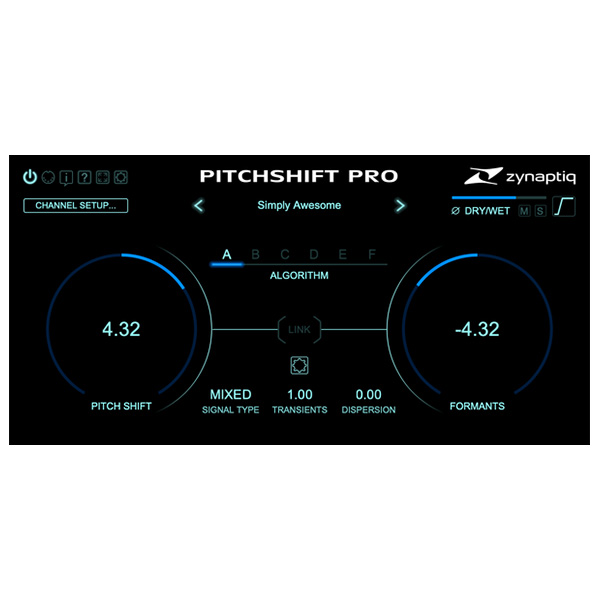
PITCH SHIFT is a revolutionary pitch-shifting plugin tailored for musicians, sound designers, and audio engineers. Combining advanced algorithms with an intuitive interface, PITCH SHIFT empowers users to achieve professional-grade pitch manipulation effortlessly. Whether fine-tuning vocals, designing innovative sound effects, or adapting audio for film, PITCH SHIFT delivers unmatched precision and creative freedom.
Key Features of PITCHSHIFT Pro
1. Advanced Pitch Shifting Algorithms
- Cutting-Edge Technology: Choose from classic delay-based techniques to modern resynthesis and time-stretching algorithms.
- Hybrid Processing: Seamlessly combine methods for optimal results in any scenario.
2. Editions to Suit Every Need
- PITCH SHIFT: Equipped with 3 high-quality algorithms designed for mono and stereo audio tasks.
- PITCH SHIFT PRO: Unlocks 6 algorithms, including experimental modes and expanded sound design capabilities.
- Supports phase-locked processing across up to 16 channels for complex audio workflows.
3. Specialized Modes for Creative Sound Design
- CONFORM Algorithm: Perfect for harmonizing and ensuring tonal consistency.
- GRANULAR Algorithm: Delivers unique textures by breaking sound into granular components.
- LPC Step Algorithm: Ideal for experimental manipulation, offering dynamic and robotic sound transformations.
4. Extended Formant Shift Control
- ±24 semitone range for extreme pitch shifts or subtle vocal adjustments.
- Perfect for creating otherworldly voices or natural-sounding harmonies.
5. Multi-Channel Support
- Phase-Synced Processing: Maintain phase integrity across multi-channel audio setups.
- Ideal for immersive formats like Dolby Atmos or multi-speaker installations.
Applications of PITCHSHIFT Pro
- Music Production:
- Add harmonies or create unique textures for instruments and vocals.
- Explore new creative possibilities in electronic music with experimental pitch modes.
- Sound Design:
- Transform everyday sounds into alien landscapes or robotic effects.
- Use granular or LPC modes to sculpt dynamic and cinematic audio.
- Post-Production:
- Adjust pitch for frame rate conversions or correct tonal inconsistencies.
- Synchronize multi-channel audio seamlessly for film, TV, or games.
Why Choose PITCHSHIFT
With its combination of advanced algorithms, specialized modes, and flexible workflows, PITCHSHIFT is the ultimate tool for pitch manipulation in music production and sound design. Its intuitive interface and deep customization options ensure high-quality results with minimal effort, making it the perfect choice for both seasoned professionals and creative enthusiasts.
Elevate your projects with the transformative power of PITCHSHIFT—the future of pitch-shifting is here! 🎛🎵












Reviews
There are no reviews yet.