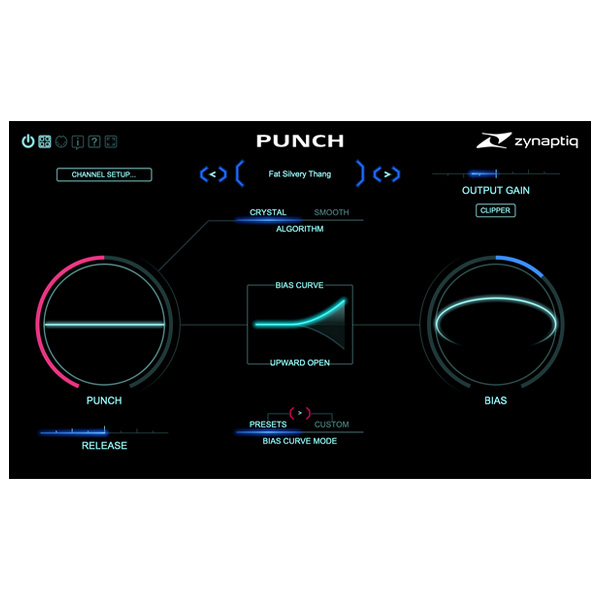
Zynaptiq – PUNCH (Windows)

PUNCH Shock Inducer: Elevate Your Sound with Unmatched Dynamic Control
Formats: VST3 · AAX

£20.00

Discover Zynaptiq – PUNCH (Windows)

PUNCH Shock Inducer: Elevate Your Sound with Unmatched Dynamic Control

Dynamic Control at Your Fingertips Adjust release times to fine-tune your sound, from tight snapping transients to medium percussive attacks and smooth…

Enhanced Sound Contour Add presence, midrange punch, and low-end meatiness to your audio. Reduce over-compression effects and shape your mix precisely, achieving…

Intelligent Processing Algorithms Leverage CRYSTAL and SMOOTH algorithms, powered by advanced signal statistics. These algorithms reconstruct sound using ultra-clean minimum phase bands—offering…

Explore product features & full description

PUNCH Shock Inducer: Elevate Your Sound with Unmatched Dynamic Control

Transform your audio with PUNCH, the intelligent shock inducer designed to bring organic, musical punch and contour to your tracks, stems, or mixes. Built on cutting-edge advancements in source separation, signal statistics, frequency domain processing, and filter design, PUNCH allows you to infuse your sound with airy presence, powerful dynamics, and smooth contouring. Whether you’re adding a crisp transient snap or a long, impactful compressor hit, PUNCH delivers precision and versatility for every application.

Key Features of PUNCH Shock Inducer

  • Dynamic Control at Your Fingertips
    Adjust release times to fine-tune your sound, from tight snapping transients to medium percussive attacks and smooth dynamic expansions. Perfect for individual sounds, stems, or entire mixes.
  • Enhanced Sound Contour
    Add presence, midrange punch, and low-end meatiness to your audio. Reduce over-compression effects and shape your mix precisely, achieving everything from subtle enhancements to bold transformations.
  • Intelligent Processing Algorithms
    Leverage CRYSTAL and SMOOTH algorithms, powered by advanced signal statistics. These algorithms reconstruct sound using ultra-clean minimum phase bands—offering options for 10 or 100+ bands for unparalleled clarity.
  • Frequency-Dependent Processing with BIAS
    Fine-tune your sound with frequency-dependent adjustments using the intuitive BIAS function and visual hover menus, ensuring effortless control over every aspect of your mix.
  • Transparent and Versatile Output
    Enjoy pristine sound quality with oversampling or multi-band output clippers. PUNCH delivers zero-latency processing for real-time applications without compromising audio fidelity.
  • Multi-Channel Workflow Support
    Process up to 16 channels simultaneously, unlocking exciting possibilities for complex audio workflows.
  • Optimized Performance
    Optional 64-bit processing ensures high efficiency, while the fully vectorized GUI offers up to 200% scaling, making PUNCH user-friendly and visually adaptable to any screen size.

Why Choose PUNCH Shock Inducer?

Designed for producers, engineers, and sound designers, PUNCH is the ultimate tool for creating dynamic, polished, and professional-quality audio. Whether you're enhancing single sounds, shaping entire mixes, or bringing life to over-compressed tracks, PUNCH empowers you to achieve your sonic vision with ease and precision.

Take your sound to the next level with PUNCH Shock Inducer—where innovation meets unparalleled musicality.


Compatibility checklist

  • Windows 10,11 (64Bit Only)
  • VST3, AAX
  • Formats: VST3 · AAX

Requirements vary by supplied version. Confirm your setup with support before purchasing.

Delivery & activation

  1. Complete your purchaseReview compatibility and purchase details.
  2. Download your filesAccess available downloads through your order and account.
  3. Follow the included setup guideContact GetPlugins if you need installation help.

Activation, where included, is provided by GetPlugins. Publisher-account registration, transferable publisher keys and a publisher-issued licence are not included. Read the activation policy.

Frequently asked questions

How do I receive my download?

After payment, access available files from your order details and GetPlugins account. Contact support if a download is missing.

What activation is included?

Follow the activation instructions supplied with your download. Activation is provided by GetPlugins. Confirm device allowances and reinstall arrangements before ordering.

Will this work with my computer and DAW?

Check the compatibility information for this listing and ask us to confirm the exact supplied build. Libraries may require a compatible sampler or additional software.

What if I need installation help?

Email support@getplugins.io with your order number, operating system, DAW and any error message.

Which updates are included?

Activation and updates are separate. Confirm the available version and update arrangements before ordering; do not assume access to future publisher releases.

How do I request a refund?

Contact support with your order number and issue details. Read our Refund Policy for eligibility and the request process.

Customer Reviews

Reviews

There are no reviews yet.

Be the first to review “Zynaptiq – PUNCH (Windows)”

Your email address will not be published. Required fields are marked *