Xfer Records – LFOTool (Windows)

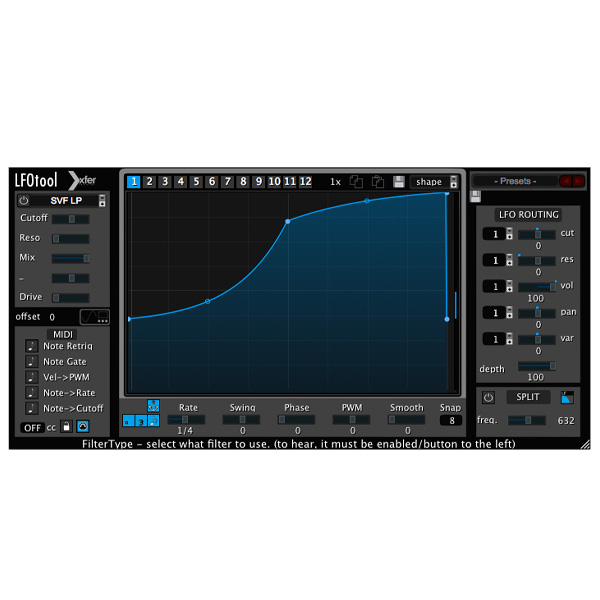
LFOTool will process incoming audio as well as generate a MIDI message stream for controlling other instruments.
Formats: AAX · VST

£15.00

Discover Xfer Records – LFOTool (Windows)

LFOTool will process incoming audio as well as generate a MIDI message stream for controlling other instruments.

LFO with customizable point+tension-curve editor, 12 graphs in a preset (switchable via MIDI notes or automation)

Up to 4 graphs simultaneously (Cutoff/Reso/Pan)

Graph preset shapes from a drop-down menu, able to save your own

Explore product features & full description

LFOTool will process incoming audio as well as generate a MIDI message stream for controlling other instruments.

Endless LFO Power
This unique plug-in also allows users to sculpt custom LFO curves and shapes and comes equipped with dozens of presets to achieve desired results quickly.

Fast and easy to use
Consistent with other products in Xfer Records’ software lineup, LFOTool is coded entirely in C++ in order to minimize the CPU load during operation.

Features

  • LFO with customizable point+tension-curve editor, 12 graphs in a preset (switchable via MIDI notes or automation)
  • Up to 4 graphs simultaneously (Cutoff/Reso/Pan)
  • Graph preset shapes from a drop-down menu, able to save your own
  • Both macOS and Windows versions included
  • 2+64 bit VST, AudioUnit, and AAX support
  • Can optionally send MIDI CC out to control other softsynths, effects, or external hardware which responds to MIDI CC messages.
  • BPM (with optional swing) or Hz LFO rate control
  • Sample-accurate sync
  • Dozens of presets included

Compatibility checklist

  • Windows 10,11 (64Bit Only)
  • VST, AAX
  • Formats: AAX · VST

Requirements vary by supplied version. Confirm your setup with support before purchasing.

Delivery & activation

  1. Complete your purchaseReview compatibility and purchase details.
  2. Download your filesAccess available downloads through your order and account.
  3. Follow the included setup guideContact GetPlugins if you need installation help.

Activation, where included, is provided by GetPlugins. Publisher-account registration, transferable publisher keys and a publisher-issued licence are not included. Read the activation policy.

Frequently asked questions

How do I receive my download?

After payment, access available files from your order details and GetPlugins account. Contact support if a download is missing.

What activation is included?

Follow the activation instructions supplied with your download. Activation is provided by GetPlugins. Confirm device allowances and reinstall arrangements before ordering.

Will this work with my computer and DAW?

Check the compatibility information for this listing and ask us to confirm the exact supplied build. Libraries may require a compatible sampler or additional software.

What if I need installation help?

Email support@getplugins.io with your order number, operating system, DAW and any error message.

Which updates are included?

Activation and updates are separate. Confirm the available version and update arrangements before ordering; do not assume access to future publisher releases.

How do I request a refund?

Contact support with your order number and issue details. Read our Refund Policy for eligibility and the request process.

Customer Reviews

Reviews

There are no reviews yet.

Be the first to review “Xfer Records – LFOTool (Windows)”

Your email address will not be published. Required fields are marked *