🎛️ Woodstock Audio – Open Compressor
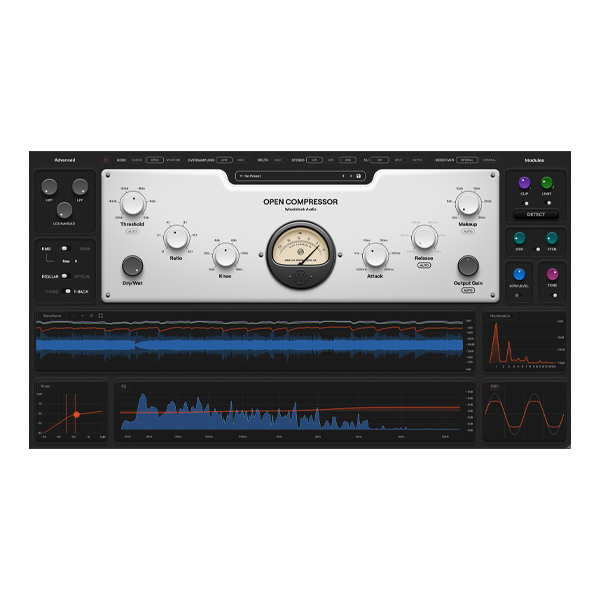
Step into the next generation of dynamics control with Woodstock Audio – Open Compressor, a cutting-edge plugin that blends analog warmth, digital precision, and real-time visual feedback into one intelligent mixing tool. More than just a compressor, Open Compressor is an interactive learning environment that lets you see, hear, and understand exactly how compression shapes your sound.
Perfect for producers, mixing engineers, educators, and sound designers, this innovative plugin delivers pristine audio performance while giving you deep insight into your mix — making it the ultimate tool for both learning and professional production.
⚙️ The Ultimate Compression Engine
At its core, Open Compressor is a powerhouse of flexibility and precision. From subtle vocal smoothing to hard-hitting drum compression, it adapts seamlessly to any creative workflow — giving you total control over dynamics, tone, and punch.
✨ Core Highlights:
🎚️ Fully Adjustable Compression Controls – Fine-tune threshold, ratio (1:1 to 24:1), attack, release, and cutoff for total control.
🔊 Analog & Optical Modes – Switch between classic analog warmth or smooth optical compression curves.
⚙️ Advanced Detection System – Choose RMS or Peak, feed-forward or feedback operation, and fine-tune with sidechain HP/LP filtering.
💡 Smart Automation Engine – Enjoy auto gain, auto threshold, and auto release features for consistent, balanced output.
🔥 Saturation & Clipping Section – Add analog-style harmonics with odd/even drive, soft clipper, and transparent limiter.
🎧 Precision Meets Visualization
What truly sets Open Compressor apart is its real-time visual feedback system — a complete visual suite that lets you see every nuance of your compression in action. Watch gain reduction, harmonics, and spectral changes unfold as you tweak your settings, helping you mix smarter, faster, and more musically.
✨ Visual Tools Include:
📈 Waveform & Gain Reduction Meters – See transients and gain movements in real time.
🌈 Harmonic Analyzer – Visualize how saturation adds warmth and tone.
🎛️ Knee & Spectrum Displays – Understand how your compression interacts with frequency balance.
⚡ GPU-Accelerated Graphics – Enjoy ultra-smooth visualization with minimal CPU load.
These visuals make Open Compressor a perfect learning companion for producers and students eager to master the art of compression — turning a complex mixing process into a clear, creative experience.
🎶 Shape, Learn & Create with Confidence
From transparent mastering compression to heavy-handed drum control, Open Compressor gives you the sonic depth of analog hardware and the clarity of modern DSP design. Its dual-engine flexibility and auto-intelligent features make it equally suited for studio professionals and music production learners.
💥 Use Open Compressor to:
✅ Enhance vocals with smooth, emotional control.
✅ Add punch and presence to drums and percussion.
✅ Warm up digital tracks with analog-style saturation.
✅ Visually understand how compression affects your mix.
✅ Master tracks with precision and loudness balance.
🚀 Why Choose Woodstock Audio – Open Compressor?
✨ Educational + Professional Power – Perfect for producers, educators, and audio students alike.
🎛️ Complete Dynamics Control – From subtle glue to bold character shaping.
⚡ Modern GPU-Accelerated Interface – Fluid visuals, dynamic resizing, and efficient performance.
🔥 Analog Warmth Meets Digital Precision – Classic tone without CPU strain.
🎧 Perfect for Any Workflow – Mixing, mastering, live sound, and sound design.







Reviews
There are no reviews yet.