Wavesequencer Theia (Windows)

Theia provides easy access to the mighty Hyperion synth and its gorgeous expansive sound library with close to…
Formats: VST3

£30.00

Discover Wavesequencer Theia (Windows)

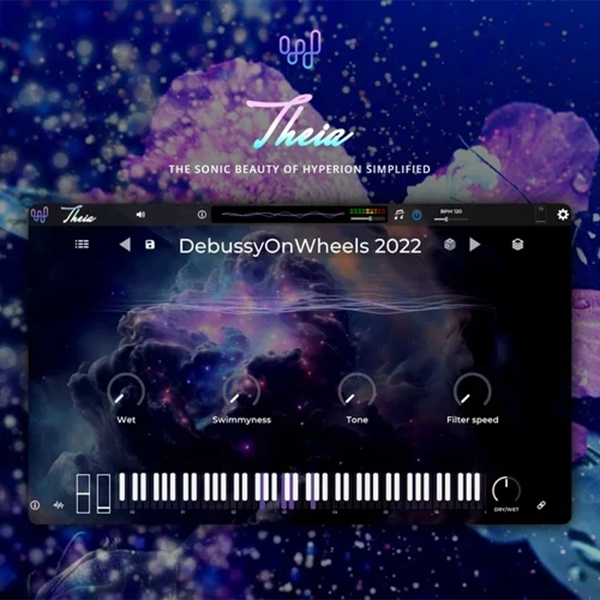
Theia provides easy access to the mighty Hyperion synth and its gorgeous expansive sound library with close to 600 presets. Its performance-focused interface places the core controls of each sound within easy reach, allowing you to effortlessly browse complex patch designs and focus on making music. An instant source of musical inspiration for music producers…

Explore product features & full description

Theia provides easy access to the mighty Hyperion synth and its gorgeous expansive sound library with close to 600 presets. Its performance-focused interface places the core controls of each sound within easy reach, allowing you to effortlessly browse complex patch designs and focus on making music. An instant source of musical inspiration for music producers of all genres.

User Interface

Theia’s minimalist interface puts the focus squarely on music creation and performance. Automatable pre-assigned macro controls allow for rapid adjustments to key sonic parameters while per-patch custom backgrounds aid inspiration. A waveform preview is on hand to provide visual feedback as you navigate through the carefully curated and optimized library of sounds. Feeling stuck for inspiration? - Hit the dice button for a random patch!

The Browser

Finding the perfect sound in a vast library of 587 factory presets is easy using the browser which allows you to filter by instrument type, performance, or emotion and then further order results by author, type, name, and more. Favorites can be set with the click of a button and recalled later just as easily.

Sound Layers Editor

Preset content is built from one or more layers of lush sounds, and these layers can be accessed and modified via the Sound Layers Editor. Each layer can be adjusted independently with MIDI channel selection, transpose, key response zones, pitch bend ranges, voice allocation, and arpeggiation settings.

Theia Design Team

Theia is designed and coded by Paul Carter – AKA Wavesequencer. Originally from the UK, now living in California, Paul has worked in the semiconductor industry for many years developing both firmware and applications for consumer electronics products.

His passion for music and sound synthesis dates back to learning to play piano as a child, where he was always trying to improvise and come up with new sounds much to the annoyance of some of his music teachers and band conductors. Growing up in the 80s he was inspired by various synth-pop bands as well as electronic music artists such as Vangelis, Jean-Michel Jarre, and Brian Eno amongst many others.

Crossgrade to Hyperion

Theia’s sound set is 100% patch-compatible with Hyperion synth, and you can further edit and create new sounds for Theia via the full modular patching interface of Hyperion synth. Additional patch content packs will be available for Hyperion and Theia.

After you purchase Theia, you will receive an email with your code to buy Hyperion for 50% off the regular price. Contact our support team if you need assistance.

Theia is also included with all Hyperion licenses.

Compatibility checklist

  • Windows 10,11 (64Bit Only)
  • Full Version
  • VST3 Only
  • Formats: VST3

Requirements vary by supplied version. Confirm your setup with support before purchasing.

Delivery & activation

  1. Complete your purchaseReview compatibility and purchase details.
  2. Download your filesAccess available downloads through your order and account.
  3. Follow the included setup guideContact GetPlugins if you need installation help.

Activation, where included, is provided by GetPlugins. Publisher-account registration, transferable publisher keys and a publisher-issued licence are not included. Read the activation policy.

Frequently asked questions

How do I receive my download?

After payment, access available files from your order details and GetPlugins account. Contact support if a download is missing.

What activation is included?

Follow the activation instructions supplied with your download. Activation is provided by GetPlugins. Confirm device allowances and reinstall arrangements before ordering.

Will this work with my computer and DAW?

Check the compatibility information for this listing and ask us to confirm the exact supplied build. Libraries may require a compatible sampler or additional software.

What if I need installation help?

Email support@getplugins.io with your order number, operating system, DAW and any error message.

Which updates are included?

Activation and updates are separate. Confirm the available version and update arrangements before ordering; do not assume access to future publisher releases.

How do I request a refund?

Contact support with your order number and issue details. Read our Refund Policy for eligibility and the request process.

Customer Reviews

Reviews

There are no reviews yet.

Be the first to review “Wavesequencer Theia (Windows)”

Your email address will not be published. Required fields are marked *