Venomode – Maximal 3 (Windows)

Take your tracks to the loudness sweet spot with Maximal 3 by Venomode, a powerhouse true-peak limiter, soft…
Formats: VST3 · VST

£22.00

Discover Venomode – Maximal 3 (Windows)

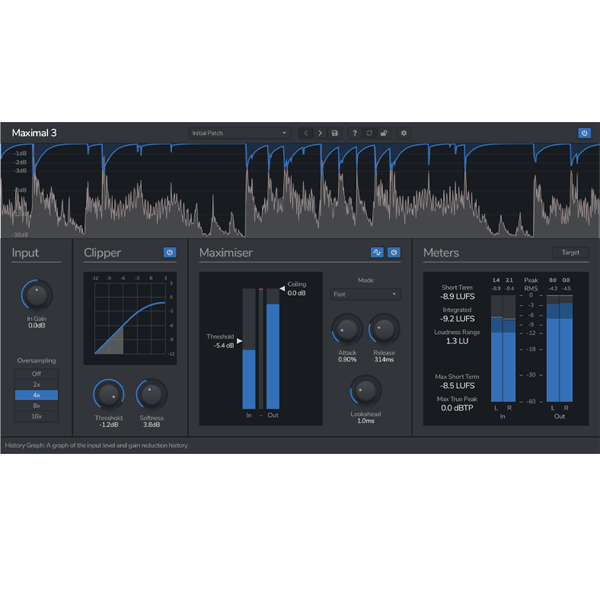
Take your tracks to the loudness sweet spot with Maximal 3 by Venomode, a powerhouse true-peak limiter, soft clipper, and broadcast-standard loudness meter — all in one sleek, efficient plugin for Windows. Whether you're mastering for Spotify, YouTube, radio, or club play, Maximal 3 ensures your mix hits hard while retaining clarity, punch, and musicality.…

✨ Clean for subtle mastering

🧲 Gluey for bus cohesion

💣 Punchy for drums, EDM & hip-hop

Explore product features & full description

🔊 Venomode – Maximal 3 (Windows) 🎚️

Take your tracks to the loudness sweet spot with Maximal 3 by Venomode, a powerhouse true-peak limiter, soft clipper, and broadcast-standard loudness meter — all in one sleek, efficient plugin for Windows. Whether you're mastering for Spotify, YouTube, radio, or club play, Maximal 3 ensures your mix hits hard while retaining clarity, punch, and musicality. 🎧🔥

🚀 Core Features:

🧱 True-Peak Brickwall Limiting
Stay loud without overshooting. Maximal 3 uses lookahead true-peak detection to catch intersample peaks and prevent digital distortion — making it broadcast-safe and streaming-ready.
✔️ Transparent and accurate, even at high input levels.

🎛️ 4 Unique Limiter Modes + Full Envelope Control
Shape your dynamics with precision:

  • ✨ Clean for subtle mastering

  • 🧲 Gluey for bus cohesion

  • 💣 Punchy for drums, EDM & hip-hop

  • 🔄 Pump for rhythmic, breathing compression

Adjust attack and release to tailor your sound with surgical control.

🔥 Variable Soft Clipping with Analog Flavor
Smooth your transients or add harmonic saturation using the adjustable clipping curve — from hard to soft.
✔️ Perfect for adding vintage warmth, removing harsh peaks, or coloring your mix with character.

📈 High-Precision Oversampling
Boost your mastering fidelity with up to 16x linear-phase oversampling — perfect for eliminating aliasing and catching subtle inter-sample peaks.

📊 Built-In Loudness Metering
Visualize your LUFS and true-peak levels with a broadcast-compliant meter based on ITU-R BS.1770-4 specs.
🎯 Set your own target loudness, including EBU R128, YouTube, or Spotify standards.

🎯 Ideal For:

  • 🎼 Mastering engineers seeking peak-safe, transparent loudness

  • 🎧 Mix engineers wanting bus glue and transient shaping

  • 🔊 Electronic, pop & hip-hop producers craving loud, punchy results

  • 📺 Broadcast & post-pro teams needing loudness-compliant delivery

🛠️ Why Choose Maximal 3 on Windows?
✅ Fully compatible with VST/VST3 on all major Windows DAWs (FL Studio, Ableton, Cubase & more)
✅ Low CPU usage for real-time processing
✅ Combines limiting, clipping, and metering in one powerful tool
✅ Fast, intuitive UI built for pro workflows
Compatibility checklist

  • Windows 10,11 (64Bit Only)
  • VST3, VST
  • Formats: VST3 · VST

Requirements vary by supplied version. Confirm your setup with support before purchasing.

Delivery & activation

  1. Complete your purchaseReview compatibility and purchase details.
  2. Download your filesAccess available downloads through your order and account.
  3. Follow the included setup guideContact GetPlugins if you need installation help.

Activation, where included, is provided by GetPlugins. Publisher-account registration, transferable publisher keys and a publisher-issued licence are not included. Read the activation policy.

Frequently asked questions

How do I receive my download?

After payment, access available files from your order details and GetPlugins account. Contact support if a download is missing.

What activation is included?

Follow the activation instructions supplied with your download. Activation is provided by GetPlugins. Confirm device allowances and reinstall arrangements before ordering.

Will this work with my computer and DAW?

Check the compatibility information for this listing and ask us to confirm the exact supplied build. Libraries may require a compatible sampler or additional software.

What if I need installation help?

Email support@getplugins.io with your order number, operating system, DAW and any error message.

Which updates are included?

Activation and updates are separate. Confirm the available version and update arrangements before ordering; do not assume access to future publisher releases.

How do I request a refund?

Contact support with your order number and issue details. Read our Refund Policy for eligibility and the request process.

Customer Reviews

Reviews

There are no reviews yet.

Be the first to review “Venomode – Maximal 3 (Windows)”

Your email address will not be published. Required fields are marked *