

Discover U-he – MFM2 (Windows)
MFM2 is not a standalone product, it requires host software. MFM2 is compatible with nearly all DAWs.
1000 × 600 or larger display
Linux: glibc version 2.28 or newer
Ping-pong and panning delays
Explore product features & full description
Requirements
 Windows 7 or newer
or
 Linux
Linux
-
- Host software / DAW
- 1GB RAM, more recommended
- 50MB free disk space
- 1000 × 600 or larger display
- Modern CPU required:
Windows/Linux: Intel Nehalem or newer, AMD Bulldozer or newer
- Linux: glibc version 2.28 or newer
Formats
MFM2 is not a standalone product, it requires host software. MFM2 is compatible with nearly all DAWs.
Windows:
VST2, VST3, AAX* (32-/64-bit)
CLAP (64-bit only)
* AAX requires Pro Tools 10.3.7 or later
MFM2.5 can do...
- Ping-pong and panning delays
- Filtered and frequency-shifted delays
- Chorus, flanger, resonator
- Reverb, diffusion and ambience
- Granular effects
- Degrading & distorting delays
- Ducked and compressed delays
- Endless loops
- Keyboard-controlled (tuned) comb filter
- Massive glitch effects
- Any combination of the above
- ...and much more
MFM2: More Feedback Machine
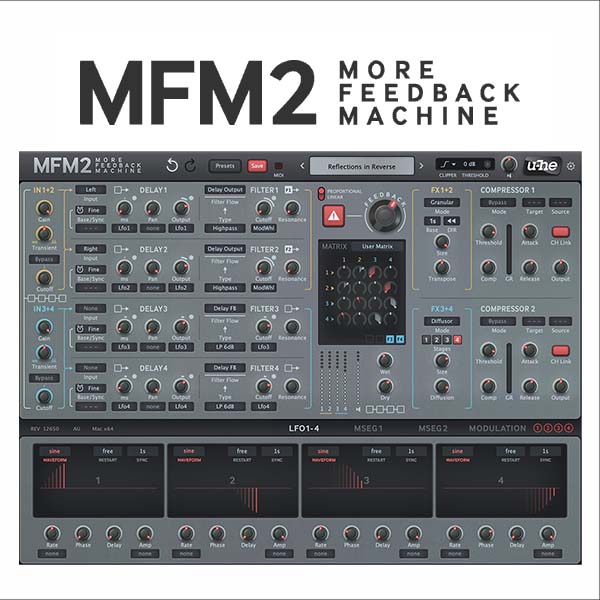
MFM2 is our over-the-top digital delay plug-in. You can create anything from subtle textured echos to huge spacey reverbs, from wild tonal steps on a pad to rhythmic deconstruction of a drum track. As a regular delay MFM2 already offers as much control and inspiration as possible, while the advanced features in version 2.5 open up wider horizons. More feedback, more control, more inspiration!
-
- New in version 2.5: input section with gain, filter and transient balance
- 4 delay lines with independent absolute time or tempo-synced modes
- Each delay line has its own multimode filter: 2x lowpass, bandpass, 2x highpass, bandreject or allpass
- 6 default delay configurations or user matrix (freely route signals between all 4 delay lines)
- 4 syncable LFOs with 8 waveform options or user definable shapes
- 2 syncable and loopable multi-stage envelope generator (MSEG) modulation sources
- 4-slot modulation matrix with depth modulation from a second source
- 2 channel-pair effects: soft clipper, bit crusher, phaser, frequency shifter, filter...
- New in version 2.5: granular (pitch shift, reverse delays) and diffusor (reverb)
- 2 channel-pair compressor/limiters, with peak or maximize modes
- New in version 2.5: output shield (soft clipper) with strength and threshold options
- Scalable UI from 70% to 200%
- 400+ factory presets
Compatibility checklist
- Confirm the supplied build, operating system and required host before ordering.
Requirements vary by supplied version. Confirm your setup with support before purchasing.
Delivery & activation
- Complete your purchaseReview compatibility and purchase details.
- Download your filesAccess available downloads through your order and account.
- Follow the included setup guideContact GetPlugins if you need installation help.
Activation, where included, is provided by GetPlugins. Publisher-account registration, transferable publisher keys and a publisher-issued licence are not included. Read the activation policy.
Frequently asked questions
How do I receive my download?
After payment, access available files from your order details and GetPlugins account. Contact support if a download is missing.
What activation is included?
Follow the activation instructions supplied with your download. Activation is provided by GetPlugins. Confirm device allowances and reinstall arrangements before ordering.
Will this work with my computer and DAW?
Check the compatibility information for this listing and ask us to confirm the exact supplied build. Libraries may require a compatible sampler or additional software.
What if I need installation help?
Email support@getplugins.io with your order number, operating system, DAW and any error message.
Which updates are included?
Activation and updates are separate. Confirm the available version and update arrangements before ordering; do not assume access to future publisher releases.
How do I request a refund?
Contact support with your order number and issue details. Read our Refund Policy for eligibility and the request process.







Reviews
There are no reviews yet.