


Discover Tina Guo Acoustic Cello Legato
You Must Purchase Kontakt Pro From Us To Install & Use This Library In Full Version Click Here
Explore product features & full description
Tina Guo Acoustic Cello Legato
Tina Guo's distinctly emotive acoustic cello captured as a solo legato patch utilizing Cinesamples' recording and programming technique - Seamless Legato! Recorded at the legendary MGM Scoring Scoring Stage at Sony Pictures Studios in Los Angeles, it includes Cinesamples' CineStrings Solo Legato engine and Infinite Bow feature.
About the Product
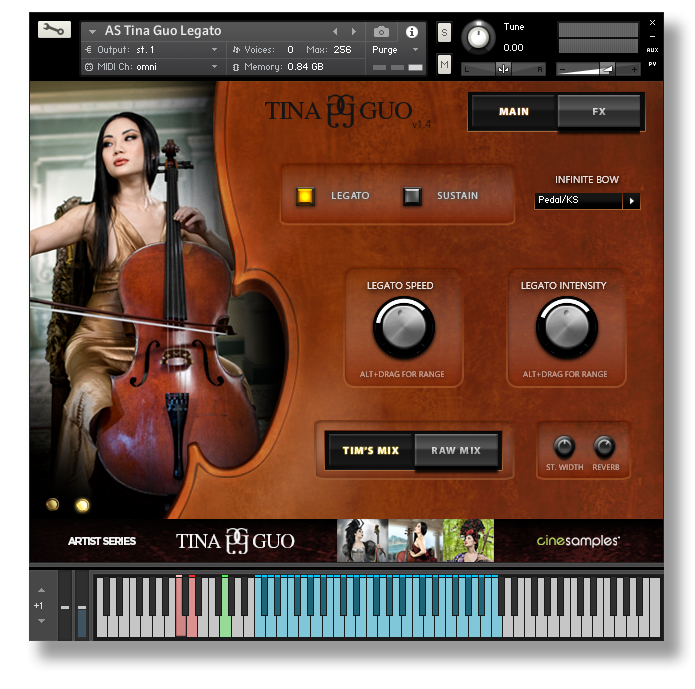
We are excited to announce that Tina Guo Acoustic Cello Legato and Tina Guo now have the Infinite Bow feature found in all of our solo string products: Tina Guo vol 2, Taylor Davis, CineStrings SOLO, and Viola da Gamba.
By default, Tina's natural bow changes occur on sustained notes. Use the sustain pedal or the green Key Switch before a sustained note to extend the bow length as needed. This is understandably an unnatural occurrence, but it provides the necessary bow length required in slower tempi. Simply re-attack the note when you need a bow change on the same note.
The v1.4 Infinite Bow update is available in new purchases of Tina Guo (FULL) and Tina Guo Acoustic Cello Legato. Both require Kontakt v5.8.1 or higher.
*** Current customers of both products receive the update for FREE and have been sent a separate email with update instructions. This is a download and installation of the complete product. It is recommended NOT to direct the Connect Download utility to download and install in to your current Tina Guo folder! Allow Connect to complete its entire install process. Then archive your current version for safety and copy this final installation folder on to your sample drive.
Compatibility checklist
- Confirm the supplied build, operating system and required host before ordering.
Requirements vary by supplied version. Confirm your setup with support before purchasing.
Delivery & activation
- Complete your purchaseReview compatibility and purchase details.
- Download your filesAccess available downloads through your order and account.
- Follow the included setup guideContact GetPlugins if you need installation help.
Activation, where included, is provided by GetPlugins. Publisher-account registration, transferable publisher keys and a publisher-issued licence are not included. Read the activation policy.
Frequently asked questions
How do I receive my download?
After payment, access available files from your order details and GetPlugins account. Contact support if a download is missing.
What activation is included?
Follow the activation instructions supplied with your download. Activation is provided by GetPlugins. Confirm device allowances and reinstall arrangements before ordering.
Will this work with my computer and DAW?
Check the compatibility information for this listing and ask us to confirm the exact supplied build. Libraries may require a compatible sampler or additional software.
What if I need installation help?
Email support@getplugins.io with your order number, operating system, DAW and any error message.
Which updates are included?
Activation and updates are separate. Confirm the available version and update arrangements before ordering; do not assume access to future publisher releases.
How do I request a refund?
Contact support with your order number and issue details. Read our Refund Policy for eligibility and the request process.



Reviews
There are no reviews yet.