
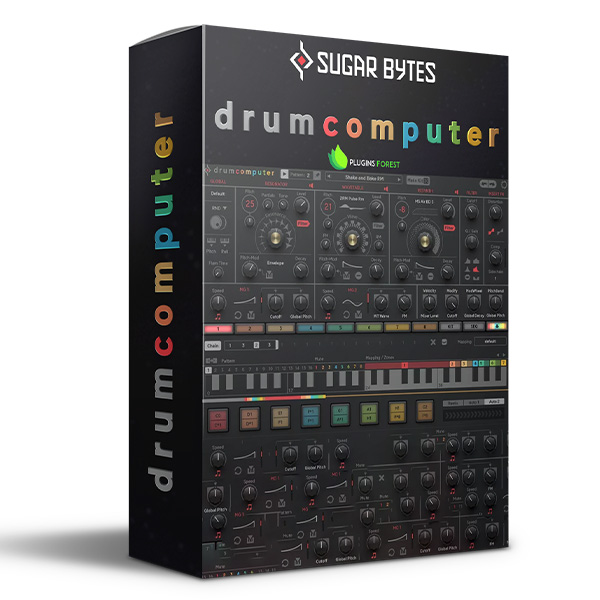
Discover Sugar Bytes DrumComputer (Windows)
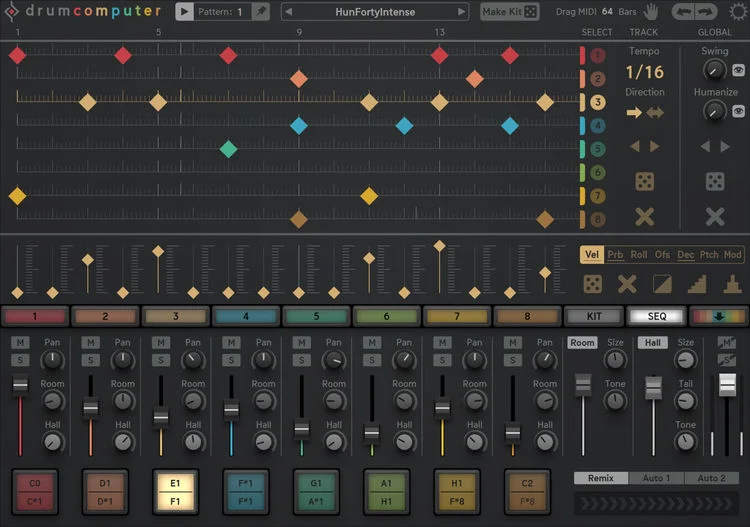
At first glance, DrumComputer's UI may look a bit busy, but it's actually more straightforward to use than you might think. Each of the eight channels features the same controls, and most of the controls are perfectly self-explanatory to use. You can tweak just about everything, digging deep into every parameter. At the same time,…
Ultra-powerful drum synthesizer and sequencer virtual instrument
Remarkably simple user interface with extreme depth for tone tweaking and sound design
Each of the 8 channels features its own powerful multilayer drum synthesizer
Explore product features & full description
Easy to use, infinitely powerful
At first glance, DrumComputer's UI may look a bit busy, but it's actually more straightforward to use than you might think. Each of the eight channels features the same controls, and most of the controls are perfectly self-explanatory to use. You can tweak just about everything, digging deep into every parameter. At the same time, you can also totally randomize everything from individual drums to entire kits and patterns. It's a sound-design geek's dream come true.
Dig in deep with 3-layer synthesis
It would be easy to write a book on the extensive synthesis available to you in Sugar Bytes DrumComputer. Before we jump in, try to appreciate that you get all of this eight times over, with each for DrumComputer's eight channels. Each channel includes a 3-layer sound generator, combining a Resonator transient/resonance engine, a Wavetable sustain/mid tone engine, and a Resynth synthesizer that can do anything from creating simple synth tones to creating realistic trails.
Each section includes a massive selection of oscillation sources/waveforms, all broken into useful parameters. And if you're looking for a bit of randomness, you can always have DrumComputer come up with totally unique drum sound while constraining the randomness to a type of instrument. We've never seen an intelligent randomizer like this before!
Truly inspiring onboard sequencing
With the capacity to create millions of more drum sounds than you'll be able to audition in your lifetime, DrumComputer is already totally over the top in the creativity department. The 16-step, 16-pattern sequencer is familiar enough the make any modestly seasoned electronic music producer feel at home, there's a lot more to DrumComputer's sequencer than meets the eye.
Some of the highlights producers at Sweetwater are particularly impressed by include the sheer flexibility of each of the eight channels. You can adjust everything from the number of steps in the pattern to the playback direction on an instrument-by-instrument basis. The limited randomization engine for patterns in DrumComputer is just brilliant, as the randomization engine for sound design, providing you with an endless supply of useable grooves constantly available at your disposal.
Step-based automation is another feature you have to know about. It lets you vary everything from note probability (a great tool for creating beats that create natural variations) to pitch and modulation settings. When you factor in its sound design capabilities, you can clearly see how easy it is to create entire tracks, synths and all, in Sugar Bytes DrumComputer.
- Ultra-powerful drum synthesizer and sequencer virtual instrument
- Remarkably simple user interface with extreme depth for tone tweaking and sound design
- Each of the 8 channels features its own powerful multilayer drum synthesizer
- Resonator is responsible for the attack transient and resonance of the body
- Wavetable adds sustained sound to the instrument, such as undertones with ring modulation or FM
- Resynth takes a unique synthesis approach to defining decay trails
- Create everything from classic percussion to tonal synthesizers
- Randomize instruments within a limited range to produce unique yet recognizable snares, kicks, claps, and more
- Multi-destination modulation engine makes it easy to add a ton of versatility to your sounds
- Filter, compressor, overdrive, and 2 kinds of send reverb (Room and Hall) onboard
- Easy keyboard mapping for patterns, mutes, and engine triggers
- Keyzones let you instantly move between rolls, pitch, and modulation control
- The 16-step, 16-pattern sequencer features amazing per-track controls, including modulation/automation
- MIDI drag and drop generates MIDI files that contain all CC automation for your sequences
Compatibility checklist
- Windows 10,11 (64Bit Only)
- Standalone, VST, VST3, AAX
- Formats: VST3 · AAX · Standalone · VST
Requirements vary by supplied version. Confirm your setup with support before purchasing.
Delivery & activation
- Complete your purchaseReview compatibility and purchase details.
- Download your filesAccess available downloads through your order and account.
- Follow the included setup guideContact GetPlugins if you need installation help.
Activation, where included, is provided by GetPlugins. Publisher-account registration, transferable publisher keys and a publisher-issued licence are not included. Read the activation policy.
Frequently asked questions
How do I receive my download?
After payment, access available files from your order details and GetPlugins account. Contact support if a download is missing.
What activation is included?
Follow the activation instructions supplied with your download. Activation is provided by GetPlugins. Confirm device allowances and reinstall arrangements before ordering.
Will this work with my computer and DAW?
Check the compatibility information for this listing and ask us to confirm the exact supplied build. Libraries may require a compatible sampler or additional software.
What if I need installation help?
Email support@getplugins.io with your order number, operating system, DAW and any error message.
Which updates are included?
Activation and updates are separate. Confirm the available version and update arrangements before ordering; do not assume access to future publisher releases.
How do I request a refund?
Contact support with your order number and issue details. Read our Refund Policy for eligibility and the request process.



Reviews
There are no reviews yet.